Assessing needs and planning care in nursing example 2026

Get Form
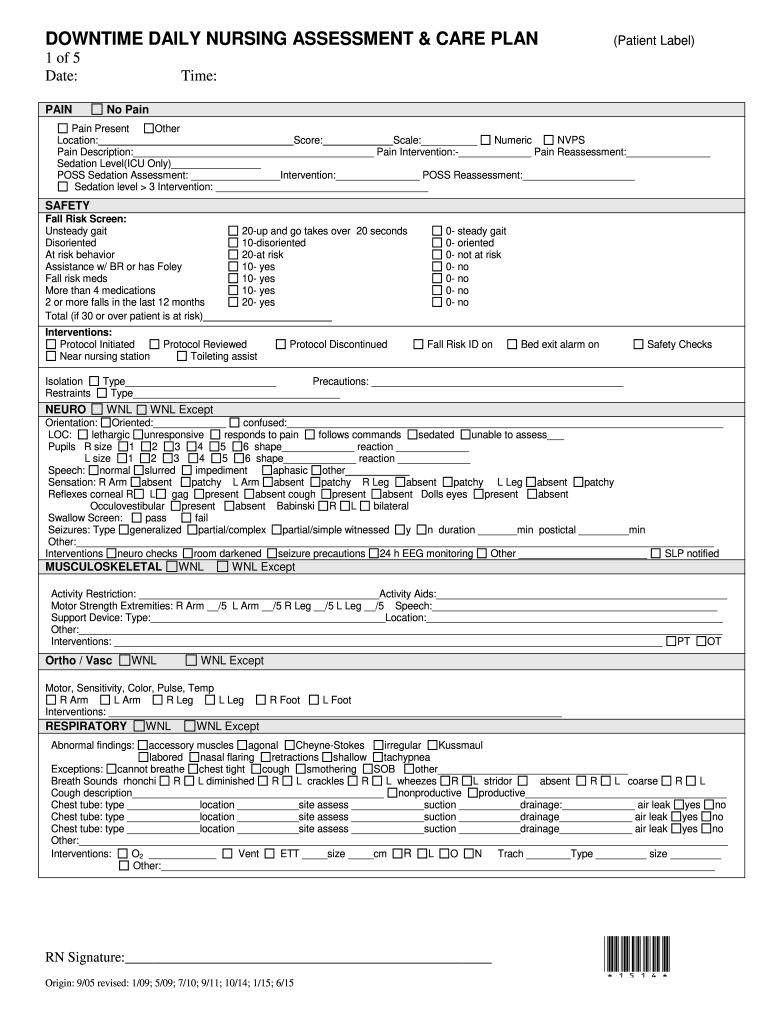
assessing needs and planning care Preview on Page 1

Here's how it works

01. Edit your assessing needs and planning care online
Type text, add images, blackout confidential details, add comments, highlights and more.
02. Sign it in a few clicks
Draw your signature, type it, upload its image, or use your mobile device as a signature pad.
03. Share your form with others
Send assessing needs and planning care in nursing via email, link, or fax. You can also download it, export it or print it out.

How to use or fill out assessing needs and planning care in nursing example with our platform

Form edit decoration
9.5
Ease of Setup
DocHub User Ratings on G2
9.0
Ease of Use
DocHub User Ratings on G2
  1. Click ‘Get Form’ to open the assessing needs and planning care in nursing example in the editor.
  2. Begin by entering the date and time at the top of the form. This is crucial for tracking patient assessments.
  3. In the 'PAIN' section, assess and document any pain present. Use the scale provided to score pain levels and describe its location and characteristics.
  4. Proceed to the 'SAFETY' section. Conduct a fall risk screen by checking relevant boxes based on patient behavior and history, then calculate the total score.
  5. Continue through each section (NEURO, MUSCULOSKELETAL, RESPIRATORY, etc.), filling out observations, assessments, and interventions as necessary. Ensure all fields are completed accurately.
  6. Finally, review all entries for accuracy before signing off at the bottom of the form. This ensures that all information is documented correctly for future reference.

Start using our platform today to streamline your nursing assessments for free!

See more assessing needs and planning care in nursing example versions

We've got more versions of the assessing needs and planning care in nursing example form. Select the right assessing needs and planning care in nursing example version from the list and start editing it straight away!
Versions Form popularity Fillable & printable
2015 4.8 Satisfied (20 Votes)
be ready to get more

Complete this form in 5 minutes or less

Get form

Got questions?

We have answers to the most popular questions from our customers. If you can't find an answer to your question, please contact us.
Contact us
Registered nurses prioritise the needs of people when assessing and reviewing their mental, physical, cognitive, behavioural, social and spiritual needs. They use information obtained during assessments to identify the priorities and requirements for person-centred and evidence-based nursing interventions and support.
In this article, the author discusses the importance of person-centred care in assessing needs and highlights the need for all nursing interventions to be evidence based.
To give good care staff must assess each resident and plan care to support each persons life-long pat- terns, and current interests, strengths and needs. Resident and family involvement in care planning gives staff information they need to make sure residents get good care.
Common nursing interventions include: Bedside care and assistance. Administration of medication. Postpartum support. Feeding assistance. Monitoring of vitals and recovery progress.
An RN uses a systematic, dynamic way to collect and analyze data about a client, the first step in delivering nursing care. Assessment includes not only physiological data, but also psychological, sociocultural, spiritual, economic, and life-style factors as well.

Security and compliance

At DocHub, your data security is our priority. We follow HIPAA, SOC2, GDPR, and other standards, so you can work on your documents with confidence.

Learn more
ccpa2
pci-dss
gdpr-compliance
hipaa
soc-compliance

People also ask

For example, a nurses assessment of a hospitalized patient in pain includes not only the physical causes and manifestations of pain, but the patients responsean inability to get out of bed, refusal to eat, withdrawal from family members, anger directed at hospital staff, fear, or request for more pain mediation.
As a care plan example, a student would write in the interventions section: Vital signs recorded every four hours: blood pressure, heart rate, three- or five-lead electrocardiograms, functional oxygen saturation, respiratory rate and skin temperature, while an experienced registered nurse might write Q4 vital signs.

Related links