South carolina solar tax credit 2020 form-2026

Get Form
sc solar tax credit Preview on Page 1

Here's how it works

01. Edit your sc solar tax credit online
Type text, add images, blackout confidential details, add comments, highlights and more.

02. Sign it in a few clicks
Draw your signature, type it, upload its image, or use your mobile device as a signature pad.

03. Share your form with others
Send tc 38 via email, link, or fax. You can also download it, export it or print it out.

How to use or fill out south carolina solar tax credit 2020 form with our platform

Form edit decoration
9.5
Ease of Setup
DocHub User Ratings on G2
9.0
Ease of Use
DocHub User Ratings on G2
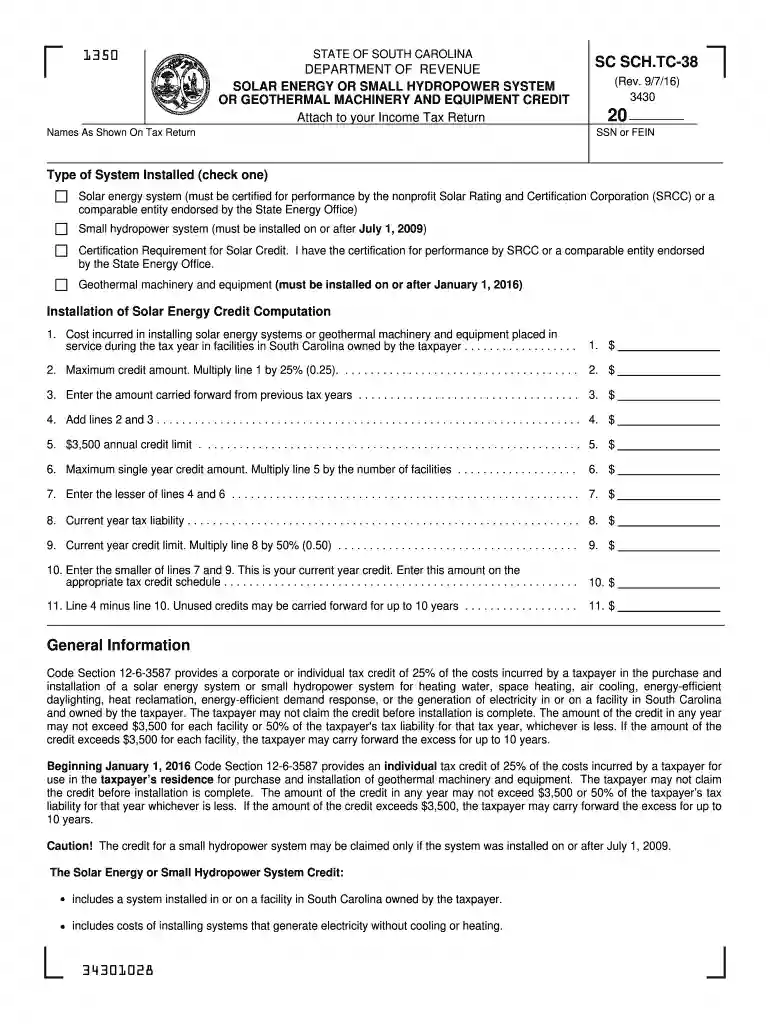
  1. Click ‘Get Form’ to open the South Carolina Solar Tax Credit 2020 form in the editor.
  2. Begin by entering your name and Social Security Number (SSN) or Federal Employer Identification Number (FEIN) as shown on your tax return.
  3. Select the type of system installed by checking the appropriate box: Solar energy system, Small hydropower system, or Geothermal machinery and equipment.
  4. In the 'Installation of Solar Energy Credit Computation' section, input the cost incurred for installing your solar energy system or geothermal machinery in line 1.
  5. Calculate the maximum credit amount by multiplying line 1 by 25% and enter this value in line 2.
  6. If applicable, enter any amount carried forward from previous tax years in line 3. Add lines 2 and 3 together for line 4.
  7. Complete lines 5 through 10 according to the instructions provided, ensuring you adhere to the annual credit limit of $3,500.
  8. Finally, review all entries for accuracy before saving your completed form. If filing electronically, keep a copy with your tax records.

Start using our platform today to easily complete your South Carolina Solar Tax Credit form online for free!

See more south carolina solar tax credit 2020 form versions

We've got more versions of the south carolina solar tax credit 2020 form form. Select the right south carolina solar tax credit 2020 form version from the list and start editing it straight away!
Versions Form popularity Fillable & printable
2023 4.4 Satisfied (41 Votes)
2023 4.6 Satisfied (37 Votes)
2022 4.8 Satisfied (48 Votes)
2022 4.8 Satisfied (62 Votes)
2021 4.8 Satisfied (121 Votes)
2021 4.8 Satisfied (145 Votes)
2021 4.8 Satisfied (131 Votes)
2020 4.9 Satisfied (38 Votes)
2019 4.4 Satisfied (215 Votes)
2019 4.4 Satisfied (96 Votes)
2019 4.3 Satisfied (157 Votes)
2019 4 Satisfied (41 Votes)
2019 4.2 Satisfied (24 Votes)
2018 4.8 Satisfied (63 Votes)
be ready to get more

Complete this form in 5 minutes or less

Get form

Got questions?

We have answers to the most popular questions from our customers. If you can't find an answer to your question, please contact us.
Contact us
In December 2020, Congress passed an extension of the ITC, which provides a 26% tax credit for systems installed in 2020-2022, and 22% for systems installed in 2023.
Filing requirements for the solar tax credit To claim the credit, youll need to file IRS Form 5695 as part of your tax return. Youll calculate the credit on Part I of the form, and then enter the result on your 1040.
The South Carolina solar tax credit lets homeowners claim back 25% of the total costs, up to $3,500 maximum per year. This can be claimed each tax year until your credit is exhausted or up to 10 years.
File Form 5695, Residential Energy Credits with your tax return to claim the credit. You must claim the credit for the tax year when the property is installed, not merely purchased. For additional instructions on how to claim the credit for residential clean energy follow our step-by-step guide.

Security and compliance

At DocHub, your data security is our priority. We follow HIPAA, SOC2, GDPR, and other standards, so you can work on your documents with confidence.

Learn more
ccpa2
pci-dss
gdpr-compliance
hipaa
soc-compliance