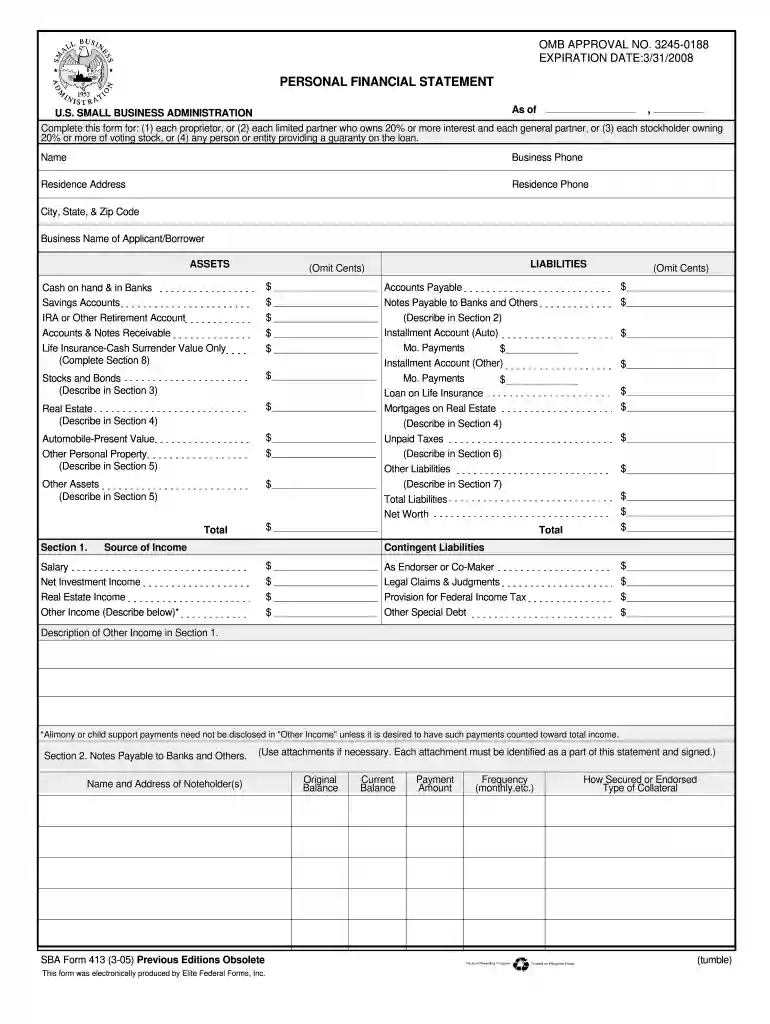
Sba form 413 05 12 2005-2026

Get Form
sba form 413 05 12 2005 Preview on Page 1

Here's how it works

01. Edit your form online
Type text, add images, blackout confidential details, add comments, highlights and more.

02. Sign it in a few clicks
Draw your signature, type it, upload its image, or use your mobile device as a signature pad.

03. Share your form with others
Send it via email, link, or fax. You can also download it, export it or print it out.

How to use or fill out SBA Form 413 05 12 2005 with Our Platform

Form edit decoration
9.5
Ease of Setup
DocHub User Ratings on G2
9.0
Ease of Use
DocHub User Ratings on G2
  1. Click ‘Get Form’ to open it in the editor.
  2. Begin by entering your personal information at the top of the form, including your name, business phone, and residence address. Ensure accuracy as this information is crucial for identification.
  3. In the 'Assets' section, list all relevant assets such as cash, savings accounts, stocks, and real estate. Use our platform's text fields to input values clearly and accurately.
  4. Proceed to the 'Liabilities' section. Here, detail any outstanding debts or obligations. Be thorough in describing each liability to provide a complete financial picture.
  5. Complete sections on income sources and contingent liabilities. This includes detailing any additional income streams that may support your loan application.
  6. Finally, review all entries for accuracy before signing. Utilize our platform’s features to save your progress and ensure everything is filled out correctly.

Start using our platform today for free to streamline your SBA Form completion!

See more sba form 413 05 12 2005 versions

We've got more versions of the sba form 413 05 12 2005 form. Select the right sba form 413 05 12 2005 version from the list and start editing it straight away!
Versions Form popularity Fillable & printable
2021 4.8 Satisfied (140 Votes)
2018 4.3 Satisfied (105 Votes)
2014 4.4 Satisfied (540 Votes)
2012 4.3 Satisfied (105 Votes)
2011 4.3 Satisfied (35 Votes)
2008 4.4 Satisfied (71 Votes)
2005 4 Satisfied (36 Votes)
2000 4 Satisfied (42 Votes)
1994 4.4 Satisfied (70 Votes)
1991 4.4 Satisfied (31 Votes)
be ready to get more

Complete this form in 5 minutes or less

Get form

Got questions?

We have answers to the most popular questions from our customers. If you can't find an answer to your question, please contact us.
Contact us
How To Create A Personal Finance Balance Sheet Gather Financial Documents. Getting all your financial documents ensures you have accurate information. Make Or Use A Free Personal Financial Statement Template. List Your Assets. List Your Liabilities. Categorize The Information And Add Up The Values. Determine Your Net Worth.
How to fill out SBA form 413 Provide basic business information. Report your assets. Report your liabilities. List your source of income and contingent liabilities to complete section 1. Detail your notes payable to banks and others in section 2. Detail the status of your stocks and bonds for section 3.
A personal financial statement, or PFS, is a document or set of documents that outlines a person or familys financial position. The balance sheet portion of a PFS exhibits your assets and liabilities, or net worth. Some people also include an income statement or other documents to create a more detailed PFS.
When it comes to long-term financial planning, preparing a Personal Financial Statement (PFS) is one of the best ways to assess your current situation and keep yourself on track to meet goals. The PFS is a relatively simple document that lists what you own (assets) and what you owe (liabilities).

Security and compliance

At DocHub, your data security is our priority. We follow HIPAA, SOC2, GDPR, and other standards, so you can work on your documents with confidence.

Learn more