
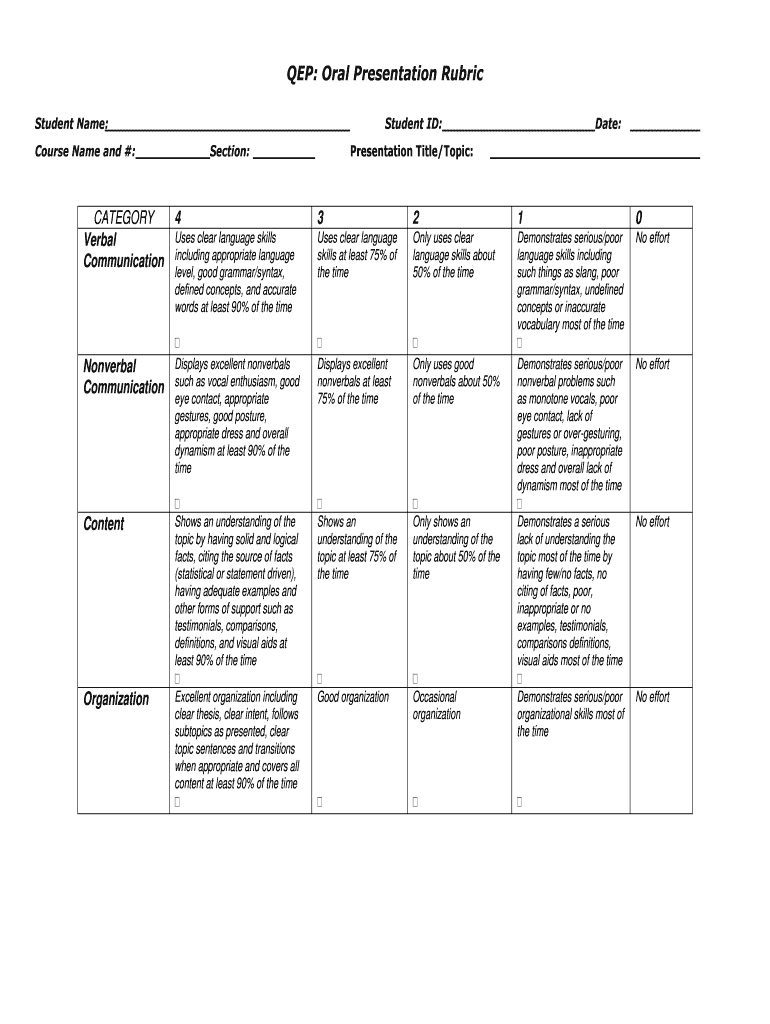





Presentation rubric college 2026

Get Form
simple rubric for presentation Preview on Page 1

Here's how it works

01. Edit your simple rubric for presentation online
Type text, add images, blackout confidential details, add comments, highlights and more.
02. Sign it in a few clicks
Draw your signature, type it, upload its image, or use your mobile device as a signature pad.
03. Share your form with others
Send simple presentation rubric via email, link, or fax. You can also download it, export it or print it out.

How to use or fill out presentation rubric college with our platform

Form edit decoration
9.5
Ease of Setup
DocHub User Ratings on G2
9.0
Ease of Use
DocHub User Ratings on G2
  1. Click ‘Get Form’ to open the presentation rubric college in the editor.
  2. Begin by entering your name, course name and number, student ID, and section at the top of the form. This information is essential for identifying your submission.
  3. In the 'CATEGORY' section, evaluate your verbal communication skills. Use the scale from 0 to 4 to rate how effectively you used clear language during your presentation.
  4. Next, assess your nonverbal communication. Mark how well you displayed enthusiasm, eye contact, gestures, and overall dynamism using the same scale.
  5. For content evaluation, provide a score based on your understanding of the topic and the evidence you presented. Ensure you cite sources where applicable.
  6. Finally, review your organization skills. Rate how clearly you introduced your topic and maintained focus throughout your presentation.

Start using our platform today to streamline your document editing and enhance your presentation evaluations for free!

See more presentation rubric college versions

We've got more versions of the presentation rubric college form. Select the right presentation rubric college version from the list and start editing it straight away!
Versions Form popularity Fillable & printable
2011 4.2 Satisfied (33 Votes)
be ready to get more

Complete this form in 5 minutes or less

Get form

Got questions?

We have answers to the most popular questions from our customers. If you can't find an answer to your question, please contact us.
Contact us

Electronic document approval demands a software solution that complies with data security and eSignature standards. DocHub is a perfect tool for that, since it fulfills all the aforementioned requirements. Whatever method you prefer to sign your sample rubric for presentation in DocHub, your eSignature will be legally binding and court-admissible.

If you store your documents in Google Drive, there is no need to download your sample presentation rubric on the computer and upload it back to our editor. A significantly easier way is to install a browser extension developed by DocHub to streamline this flow. The extension allows editing PDFs in your internet browser. Alternatively, you can integrate your DocHub and Gmail accounts for more efficient editing.

There are two types of rubrics and of methods for evaluating students' efforts: holistic and analytic rubrics.
A rubric is a type of scoring guide that assesses and articulates specific components and expectations for an assignment. Rubrics can be used for a variety of assignments: research papers, group projects, portfolios, and presentations.
To score a presentation, the teacher will assess each criterion below as Poor, Good, or Excellent. Then the teacher will assign each Poor rating 0 points, each Good 1 point, and each Excellent 2 points. Well Organized. Site's structure makes sense and it is easily navigated.

Security and compliance

At DocHub, your data security is our priority. We follow HIPAA, SOC2, GDPR, and other standards, so you can work on your documents with confidence.

Learn more
be ready to get more

Complete this form in 5 minutes or less

Get form

People also ask

' " For example, a rubric for an essay might tell students that their work will be judged on purpose, organization, details, voice, and mechanics. A good rubric also describes levels of quality for each of the criteria.
How to Create a Rubric in 6 Steps Step 1: Define Your Goal. ... Step 2: Choose a Rubric Type. ... Step 3: Determine Your Criteria. ... Step 4: Create Your Performance Levels. ... Step 5: Write Descriptors for Each Level of Your Rubric.
A rubric is a scoring tool that explicitly represents the performance expectations for an assignment or piece of work. A rubric divides the assigned work into component parts and provides clear descriptions of the characteristics of the work associated with each component, at varying levels of mastery.
The successful presenter will follow the three Ps: prepare, practice and present.
A rubric is an assessment tool that clearly indicates achievement criteria across all the components of any kind of student work, from written to oral to visual. It can be used for marking assignments, class participation, or overall grades. There are two types of rubrics: holistic and analytical.

sample rubrics for presentation