Type text, add images, blackout confidential details, add comments, highlights and more.
02. Sign it in a few clicks
Draw your signature, type it, upload its image, or use your mobile device as a signature pad.
03. Share your form with others
Send sa370 form via email, link, or fax. You can also download it, export it or print it out.
How to use or fill out sa370 with our platform
Ease of Setup
DocHub User Ratings on G2
Ease of Use
DocHub User Ratings on G2
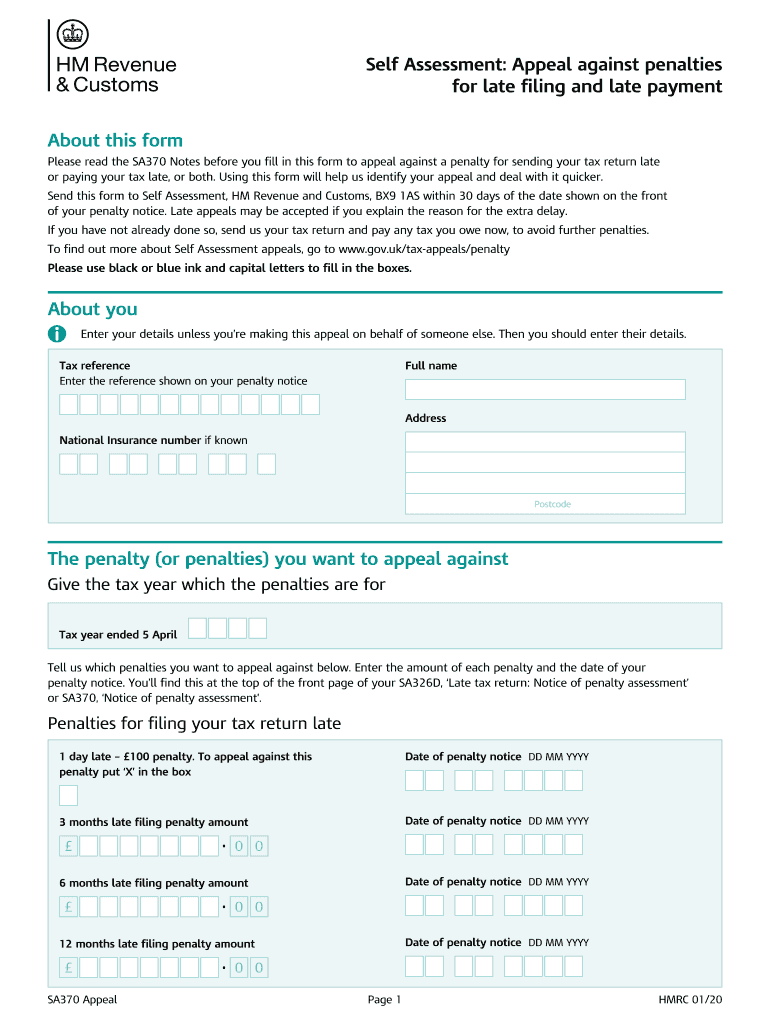
Click ‘Get Form’ to open the SA370 in the editor.
Begin by entering your personal details in the 'About you' section. If you're appealing on behalf of someone else, ensure you input their information.
Fill in your tax reference number as shown on your penalty notice, along with your address and National Insurance number if known.
Indicate the penalties you wish to appeal against by entering the relevant tax year and amounts for each penalty. Be sure to include the dates from your penalty notices.
In the 'Your reason for making an appeal' section, tick the appropriate box and provide a brief description of your circumstances. If selecting 'Other acceptable excuse', elaborate further.
Finally, sign and date your appeal before sending it to Self Assessment, HM Revenue and Customs, BX9 1AS.
Start using our platform today for free to streamline your SA370 form completion!
Mechanical Testing of Steel Products1 - Purdue Engineering
Apr 1, 2007 This standard is issued under the fixed designation A 370; the number immediately following the designation indicates the year of.Read more
SA370. XC7550-001. Memo. You can use any of the brother embroidery cards listed above with your machine. Please be aware that some specifications mayRead more
Cookie consent notice
This site uses cookies to enhance site navigation and personalize your experience.
By using this site you agree to our use of cookies as described in our Privacy Notice.
You can modify your selections by visiting our Cookie and Advertising Notice.