






Definition & Meaning
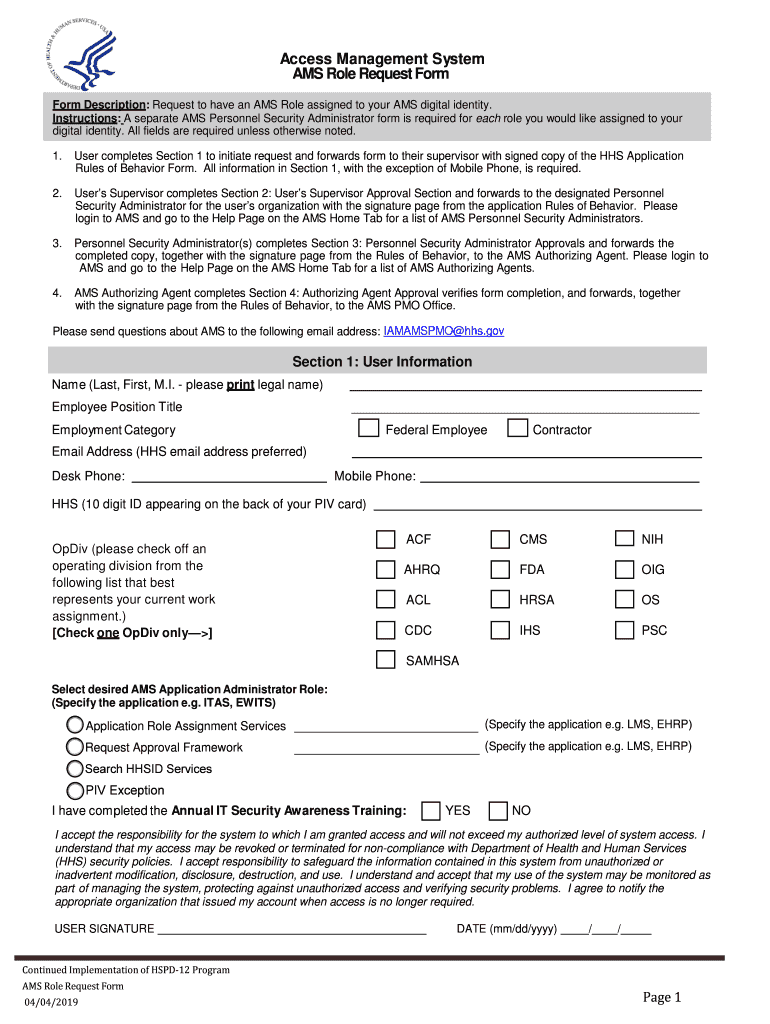
The "Access Management System AMS Admin Role Request Form" is a critical document within an organization's access control framework. It enables users to request specific administrative roles within the Access Management System (AMS), ensuring controlled and authorized access to various system functionalities. The form is integral in aligning with the Health and Human Services (HHS) guidelines, which mandate strict compliance with security and privacy standards. By requiring detailed user information and role specifications, the form helps maintain a secure environment and prevents unauthorized access.
How to Use the Access Management System AMS Admin Role Request Form
Using the AMS Admin Role Request Form involves several key steps and considerations to ensure successful role assignment:
-
Access and Download: Obtain the form from your organization's internal resources or the access management system portal. Ensure you have the latest version to meet current requirements.
-
Complete the Form: Fill out all relevant sections, including personal information, role desired, and justification. Ensure all details are accurate and complete to avoid delays.
-
Submit for Approval: Forward the completed form to your supervisor or Personnel Security Administrator for initial review. They will verify and endorse your request before it is sent to the Authorizing Agent.
-
Await Verification: The Authorizing Agent will perform a thorough verification process, assessing compliance with security policies before granting approval.
-
Receive Confirmation: Once approved, a confirmation email or system notification will inform you of your new role within the AMS, allowing you access to the specified administrative functionalities.
Steps to Complete the Access Management System AMS Admin Role Request Form
Completing the form accurately is essential for expedited processing and approval. Follow these steps:
-
Provide User Information: Enter your full name, contact details, department, and employee ID. Double-check for accuracy.
-
Specify Role: Clearly indicate the AMS admin role you're requesting. Ensure it aligns with your job responsibilities and needs.
-
Justification & Purpose: Articulate a clear and detailed justification for the role. Provide examples of tasks or projects that necessitate this level of access.
-
Required Approvals: Gather necessary endorsements from your direct supervisor. Obtain their signature or digital approval as specified.
-
Final Submission: Ensure the form is fully completed and submit it as directed – typically through the company's digital platform. Store a copy for your records.
Key Elements of the Access Management System AMS Admin Role Request Form
The form comprises several essential components critical for its intended purpose:
-
User Identification: Includes fields for entering individual identification details such as name, contact information, and employee number.
-
Role Specification: Sections dedicated to specifying the administrative roles requested, ensuring alignment with job functions.
-
Justification Section: An area for users to provide a rationale for their role request, enhancing the approval process's transparency.
-
Approval Endorsements: Spaces for signatures or digital approvals from necessary internal authorities, including supervisors and Personnel Security Administrators.
-
Compliance Acknowledgment: Statement of understanding and compliance with organizational security policies, which users sign to acknowledge their responsibilities.
Important Terms Related to Access Management System AMS Admin Role Request Form
To fully grasp the content and implications of the form, familiarize yourself with these terminologies:
-
Access Management System (AMS): A critical organizational tool for managing user access levels to various systems and data.
-
Personnel Security Administrator (PSA): The individual responsible for initial validation and endorsement of role requests.
-
Authorizing Agent: The final approver of role requests, ensuring compliance with security protocols and access policies.
-
Role Specification: The area of the form where users define the exact permissions and access levels requested.
Who Typically Uses the Access Management System AMS Admin Role Request Form
This form is predominantly used by:
-
Internal Employees: Staff members seeking enhanced access privileges for specific job functions or projects.
-
Supervisory Personnel: Managers and team leads who endorse and validate requests based on operational needs and compliance.
-
Security Administrators: Personnel responsible for reviewing and maintaining the integrity and security of access requests within the AMS.


Legal Use of the Access Management System AMS Admin Role Request Form
The form’s legal use ensures alignment with organizational policies and federal regulations such as the ESIGN Act, which governs electronic signatures and digital documentation processes. Utilizing this form within its intended legal framework supports the organization's commitment to protecting sensitive data and managing user access effectively.
Filing Deadlines / Important Dates
While the AMS Admin Role Request Form does not have specific filing deadlines, time-sensitive situations may include:
-
Project Timelines: Completing the form well ahead of project start dates ensures appropriate access is in place when needed.
-
Organizational Changes: During mergers, acquisitions, or department shifts, timely submission is crucial for maintaining operational continuity.
Penalties for Non-Compliance
Failure to utilize or complete the form correctly can lead to several organizational repercussions, such as:
-
Access Denied: Requests lacking proper endorsement or justification may be denied, delaying critical access.
-
Policy Violations: Unauthorized access attempts can trigger disciplinary actions, impacting employment status.
-
Security Breaches: Failing to secure the necessary endorsements may create vulnerabilities within the organization's access management protocols.