






Definition & Meaning
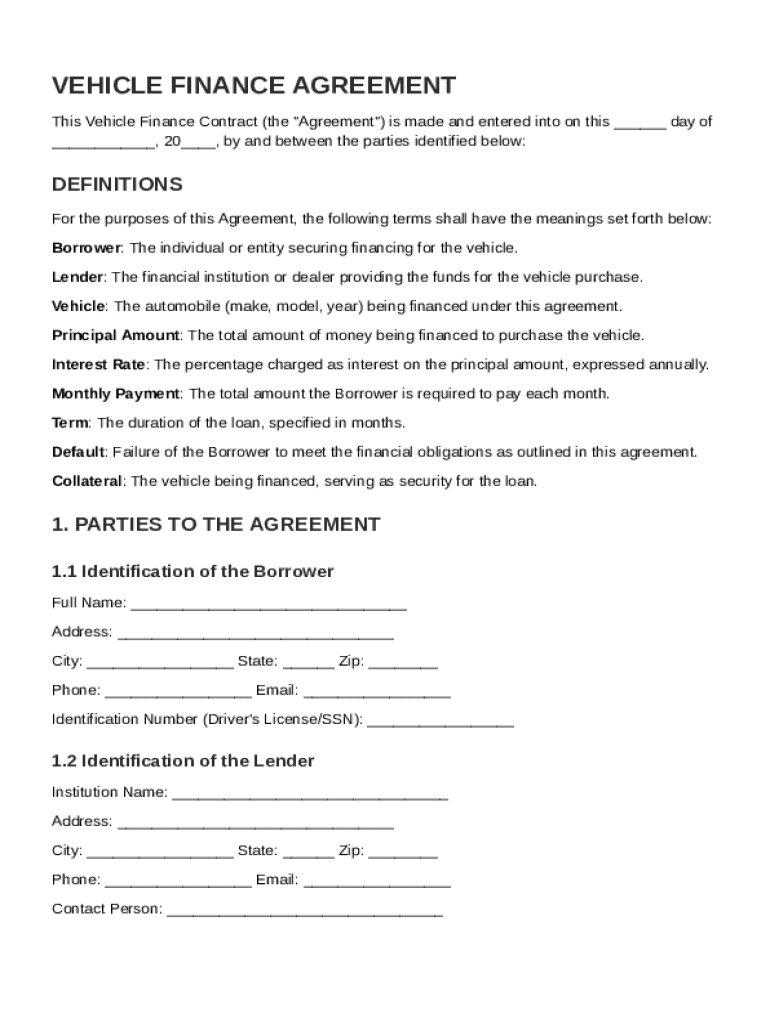
The Vehicle Finance Contract Template is a standardized form utilized to formalize the terms and conditions related to financing a vehicle through a lending institution. This essential document outlines the agreement between the borrower and the lender, specifying obligations and rights. It serves as a legally binding contract that protects both parties involved in the financial transaction.
Key Components
- Parties Involved: Identifies the borrower (purchaser of the vehicle) and the lender (money lending institution).
- Vehicle Details: Includes vital information about the vehicle being financed, such as make, model, year, and Vehicle Identification Number (VIN).
- Financing Terms: Details the principal loan amount, interest rate, repayment schedule, and duration of the loan.
- Borrower's Obligations: Specifies the responsibilities of the borrower, such as timely payments, maintenance, and insurance coverage.
- Lender's Rights: Covers the lender's rights in cases of default or breach of contract by the borrower.
How to Use the Vehicle Finance Contract Template
Using the Vehicle Finance Contract Template requires understanding the standard components included in the document and customizing them to fit specific agreements. Here's how to effectively navigate and implement this template for your needs:
-
Review Pre-Filled Sections: Begin by examining the standard clauses and language provided in the template. Ensure you understand the terminology and implications.
-
Insert Specific Details: Fill in the specific information that applies to your transaction, such as the names of the parties involved, vehicle identification, and financial terms.
-
Customize Clauses: If necessary, modify any sections to better represent the unique terms negotiated between the borrower and lender, ensuring all changes are mutually agreed upon.
-
Legal Review and Approval: It is advisable to have the document reviewed by legal counsel to confirm its compliance with applicable laws and regulations.
Steps to Complete the Vehicle Finance Contract Template
Completing the Vehicle Finance Contract Template involves a systematic approach to ensure all terms are captured accurately and comprehensively. Follow these steps for successful completion:
-
Gather Necessary Information: Collect all essential data, including personal information of the borrower and lender, vehicle details, and agreed-upon financial terms.
-
Preliminary Sections: Start by filling out the sections regarding the identification of parties and vehicle description.
-
Financial Terms and Conditions: Outline the financial agreement by specifying the principal amount, term length, interest rate, and repayment schedule.
-
Obligations and Responsibilities: Clearly articulate the borrower's obligations and any specific requirements for maintaining insurance and notifying changes in circumstances.
-
Legal Provisions: Review and complete any sections related to default terms, governing law, and dispute resolution.
-
Final Review: Perform a thorough review to ensure all fields are filled accurately, and all parties have understood the terms.
-
Signature and Execution: Once reviewed, both parties should sign the document, making it legally binding.
Key Elements of the Vehicle Finance Contract Template
The success of a Vehicle Finance Contract largely depends on the effective inclusion and execution of several key elements that define the financial relationship. These components ensure clarity and protect the interests of both the borrower and lender.
-
Principal Loan Amount: The total sum of money being borrowed for the purchase of the vehicle.
-
Interest Rate Details: The percentage charged for borrowing the funds and the method of calculation (e.g., fixed or variable).
-
Repayment Terms: Includes the installment amounts, payment frequency, and total repayment period.
-
Insurance Requirements: Stipulations requiring the borrower to maintain comprehensive and collision insurance on the vehicle.
-
Default Provisions: Specifies the consequences and processes involved if the borrower fails to meet their obligations.
Legal Use of the Vehicle Finance Contract Template
The legality of the Vehicle Finance Contract Template is pivotal in maintaining enforceable terms. This form must comply with both federal and state laws governing finance and lending practices in the United States.
Compliance and Regulations
-
ESIGN Act Compliance: Ensures that electronic signatures used within the document are recognized as legally binding.
-
Truth in Lending Act (TILA): Mandates clear disclosure of terms to prevent misleading financial practices.
-
State-Specific Regulations: Acknowledges variations in state laws that might affect certain components of the contract, such as usury laws and repossession procedures.
Important Terms Related to the Vehicle Finance Contract Template
Understanding the essential terms associated with a Vehicle Finance Contract is critical for clear communication and agreement between involved parties.
-
Collateral: The vehicle being financed, which serves as security for the loan.
-
Amortization: The process of spreading loan repayments over the duration of the loan term.
-
Vesting: Details regarding the ownership rights of the borrower as the payments progress.
-
Lienholder: The lender's legal right to the vehicle, which may be exercised if the borrower defaults on the loan.
Examples of Using the Vehicle Finance Contract Template
Practical application of the Vehicle Finance Contract Template can provide insights into how uncommon scenarios are managed, ensuring the template’s adaptability.
Scenario Analysis
-
First-Time Borrowers: Simplified versions might be adopted with fewer complex terms, focusing on education and comprehension of financial commitments.
-
Bulk Vehicle Financing: Businesses acquiring multiple vehicles may require modifications to include batch processing of similar contracts under a single agreement.
-
Lease Buyouts: Unique clauses might be introduced for scenarios involving a borrower purchasing a previously leased vehicle.
State-Specific Rules for the Vehicle Finance Contract Template
Finance contracts can vary significantly across states due to divergent legal frameworks. Understanding these regional differences is essential.
-
Usury Laws: These regulate the maximum allowable interest rates that can be charged on the borrowed amount.
-
Repossession Laws: State guidelines dictate the procedures lenders must follow when repossessing vehicles, affecting the terms within the contract.
-
Statutory Disclosures: Certain states require specific disclosures or language within financial agreements to protect consumer rights.