






Key Elements of the Signature Agreement Template
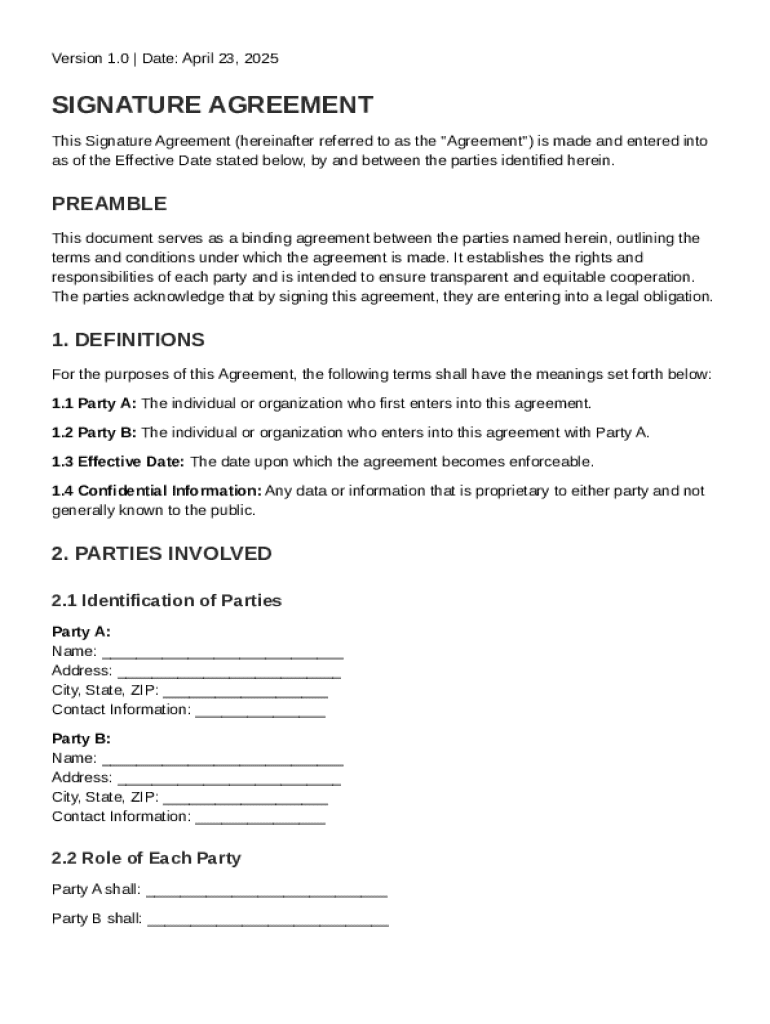
A Signature Agreement Template is a fundamental document used to formalize the terms and conditions between two parties, often referred to as Party A and Party B. It typically includes various essential components that define their relationship and ensure mutual understanding.
-
Definitions: This section clarifies specific terms used throughout the agreement, ensuring both parties have a common understanding of the language used. For example, terms like "Effective Date," "Confidential Information," and "Services" will be explicitly defined.
-
Roles and Responsibilities: The document outlines what each party is expected to do. For example, Party A may be responsible for delivering a product, while Party B might be required to provide compensation.
-
Confidentiality Obligations: A section dedicated to protecting sensitive information exchanged between parties. It often includes clauses about how such information should be handled and the consequences of unauthorized disclosure.
-
Dispute Resolution Procedures: This segment lays out the steps both parties will follow in case of disagreements, offering a structured path to resolve conflicts.
-
Governing Law: It specifies which jurisdiction’s law will be applied in interpreting the agreement, which is particularly useful if the parties are located in different states or countries.
-
Miscellaneous Provisions: Other provisions might address issues such as modifications of the agreement, notice requirements, or wholesale invalidation of clauses as determined by a court.
How to Use the Signature Agreement Template
Utilizing a Signature Agreement Template requires understanding its structure and purpose. Here’s a simplified process:
-
Review the Template: Start by reading the entire document to understand its components. This ensures familiarity with standard clauses.
-
Identify Customization Needs: Determine sections that require specific details regarding your agreement, such as names, dates, and unique obligations.
-
Enter Relevant Information: Use placeholders to replace generic terms with the parties’ actual information. For instance, replace “Party A” with the specific company or individual’s name.
-
Consult Legal Advice: It’s prudent to seek professional legal counsel to review the customized document to ensure compliance and effectiveness.
-
Finalize and Sign: Once both parties agree on the terms, they should sign the document, affirming their commitment to the outlined obligations.
Steps to Complete the Signature Agreement Template
Completing the Signature Agreement Template involves a sequence of methodical steps that ensure its accuracy and effectiveness:
-
Gather Required Information: Obtain all pertinent details of both parties, including full names and contact information.
-
Draft Initial Fill-Ins: Populate the template with specific transaction details, including scope of work, payment terms, and timelines.
-
Clarify Terms and Conditions: Ensure both parties are aware of each obligation, rights, and conditions. Adjust terms as necessary to reflect the negotiated points.
-
Review for Accuracy: Thoroughly proofread the document for errors or omissions, which could lead to misunderstandings or legal issues.
-
Engage Legal Review: Seek feedback from a legal expert specializing in contracts to verify that the template addresses all necessary legal stipulations.
-
Obtain Signatures: Facilitate the signing process using electronic signature capabilities if available, to expedite the process and enhance efficiency.
-
Distribute Copies: Ensure that copies of the signed agreement are distributed to all parties involved for their records.
Legal Use of the Signature Agreement Template
A Signature Agreement Template serves as a legally binding contract once signed and executed properly. Here are key considerations for its legal use:
-
Compliance with Laws: Ensure the agreement complies with relevant U.S. state and federal laws, particularly regarding contract enforceability and e-signatures.
-
Legality of Terms: Verify that all terms included in the template are legal and do not violate public policy or statutory requirements.
-
Execution Requirements: For the agreement to be legally binding, it must be signed by authorized representatives of each party. Check that each party has the capacity to enter into such agreements.
-
Dispute Resolution: Including a binding arbitration clause can provide an efficient alternative to litigation, offering clearer pathways to resolving conflicts.
-
Confidential Information Protection: Be aware of intellectual property laws to ensure sensitive information is adequately protected under the agreement’s terms.
Examples of Using the Signature Agreement Template
Real-world applications of a Signature Agreement Template demonstrate its versatility across different scenarios.
-
Business Transactions: Often used in sales, supply, or service agreements where clear, defined terms must be established between the seller and buyer.
-
Partnership Agreements: In cases where two parties are entering into a business venture, the template can outline roles, responsibilities, profit-sharing, and terms of engagement.
-
Freelance and Employment Contracts: Freelancers or independent contractors can use the template to define project scope, deliverables, timelines, and compensation, offering clarity and legal protection.
-
Intellectual Property Licensing: When one party licenses software or proprietary technology to another, a signature agreement ensures compliance, use rights, and payment terms.
-
Educational Collaborations: Institutions may use these templates to formalize cooperative research projects or shared educational resources.
Comparison of Digital vs. Paper Versions
The modern world offers the flexibility of digital and paper-based signature agreements, each with its own benefits:
-
Digital Version: Allows for quick edits, easy sharing, and is more environmentally friendly. With DocHub, security features such as SSL encryption and compliance with e-signature laws make it highly reliable for legal documents.
-
Paper Version: Offers tangibility and may be preferred in industries where electronic signatures are less common. One downside could be the delay inherent in the signing process due to physical transportation of documents and the manual need for additional copies.
-
Hybrid Approach: Using both digital and paper versions can cater to different participant preferences, ensuring both ease of access and comfort with traditional documentation methods.
Software Compatibility
DocHub’s comprehensive set of tools allows for seamless integration and compatibility with key software platforms:
-
Google Workspace Integration: The ability to import files directly from Google Drive and Gmail speeds up document workflows.
-
Microsoft Office Suite: Compatibility extends to DOC, XLS, and PPT formats, allowing for integration without the need for additional conversions.
-
Cloud Storage Options: Smooth interactions with cloud services like Dropbox and OneDrive maximize accessibility and ease of use.
-
Mobile Access: The platform’s functionality on mobile browsers enhances flexibility, making document management possible from virtually anywhere.
Understanding these aspects of the Signature Agreement Template significantly enhances its utility and ensures a clearer, legally solid relationship between the involved parties.