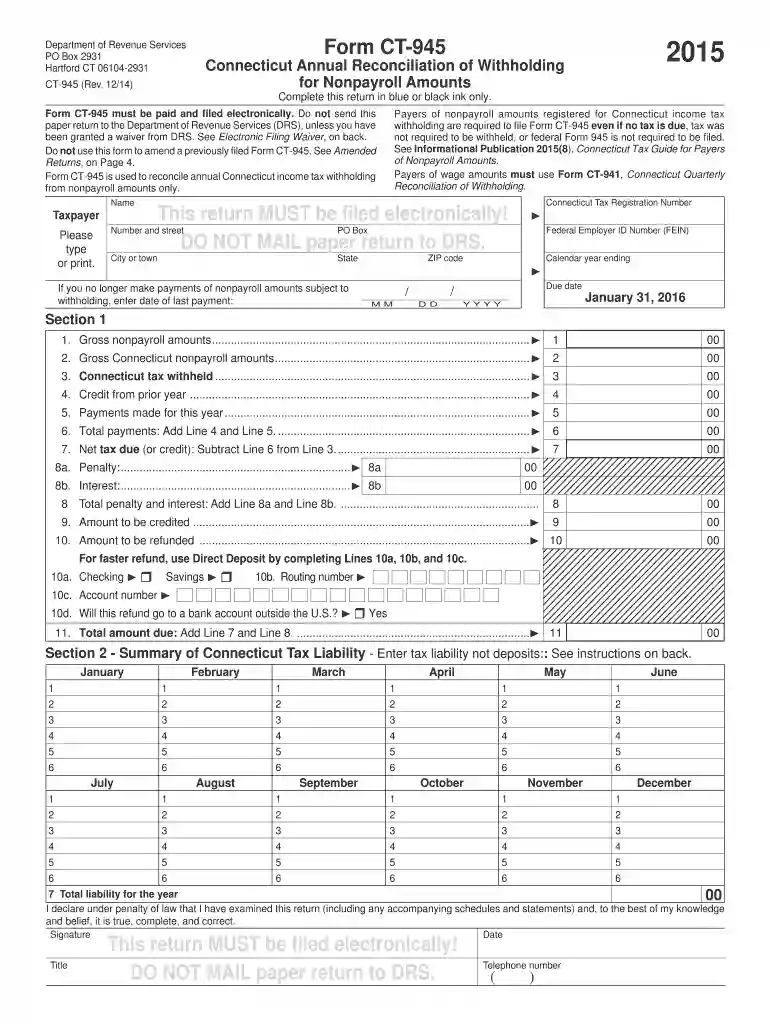
945 drs instructions 2015 form Preview on Page 1

945 drs instructions 2015 form-2026

Here's how it works

  • 01. Edit your form online

    Type text, add images, blackout confidential details, add comments, highlights and more.

  • 02. Sign it in a few clicks

    Draw your signature, type it, upload its image, or use your mobile device as a signature pad.

  • 03. Share your form with others

    Send it via email, link, or fax. You can also download it, export it or print it out.

How to use or fill out 945 drs instructions 2015 form with our platform

Form edit decoration
9.5
Ease of Setup
DocHub User Ratings on G2
9.0
Ease of Use
DocHub User Ratings on G2
  1. Click ‘Get Form’ to open the CT-945 in the editor.
  2. Begin by entering your Connecticut Tax Registration Number and Federal Employer ID Number (FEIN) in the designated fields.
  3. Fill in your name, address, and contact information accurately. Ensure all details are typed or printed clearly.
  4. In Section 1, input the gross nonpayroll amounts and Connecticut tax withheld as per your records for the year 2015.
  5. Calculate total payments by adding any credits from prior years and current year payments. Enter these totals in their respective fields.
  6. Complete Lines 8a and 8b if applicable, detailing any penalties or interest incurred.
  7. For faster refunds, opt for direct deposit by filling out Lines 10a to 10c with your bank details.
  8. Review all entries for accuracy before submitting electronically through our platform.

Start using our platform today to streamline your form completion process for free!

See more 945 drs instructions 2015 form versions

We've got more versions of the 945 drs instructions 2015 form form. Select the right 945 drs instructions 2015 form version from the list and start editing it straight away!

VersionsForm popularityFillable & printable
20254.7 Satisfied (24 Votes)
20244.9 Satisfied (45 Votes)
20234.2 Satisfied (39 Votes)
20224.3 Satisfied (24 Votes)
20214.8 Satisfied (90 Votes)
20204.4 Satisfied (300 Votes)
20184.4 Satisfied (173 Votes)
20154.4 Satisfied (397 Votes)
20144 Satisfied (24 Votes)
20134.1 Satisfied (70 Votes)
20124.2 Satisfied (68 Votes)

be ready to get more

Complete this form in 5 minutes or less

Got questions?

We have answers to the most popular questions from our customers. If you can't find an answer to your question, please contact us.

Steps to file your federal tax return These include: A W-2 form from each employer. Other earning and interest statements (1099 and 1099-INT forms) Receipts for charitable donations; mortgage interest; state and local taxes; medical and business costs; and other tax-deductible expenses if you are itemizing your return.
The name and EIN on Form 945 must match the name and EIN on your information returns where federal income tax withholding is reported (for example, backup withholding reported on Form 1099-NEC).
Step-by-step instructions to file form 945 Step 1: Enter the employer details. Step 2: Enter tax withheld. Step 3: Select the Depositor Category. Step 4: Enter the details in line 7 if you are a monthly Depositor. Step 5: Enter the details in form 945-A if you are a semi-weekly Depositor. Step 6: Sign the form.
How to Fill Form 8995 Lines 1-4: Enter your business information and calculate your total QBI. Lines 6-10: Report income from Real Estate Investment Trusts (REIT) or Publicly Traded Partnerships (PTP) if applicable. Lines 11-15: Calculate the QBI deduction, considering your total taxable income and net capital gains.
Form 945. Department of the Treasury. Internal Revenue Service. Annual Return of Withheld Federal Income Tax. For withholding reported on Forms 1099 and W-2G.

Security and compliance

At DocHub, your data security is our priority. We follow HIPAA, SOC2, GDPR, and other standards, so you can work on your documents with confidence.

People also ask

Form 945: Annual Return of Withheld Federal Income Tax. You can use Form 945 to report withholding amounts from Forms 1099 and W-2G. The application provides: Form 945 - Annual Return of Withheld Federal Income Tax.
If you know what form or publication you need, call the IRS toll-free forms number at 1-800-TAX-FORM (1-800-829-3676).
Form 945, Annual Return of Withheld Federal Income Tax, is a tax form used by businesses to report federal income taxes withheld from non-payroll payments to the IRS. This can include payments to independent contractors, 401(k) and pension payments, and more.

Related links

CT-945, 2015 Connecticut Annual Reconciliation of

Jan 31, 2016 Form CT-945 is used to reconcile annual Connecticut income tax withholding from nonpayroll amounts only. Section 1. 1. Gross nonpayroll amountsRead more

Learn more
2017 General Instructions for Forms W-2 and W-3

May 2, 2017 See the 2017 Instructions for Form 1099-MISC and the 2017 Instructions for Form. 945. For more information, enter foreign agricultural.Read more

Learn more
If you believe that this page should be taken down, please follow our DMCA take down process here