






Definition and Meaning of "REGISTER AS A VENDOR and DIRECT DEPOSIT"
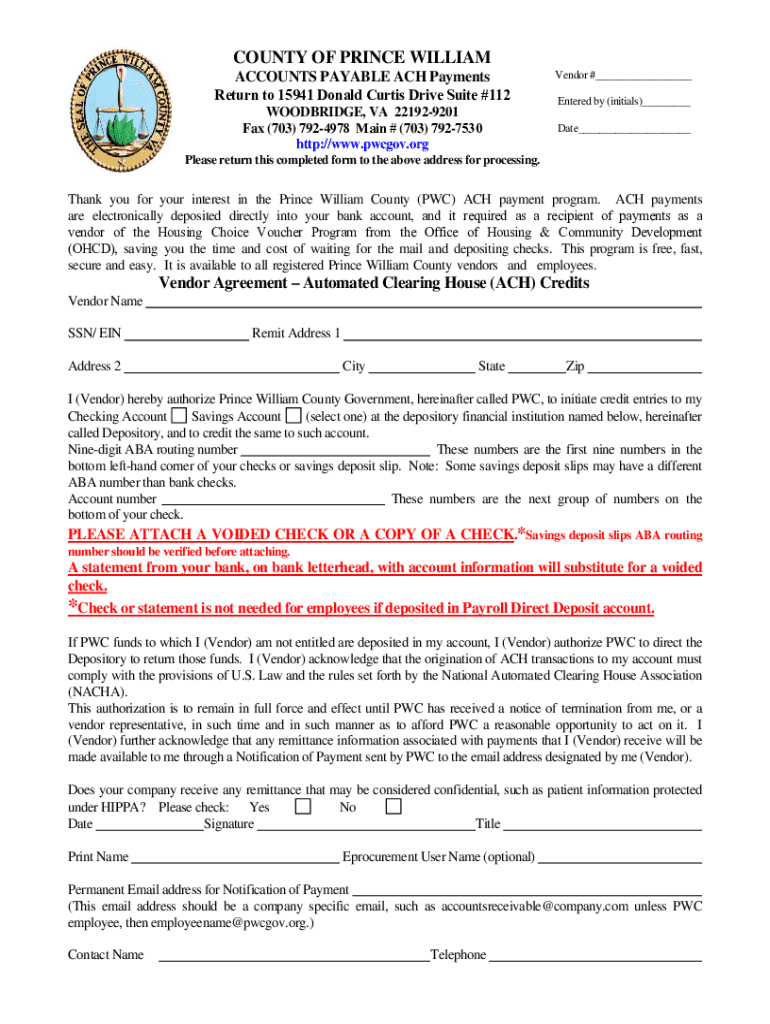
"Register as a Vendor and Direct Deposit" is a process that enables businesses and individuals to register with an organization, such as Prince William County's Office of Housing and Community Development, to receive payments efficiently. The registration often involves submitting essential business information online, agreeing to terms, and opting for direct deposit. Direct deposit allows for automatic electronic transfers of funds to a bank account, streamlining payment processes and reducing the need for paper checks.
- Vendor Registration: This is the formal process businesses or individuals undertake to become recognized as a vendor. It typically involves providing essential information about the entity, such as the legal name, contact details, and tax identification number.
- Direct Deposit: An electronic payment method where funds are transferred directly into a bank account, reducing the dependency on checks and increasing the speed of transactions.
How to Use the "REGISTER AS A VENDOR and DIRECT DEPOSIT" Form
Utilizing this form is crucial for establishing vendor status and arranging for direct payments. The process involves several steps, primarily executed through an online platform designed for efficiency and security.
- Access the Form: Start by visiting the associated organization’s website or requesting the form via email. This form is generally accessible through the entity managing vendor relations.
- Complete Required Information: Fill out all necessary sections, including company details, tax identification numbers, and contact information. Ensure accuracy to prevent delays.
- Agree to Terms: Review and accept the vendor and direct deposit terms, which outline the responsibilities and expectations from the organization.
- Submit Bank Details: Provide your bank routing and account numbers for the direct deposit setup. This is critical for electronic payment processing.
- Submit the Form: Once complete, submit the form according to the specified instructions, which could include online submission or mailing, depending on the organization's requirements.
Steps to Complete the "REGISTER AS A VENDOR and DIRECT DEPOSIT"
Completing the form involves a structured approach. Each stage demands attention to detail to ensure that the process flows smoothly without errors.
- Prepare Required Information: Gather all necessary information beforehand, such as your Federal Employer Identification Number (FEIN), bank details, and business address.
- Fill in the Details: Ensure that all fields are completed accurately. The form will typically require detailed information about the vendor and payment preferences.
- Verify and Confirm: Double-check all entries for accuracy, especially bank information, to avoid payment errors.
- Attach Necessary Documentation: Some vendors may be required to submit additional documents, such as voided checks or business registration certificates.
- Submission: Submit the form based on the instructions provided. Online submissions may provide an immediate confirmation, while mail submissions might take longer.
- Confirmation and Follow-up: After submission, ensure you receive a confirmation. Follow up if there is no response within the expected timeframe.
Why You Should "REGISTER AS A VENDOR and DIRECT DEPOSIT"
Registering as a vendor and opting for direct deposit offers several advantages:
- Efficiency in Payments: Direct deposits are faster and more reliable than paper checks, ensuring timely receipt of funds.
- Reduced Administrative Burden: Automating payments reduces paperwork and manual handling, freeing up resources.
- Security: Direct deposits reduce the risk of check theft or loss, enhancing the overall security of transactions.
- Cost-effectiveness: Reduces expenses associated with printing, mailing, and handling paper checks.
- Environmental Benefits: Decreases the need for paper, contributing to environmentally sustainable practices.
Who Typically Uses the "REGISTER AS A VENDOR and DIRECT DEPOSIT" Form
This form is essential for a variety of entities looking to streamline their payment processes. Typical users include:
- Consultants and Freelancers: These individuals often contract with larger organizations and need efficient payment methods.
- Small to Medium Business Owners: Ensuring smooth operations and cash flow is critical, and direct deposits aid in this area.
- Government Contractees: Entities dealing with government contracts often need to be registered as official vendors to receive payments.
- Nonprofit Organizations: These organizations frequently handle grants and other funding, necessitating reliable payment arrangements.


Important Terms Related to "REGISTER AS A VENDOR and DIRECT DEPOSIT"
Understanding common terminology associated with this process is crucial:
- Vendor Agreement: A legal document that outlines the terms and conditions between the vendor and the contracting entity.
- ACH Payments: Automated Clearing House payments, a network for processing electronic payments, including direct deposits.
- Remittance Advice: A notice sent by the payer to the payee documenting the payment details.
Key Elements of the "REGISTER AS A VENDOR and DIRECT DEPOSIT" Form
In-depth knowledge of the form's crucial components ensures comprehensive completion:
- Contact Information: Accurate vendor details are essential for communication.
- Bank Information: Crucially important for setting up direct deposits.
- Business Credentials: Such as tax identification number and licensing, to verify vendor legitimacy.
- Authorized Signatures: Required to ensure that the person completing the form has the necessary authority.
Examples of Using the "REGISTER AS A VENDOR and DIRECT DEPOSIT"
Practical examples illustrate how the process can benefit various situations:
- Scenario 1: A small business contracts with a county office to provide IT services and uses the form to ensure seamless payment handling.
- Scenario 2: An independent marketing consultant registers with a multinational corporation to receive monthly retainer payments via direct deposit.
- Scenario 3: A nonprofit organization secures a grant and registers to facilitate the transfer of funds using this form.
Each scenario highlights how streamlining payment and registration processes via the form aids in operational efficiency.