Type text, add images, blackout confidential details, add comments, highlights and more.
02. Sign it in a few clicks
Draw your signature, type it, upload its image, or use your mobile device as a signature pad.
03. Share your form with others
Send it via email, link, or fax. You can also download it, export it or print it out.
How to use or fill out 2010 08 25 Patient Transfer form FINAL doc with our platform
Ease of Setup
DocHub User Ratings on G2
Ease of Use
DocHub User Ratings on G2
Click ‘Get Form’ to open the Patient Transfer form in the editor.
Begin by entering the patient/client details, including their name, address, NHS number, and date of birth. Ensure accuracy for seamless transfer.
Indicate the current location of the patient and the receiving facility. This helps in coordinating the transfer effectively.
Answer the infection risk questions by selecting 'Yes' or 'No' for each relevant field. Be sure to provide details about any confirmed or suspected organisms.
Document any invasive devices present at the time of transfer by checking the appropriate boxes. This is crucial for infection control.
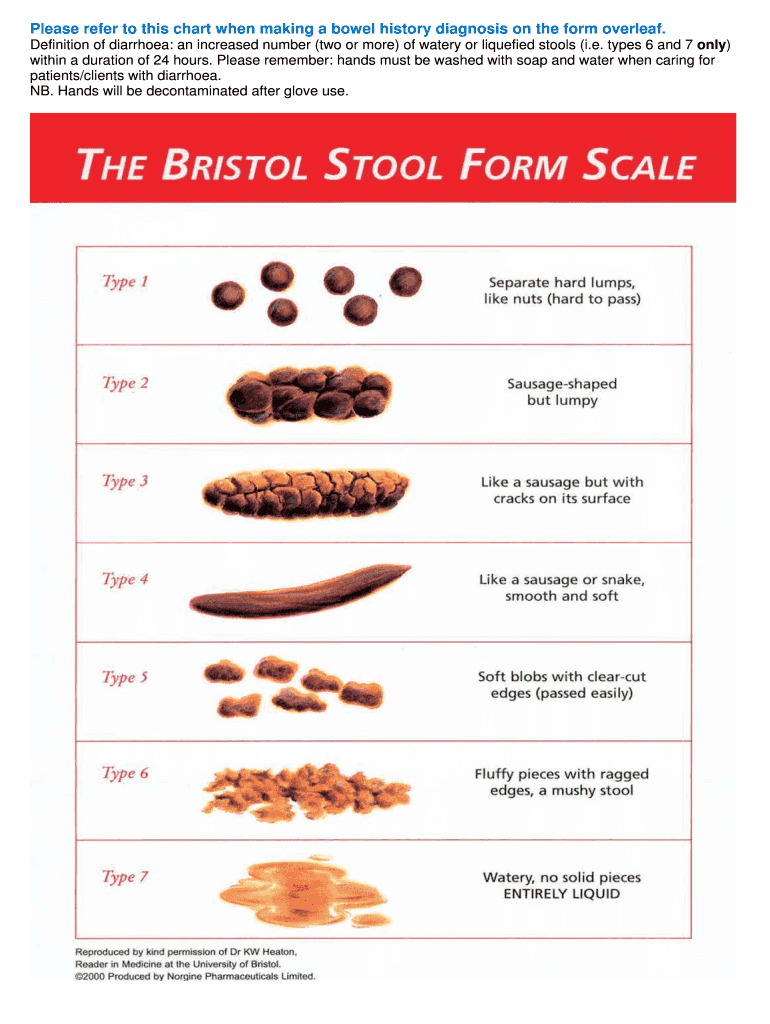
If applicable, fill in bowel history over the past three days using the Bristol stool form scale provided on the previous page.
Complete additional sections regarding treatment information and whether isolation is required before finalizing your entries.
Start using our platform today to streamline your document editing and ensure a smooth patient transfer process!
Fill out 2010 08 25 Patient Transfer form FINAL doc online It's free
This form will be used by the United States (U.S.) Government in conducting background investigations, reinvestigations, and continuous evaluations of.
This transmittal introduces Chapter 40, Hospital and Hospital Health Care Complex Cost Report,. Form CMS-2552-10, which contains instructions for the completion
Cookie consent notice
This site uses cookies to enhance site navigation and personalize your experience.
By using this site you agree to our use of cookies as described in our Privacy Notice.
You can modify your selections by visiting our Cookie and Advertising Notice.