01. Edit your nevada modified business tax form online
Type text, add images, blackout confidential details, add comments, highlights and more.
02. Sign it in a few clicks
Draw your signature, type it, upload its image, or use your mobile device as a signature pad.
03. Share your form with others
Send it via email, link, or fax. You can also download it, export it or print it out.
How to use or fill out Nevada Modified Tax Return 2009 form with our platform
Ease of Setup
DocHub User Ratings on G2
Ease of Use
DocHub User Ratings on G2
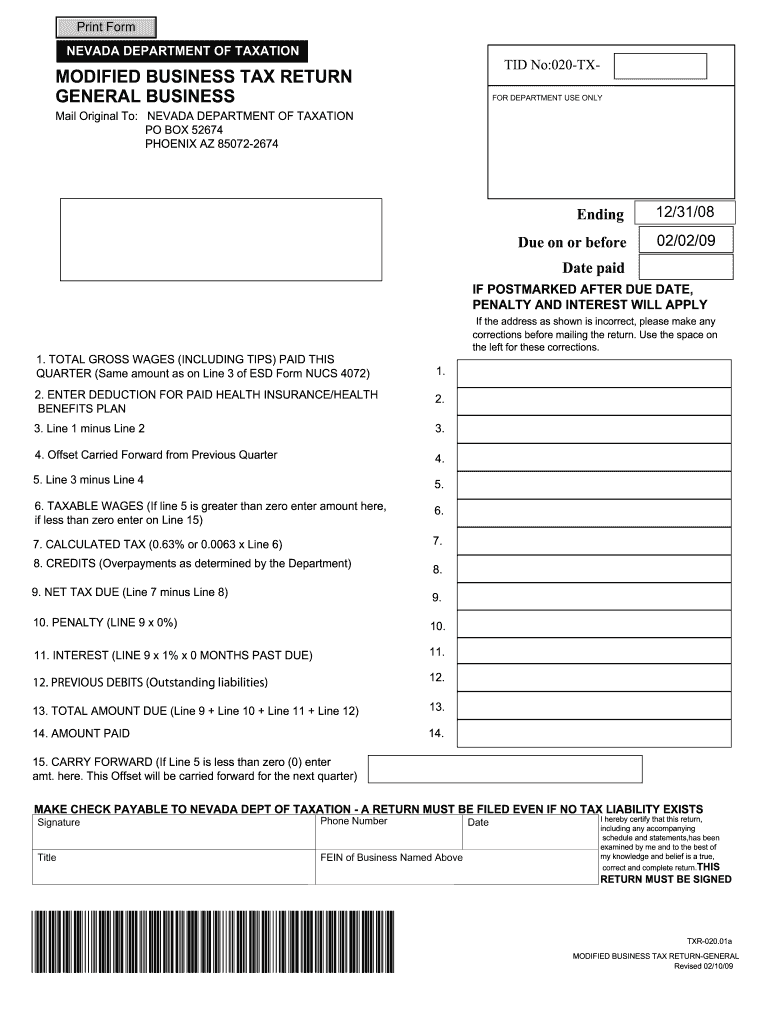
Click ‘Get Form’ to open the Nevada Modified Tax Return 2009 form in the editor.
Begin by entering your Total Gross Wages (Line 1). This should include all gross wages and reported tips paid during the quarter, as indicated on Line 3 of ESD Form NUCS 4072.
Next, input any deductions for paid health insurance or health benefits on Line 2. This amount will reduce your taxable wages.
Calculate Line 3 by subtracting Line 2 from Line 1. This gives you the adjusted gross wages.
If applicable, enter any offsets carried forward from the previous quarter on Line 4. This reduces your wage base for tax calculation.
Complete Line 5 by subtracting Line 4 from Line 3 to determine your taxable wages. If this amount is less than zero, it will be carried forward to the next quarter.
Calculate your tax due on Line 7 by multiplying your taxable wages (Line 6) by the tax rate of 0.63%.
Enter any credits from prior overpayments on Line 8 and calculate your Net Tax Due on Line 9 by subtracting this credit from your calculated tax.
Finally, complete Lines 10 through 15 as necessary, ensuring you account for penalties, interest, and total amounts due before signing and submitting the form.
Start filling out your Nevada Modified Tax Return today using our platform for free!
Fill out nevada modified tax return 2009 form online It's free
Jan 1, 2009 The collection allowance for these tax types will be reduced from .5% to .25% for the period beginning on January 1,. 2009 and ending on June 30Read more
Jan 15, 2010 For individuals: Form 1045, Application for Tentative Refund, or Form 1040X, Amended U.S. Individual. Income Tax Return, for the earliest taxRead more
Duke Energy is a major electricity generating company headquartered in Charlotte, North Carolina. Duke Energy owns and operates at least 36,000 MW ofRead more
Cookie consent notice
This site uses cookies to enhance site navigation and personalize your experience.
By using this site you agree to our use of cookies as described in our Privacy Notice.
You can modify your selections by visiting our Cookie and Advertising Notice.