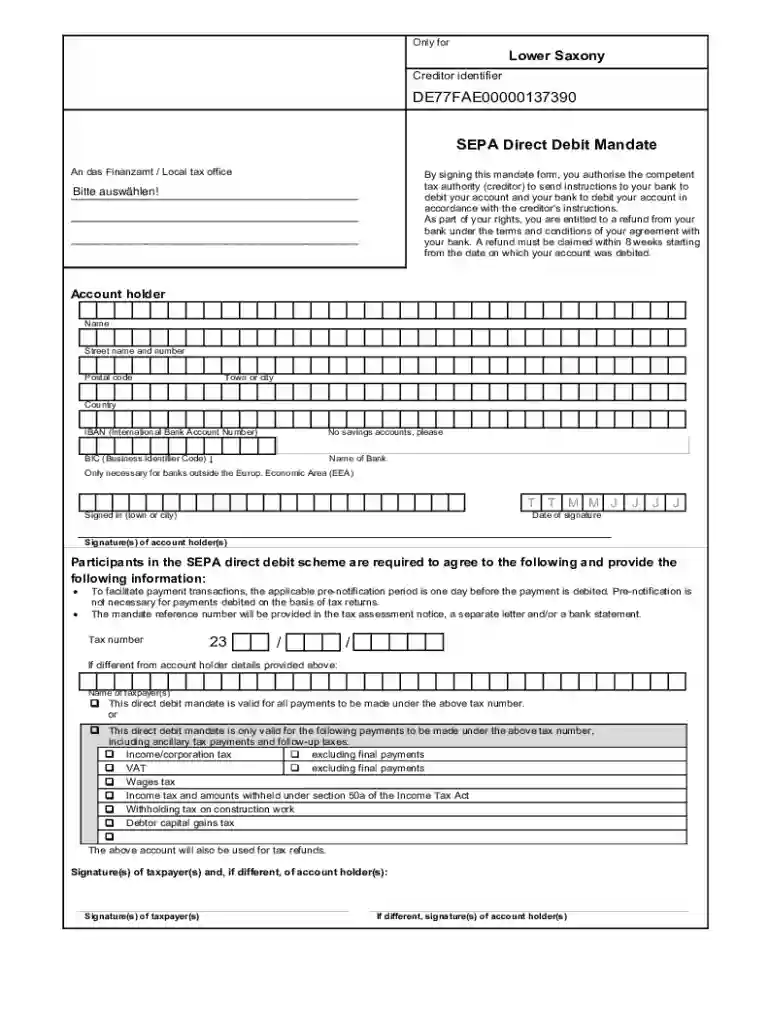
Fs egov sachsen formservfindformTax office Only for Creditor identifier Saxony - Sachsen 2026

Get Form
fs egov sachsen formservfindformTax office Only for Creditor identifier Saxony - Sachsen Preview on Page 1

Here's how it works

01. Edit your form online
Type text, add images, blackout confidential details, add comments, highlights and more.

02. Sign it in a few clicks
Draw your signature, type it, upload its image, or use your mobile device as a signature pad.

03. Share your form with others
Send it via email, link, or fax. You can also download it, export it or print it out.

Definition and Meaning

The term "fs egov sachsen formservfindformTax office Only for Creditor identifier Saxony - Sachsen" refers to a specific type of form utilized within the German state's electronic government framework, typically related to tax matters within the Saxony region. This form is primarily designed for use by creditors in Saxony, helping streamline the process of managing tax identifiers and ensuring compliance with local regulations. The form not only facilitates smooth tax operations but also aligns with Saxony's digital transformation objectives by providing electronic access to necessary documentation.

How to Use the Form

Utilizing the "fs egov sachsen formservfindformTax office Only for Creditor identifier Saxony - Sachsen" follows a series of steps to ensure accurate submission:

  1. Access the Form: Start by accessing the form on the official Saxony e-government portal.
  2. Fill Out Required Sections: Provide creditor details, including the unique identifier, personal information, and relevant tax-related data.
  3. Submit Supporting Documents: Attach necessary documentation, such as proofs of identity, and any previous tax communications.
  4. Review and Validate: Before final submission, carefully review all entries for accuracy and completeness to prevent processing delays.
  5. Submit and Save Confirmation: Submit the form online and ensure you receive a confirmation of receipt for your records.

How to Obtain the Form

To obtain the "fs egov sachsen formservfindformTax office Only for Creditor identifier Saxony - Sachsen," individuals and businesses must:

  • Visit the Official Portal: Navigate to the Sachsen e-government website, designed to facilitate access to state-specific forms.
  • Log In or Register: Secure access through registration or logging into your existing account to download the required form.
  • Search and Select: Utilize the search functionality to locate the specific form by name or related keywords.
  • Download and Print: Depending on your preference, either download the form for electronic completion or print for manual completion.

Steps to Complete the Form

Completion of the form involves detailed data input and verification:

  1. Insert Basic Information: Fill in the creditor’s identification details and contact information.
  2. Detail Financial Information: Provide accurate bank details and transaction history relevant to the tax year.
  3. Specify Creditor Identifier: Include the unique identifier assigned to the creditor for tax transactions in Saxony.
  4. Attach Necessary Documentation: Compile and upload any required supporting documents that validate the information provided.
  5. Finalize and Submit: Double-check all fields for accuracy before submitting the form electronically.

Key Elements of the Form

The core components of the "fs egov sachsen formservfindformTax office Only for Creditor identifier Saxony - Sachsen" include:

  • Creditor Identifier: A field for the specification of the unique number provided by the tax office.
  • Personal and Contact Information: Sections for the collection of the creditor's name, address, and communication details.
  • Bank and Financial Details: Areas designated for inputting bank account numbers and related financial details.
  • Supporting Material: A checklist of additional documents needed to complete the form successfully.

Legal Use of the Form

The form serves important legal purposes in Saxony's tax framework:

  • Tax Obligations: Assists creditors in meeting their statutory tax reporting requirements.
  • Legal Compliance: Ensures compliance with state-specific tax laws.
  • Documentation Record: Provides legal documentation of tax-related transactions for accountability and audit purposes.

Important Terms Related to the Form

Essential terms include:

  • Creditor Identifier: A unique number associated with a creditor for tax purposes.
  • E-Government: The use of digital tools and systems in managing government services.
  • Tax Compliance: Adherence to tax regulations and laws.
  • Securities: Documents providing proof of financial obligations.

Who Typically Uses the Form

The form is predominantly used by:

  • Business Entities: Companies operating within the Saxony region that are required to manage tax duties.
  • Financial Institutions: Banks and other entities handling financial transactions for creditors.
  • Individual Creditors: Persons with obligations to declare tax engagements related to credit transactions.
decoration image ratings of Dochub

Who Issues the Form

The form is issued by the regional tax authorities within the state of Saxony, in line with national and state-specific guidelines for tax and financial reporting. This ensures its alignment with both local regulations and broader German tax laws, providing a standardized approach to tax compliance for creditors in the region.

be ready to get more

Complete this form in 5 minutes or less

Get form

Got questions?

We have answers to the most popular questions from our customers. If you can't find an answer to your question, please contact us.
Contact us
You can find it by contacting your creditor directly or from your recent transactions on 365 online where extended information (like the Creditor ID) is available for previously presented SEPA Direct Debits.
A SEPA creditor identifier is an ID number associated with each SEPA Direct Debit payment and identifies the company making the payment. SEPA Direct Debit is automatically enabled for accounts using Stripes creditor identifier. To activate this payment method, run a live mode SEPA Direct Debit charge.

Security and compliance

At DocHub, your data security is our priority. We follow HIPAA, SOC2, GDPR, and other standards, so you can work on your documents with confidence.
Learn more
ccpa2
pci-dss
gdpr-compliance
hipaa
soc-compliance
be ready to get more

Complete this form in 5 minutes or less

Get form