Type text, add images, blackout confidential details, add comments, highlights and more.
02. Sign it in a few clicks
Draw your signature, type it, upload its image, or use your mobile device as a signature pad.
03. Share your form with others
Send florida pta audit form via email, link, or fax. You can also download it, export it or print it out.
How to use or fill out pta audit report with our platform
Ease of Setup
DocHub User Ratings on G2
Ease of Use
DocHub User Ratings on G2
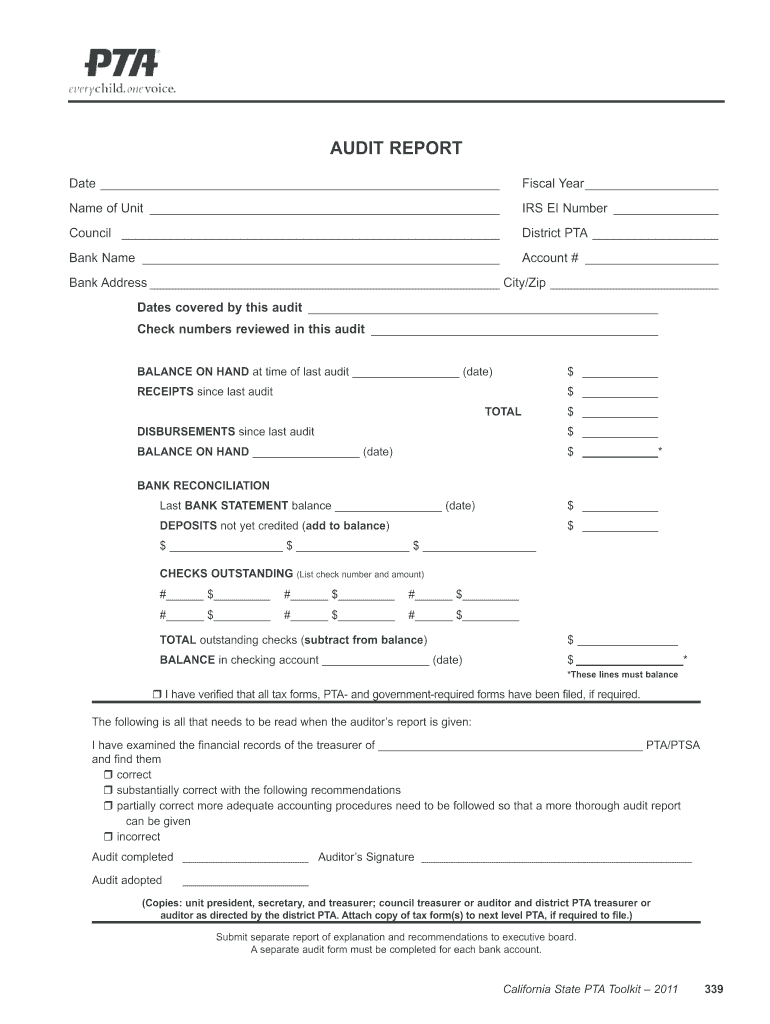
Click ‘Get Form’ to open the PTA audit report in the editor.
Begin by entering the date and fiscal year at the top of the form. This sets the context for your audit.
Fill in your unit's name, IRS EI number, council, district PTA, bank name, account number, and bank address. Ensure accuracy as these details are crucial for identification.
Specify the dates covered by this audit and list any check numbers reviewed during this period.
Document the balance on hand from the last audit and total receipts since then. This will help track financial changes.
Record disbursements since the last audit and calculate your current balance on hand.
Complete the bank reconciliation section by noting the last bank statement balance and any deposits not yet credited.
List outstanding checks with their numbers and amounts to ensure all transactions are accounted for.
Finally, verify that all required tax forms have been filed and complete the auditor’s signature section before submitting your report.
Start using our platform today to streamline your PTA audit report process for free!
Oct 1, 2017 PERFORMANCE REPORT PTA/PTO meetings, community gatherings, and health fairs. Low conspicuity can increase the risk of motorcycle crashRead more
PTA and Expenditure Type Validations Definition of PTA - IMSS
As a reminder, as part of audit checks and balances, IMSS staff is unable to change any transactional data from the front end. TIP: Use the PTA Query, whichRead more
On the basis of the banks risk assessment of its PTA activities, as well as prior examination and audit reports, select a sample of PTAs. From the sampleRead more
Cookie consent notice
This site uses cookies to enhance site navigation and personalize your experience.
By using this site you agree to our use of cookies as described in our Privacy Notice.
You can modify your selections by visiting our Cookie and Advertising Notice.