Lmia number format 2026

Get Form
lmia number check Preview on Page 1

Here's how it works

01. Edit your lmia number check online
Type text, add images, blackout confidential details, add comments, highlights and more.

02. Sign it in a few clicks
Draw your signature, type it, upload its image, or use your mobile device as a signature pad.

03. Share your form with others
Send how to check if lmia is genuine via email, link, or fax. You can also download it, export it or print it out.

How to use or fill out lmia number format with our platform

Form edit decoration
9.5
Ease of Setup
DocHub User Ratings on G2
9.0
Ease of Use
DocHub User Ratings on G2
  1. Click ‘Get Form’ to open the lmia number format in the editor.
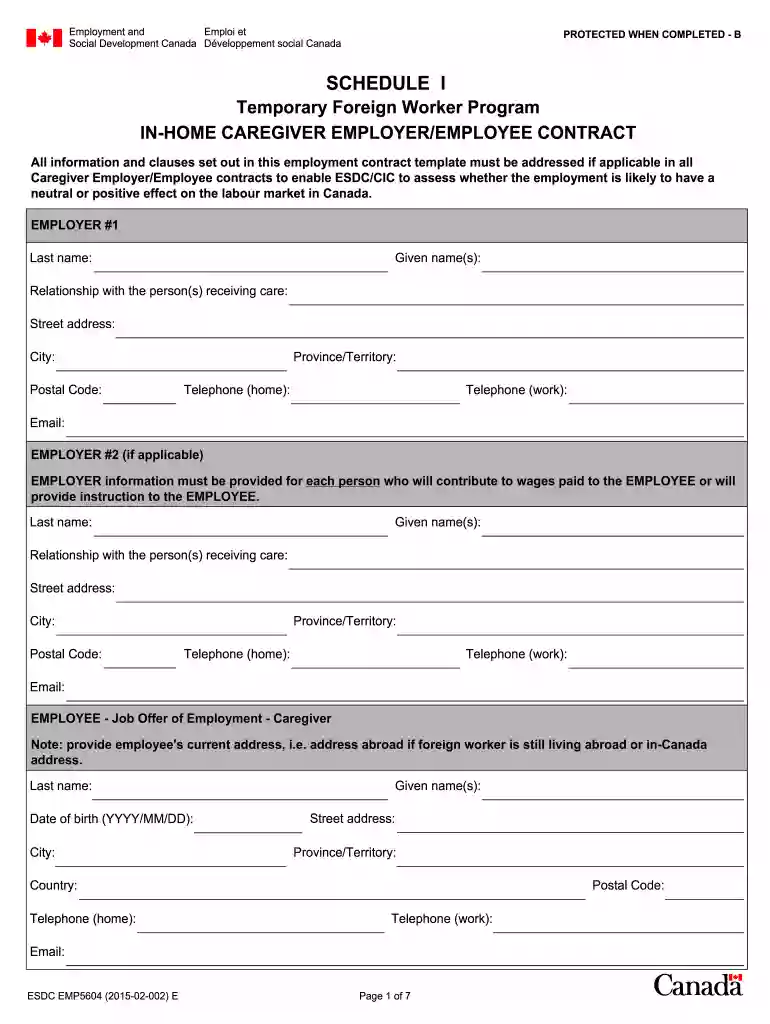
  2. Begin by filling out the EMPLOYER #1 section. Enter the last name, given name(s), relationship with the person receiving care, and contact details including street address, city, postal code, province/territory, and telephone numbers.
  3. If applicable, complete the EMPLOYER #2 section with similar information as above for any additional employers contributing to wages.
  4. Proceed to the EMPLOYEE section. Provide the employee's last name, given name(s), date of birth, current address (if abroad or in Canada), and contact information.
  5. Fill out the EMPLOYEE'S PLACE OF WORK section by indicating whether they will work at the employer's residence and provide details if not.
  6. Complete sections regarding job description, work schedule and wages, recruitment fees, accommodation provisions, transportation costs, health care insurance, workplace safety insurance, notice of resignation and termination.
  7. Finally, ensure all parties sign and date the contract to validate it before submission.

Start using our platform today for free to streamline your document editing and form completion!

See more lmia number format versions

We've got more versions of the lmia number format form. Select the right lmia number format version from the list and start editing it straight away!
Versions Form popularity Fillable & printable
2018 4.8 Satisfied (128 Votes)
2016 4.2 Satisfied (74 Votes)
2015 4.4 Satisfied (93 Votes)
2015 4.4 Satisfied (541 Votes)
2015 4.5 Satisfied (61 Votes)
2014 4 Satisfied (26 Votes)
be ready to get more

Complete this form in 5 minutes or less

Get form

Got questions?

We have answers to the most popular questions from our customers. If you can't find an answer to your question, please contact us.
Contact us
An LMIA number has 7 digits and starts with an 8. Does the the number your employer provided you matches that? You employer should have given you a copy of the LMIA, as youll need it for your work permit application.
A Labour Market Impact Assessment (LMIA) is a document that an employer in Canada may need to get before hiring a foreign worker. A positive LMIA will show that there is a need for a foreign worker to fill the job. It will also show that no Canadian worker or permanent resident is available to do the job.
The Francophone Mobility Program, coded C-16 under IRPR R205(b), is an LMIA-exempt work permit designed to encourage the growth of Francophone communities across Canada. The job itself does not need to require French or be conducted in French. The position can be entirely in English.
You can check the status of your LMIA application at any time, under the Status column of the Employer Dashboard. If you have any questions, you can also contact the Employer Contact Centre at 1-800-367-5693.
How to Verify If an LMIA Is Genuine Check the Source of the LMIA Approval Letter. A genuine LMIA approval letter is issued directly by Employment and Social Development Canada (ESDC)/Service Canada. Confirm the LMIA Number. Contact Service Canada. Cross-Check with Your Employer. Look for Red Flags of LMIAs.

Security and compliance

At DocHub, your data security is our priority. We follow HIPAA, SOC2, GDPR, and other standards, so you can work on your documents with confidence.

Learn more
be ready to get more

Complete this form in 5 minutes or less

Get form