Download Form RT-83SP - formuPack 2026

Get Form
Download Form RT-83SP - formuPack Preview on Page 1

Here's how it works

01. Edit your form online
Type text, add images, blackout confidential details, add comments, highlights and more.

02. Sign it in a few clicks
Draw your signature, type it, upload its image, or use your mobile device as a signature pad.

03. Share your form with others
Send it via email, link, or fax. You can also download it, export it or print it out.

Definition & Meaning

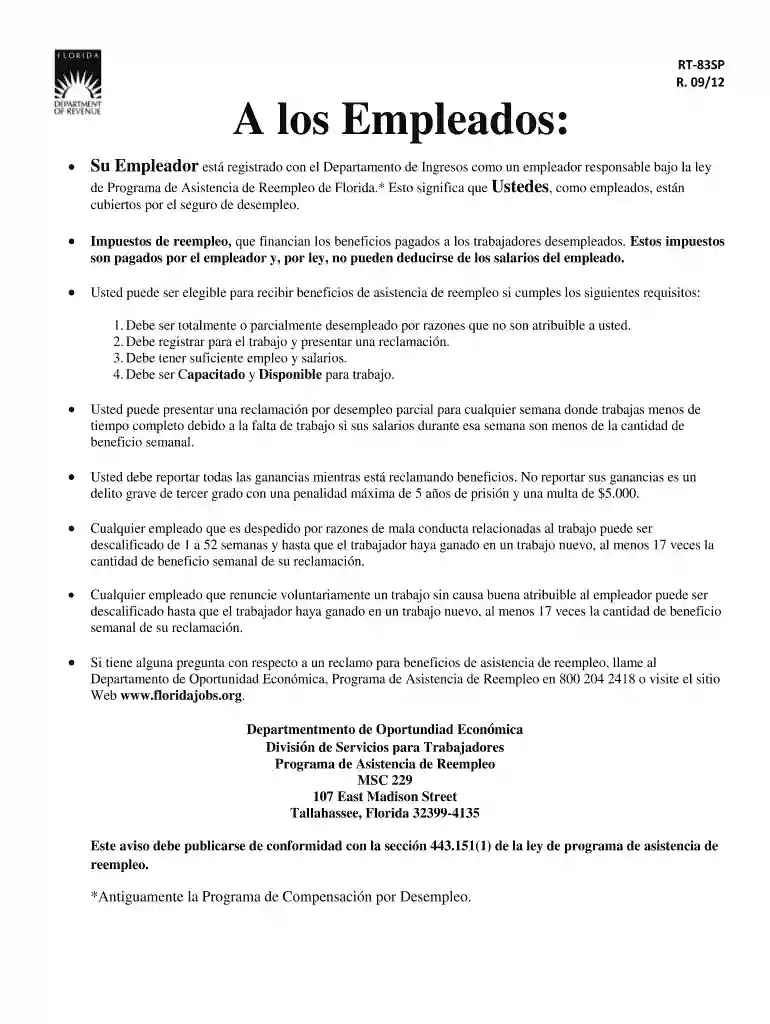
Form RT-83SP is a document designed to inform employees about their unemployment insurance coverage under Florida's Reemployment Assistance Program. It details eligibility requirements for unemployment benefits, implications of failing to report earnings, and disqualifications due to dismissal or resignation. This form serves as a vital communication tool between the government and employees regarding their rights and obligations concerning unemployment benefits.

How to Use the Download Form RT-83SP - formuPack

To effectively utilize the RT-83SP form, you should first ensure that you fully understand the information it provides about unemployment insurance coverage. This involves reviewing sections related to eligibility criteria, reporting requirements, and potential disqualifications. The form can be filled out online using platforms that support PDF editing, such as DocHub, which allows for adding text, annotating fields, and inserting necessary personal information before submission.

How to Obtain the Download Form RT-83SP - formuPack

The RT-83SP form can typically be downloaded from official government websites associated with Florida's unemployment insurance program. The form may also be available on third-party document management platforms like DocHub, where users can directly import, fill, and send documents. Ensure your source is reliable to maintain the authenticity of the form and its content.

Steps to Complete the Download Form RT-83SP - formuPack

  1. Read Instructions Carefully: Before filling out the form, read all instructions to understand the required information.
  2. Enter Personal Information: Use the editable fields to enter your name, contact information, and other personal details as required.
  3. Complete Employment Information: Provide details about your employment history, as specified in the form.
  4. Review and Sign: Carefully review all entered information for accuracy. Sign the form electronically if necessary.
  5. Submit the Form: Submit the completed form as advised, either through online submission systems, email, or physical delivery, adhering to provided instructions.

Why Should You Download Form RT-83SP - formuPack

Downloading and completing Form RT-83SP is essential for employees to be informed about their unemployment insurance coverage and rights. Knowing the eligibility criteria and implications can prevent misunderstandings related to benefits. Furthermore, ensuring the form is filled accurately and thoroughly means you're complying with necessary legal requirements and securing your rights to unemployment support if needed.

Important Terms Related to Download Form RT-83SP - formuPack

  • Reemployment Assistance: A program offering financial aid to unemployed individuals meeting specific eligibility criteria.
  • Disqualification: Conditions under which an individual may be rendered ineligible for unemployment benefits.
  • Eligibility Criteria: Specific requirements that must be met to qualify for unemployment benefits.
  • Reporting Requirements: Obligations to disclose accurate information about employment and earnings.

Legal Use of the Download Form RT-83SP - formuPack

The legal use of Form RT-83SP is to ensure transparent communication between the employee and the Florida government regarding unemployment coverage. Employees are required by law to complete this form accurately to verify their eligibility and maintain their entitlements. Providing false information can lead to disqualification and potential legal penalties.

Key Elements of the Download Form RT-83SP - formuPack

  • Eligibility Requirements: Criteria related to employment duration and earnings.
  • Reporting Obligations: Instructions on how to report earnings and changes in employment status.
  • Contact Information: Details for getting in touch with relevant authorities for claims inquiries.
  • Privacy Notices: Information about how personal data will be handled and protected.

Penalties for Non-Compliance

Non-compliance with the instructions and requirements of Form RT-83SP may result in serious consequences, including denial of unemployment benefits. Employees who fail to accurately report their earnings or provide false information could face legal actions and be required to repay benefits received under false pretenses. It's crucial to adhere strictly to the provided guidelines to avoid such repercussions.

See more Download Form RT-83SP - formuPack versions

We've got more versions of the Download Form RT-83SP - formuPack form. Select the right Download Form RT-83SP - formuPack version from the list and start editing it straight away!
Versions Form popularity Fillable & printable
2023 4.6 Satisfied (55 Votes)
2019 4.9 Satisfied (51 Votes)
2015 4.4 Satisfied (51 Votes)
2012 4.2 Satisfied (86 Votes)
be ready to get more

Complete this form in 5 minutes or less

Get form

Got questions?

We have answers to the most popular questions from our customers. If you can't find an answer to your question, please contact us.
Contact us
Get the current filing years forms, instructions, and publications for free from the IRS. Download them from IRS.gov. Order online and have them delivered by U.S. mail. Order by phone at 1-800-TAX-FORM (1-800-829-3676)
Picking up copies at an IRS Taxpayer Assistance Center. Going to the IRS Small Business and Self-Employed Tax Center page. Requesting copies by phone 800-TAX-FORM (800-829-3676). Hours of operation are 7 a.m. to 10 p.m., Monday-Friday, your local time except Alaska and Hawaii which are Pacific time.
We accept forms that are consistent with the official printed versions and do not have an adverse impact on our processing. This policy includes forms printed from IRS.gov and output on high-quality devices such as laser or ink-jet printers, unless otherwise specified on the form itself.
How to access your 1099-R tax form Sign in to your online account. Go to OPM Retirement Services Online. Click 1099-R Tax Form in the menu to view your most recent tax form. Select a year from the dropdown menu to view tax forms from other years. Click the save or print icon to download or print your tax form.
Even if you didnt receive a 1098-E from your servicer, you can download your 1098-E from your loan servicers website. If you are unsure who your loan servicer is, log in to StudentAid.gov or call the Federal Student Aid Information Center at 1-800-4-FED-AID (1-800-433-3243; TTY 1-800-730-8913).

Security and compliance

At DocHub, your data security is our priority. We follow HIPAA, SOC2, GDPR, and other standards, so you can work on your documents with confidence.

Learn more
ccpa2
pci-dss
gdpr-compliance
hipaa
soc-compliance

People also ask

Downloading from IRS Forms Publications page. Picking up copies at an IRS Taxpayer Assistance Center. Going to the IRS Small Business and Self-Employed Tax Center page. Requesting copies by phone 800-TAX-FORM (800-829-3676).
If you mailed a tax return and havent heard from them, please check expected wait times for current IRS operations and services. Are tax forms available at my local Post Office? No, Post Offices do not have tax forms available for customers.