




01. Edit your form online
Type text, add images, blackout confidential details, add comments, highlights and more.

Type text, add images, blackout confidential details, add comments, highlights and more.

Draw your signature, type it, upload its image, or use your mobile device as a signature pad.

Send it via email, link, or fax. You can also download it, export it or print it out.
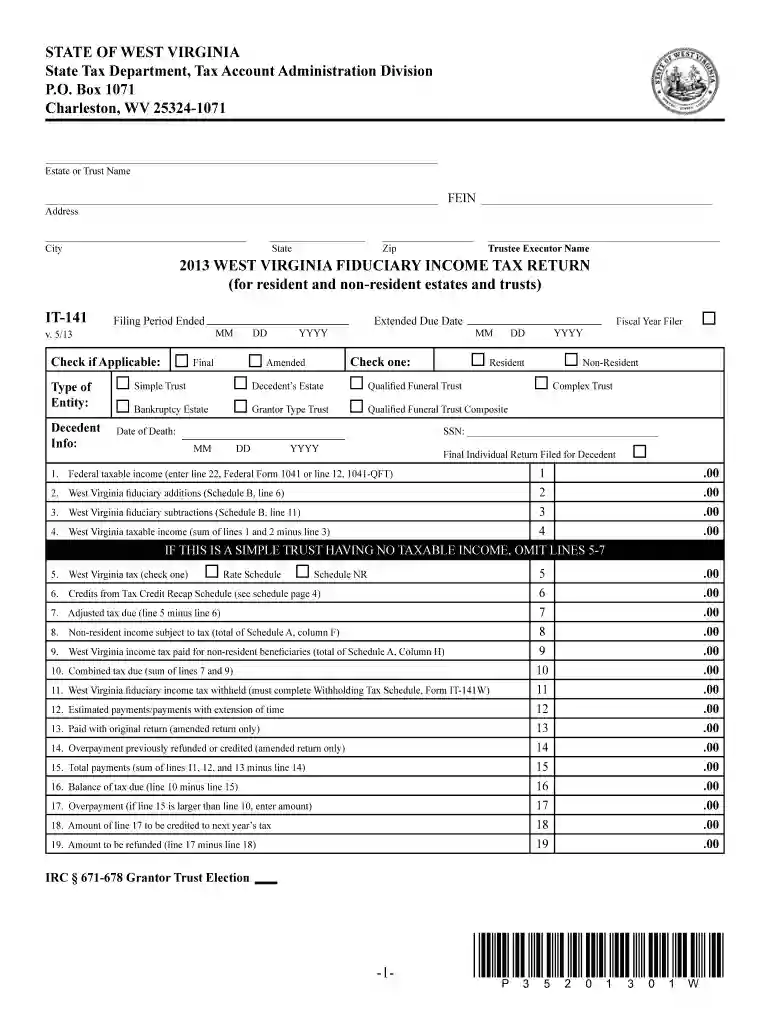
The Form IT-141 is officially known as the West Virginia Fiduciary Income Tax Return. This form is utilized by estates and trusts to report income, deductions, and tax liabilities within the state of West Virginia. It plays a crucial role in ensuring that fiduciary entities comply with state tax laws, accurately report their taxable income, and calculate the necessary tax dues. Filing Form IT-141 is an essential step for both resident and non-resident estates and trusts operating in West Virginia to maintain tax compliance.
Filing Form IT-141 is a legal requirement for all fiduciaries managing estates or trusts within West Virginia. It ensures that these entities report their financial activities to the state’s tax authorities. By adhering to the state’s tax regulations through this form, fiduciaries can avoid legal penalties and maintain good standing. Legal compliance also involves accurate documentation of income distribution to beneficiaries and proper allocation of tax credits.
The West Virginia Fiduciary Income Tax Return (Form IT-141) is generally due by the 15th day of the fourth month following the close of the tax year. For most fiduciaries, this date is April 15th. To avoid late filing penalties, ensure the form and any taxes due are submitted by the deadline. Extensions may be available but must be requested officially.
Form IT-141 is primarily used by fiduciaries of estates and trusts operating in West Virginia. This includes personal representatives, trustees, and executors responsible for managing the financial affairs of the estate or trust. The form is applicable for both resident and non-resident entities that generate income sourced from West Virginia.


Failing to file Form IT-141 or providing inaccurate information may result in significant penalties. These can include monetary fines, interest on owed taxes, and possible legal actions for willful non-compliance. Fiduciaries are encouraged to accurately complete the form and adhere to all filing deadlines to mitigate potential repercussions.
While completing Form IT-141, fiduciaries can benefit from using tax preparation software like TurboTax or QuickBooks. These digital tools can streamline the tax preparation process by automating calculations, ensuring compliance with West Virginia tax regulations, and offering step-by-step guidance for filling out the form. Always verify that the desired software includes specific support for state fiduciary forms.
West Virginia has specific tax regulations governing the filing of fiduciary income tax returns. These include detailed instructions for reporting income sourced within and outside the state, as well as differentiating between resident and non-resident fiduciaries. Familiarize yourself with these state-specific rules to ensure complete and accurate submission.
Form IT-141 can be filed either digitally or via traditional paper submission. A digital submission may offer advantages such as quicker processing times, easier corrections, and simplified storage of tax records. However, some fiduciaries may prefer the paper version for tangible documentation. Choose the method that best meets your needs while ensuring timely submission.
The West Virginia State Tax Department is responsible for issuing Form IT-141. This agency oversees the collection of state taxes and provides necessary guidelines and forms to fiduciaries for accurately reporting estate and trust incomes. The department also offers resources and support for any inquiries or assistance required during the filing process.
When filling out Form IT-141, fiduciaries should have the following documents on hand:
Collecting and organizing these documents in advance will streamline the process of completing the tax return and ensure all necessary information is accurately captured.
We've got more versions of the it 141 2013 form form. Select the right it 141 2013 form version from the list and start editing it straight away!
| Versions | Form popularity | Fillable & printable |
|---|---|---|
| 2024 | 4.4 Satisfied (21 Votes) | |
| 2023 | 4.7 Satisfied (21 Votes) | |
| 2022 | 4.8 Satisfied (37 Votes) | |
| 2021 | 4.8 Satisfied (67 Votes) | |
| 2020 | 4.4 Satisfied (224 Votes) | |
| 2019 | 4.1 Satisfied (39 Votes) | |
| 2018 | 4.3 Satisfied (90 Votes) | |
| 2017 | 4.3 Satisfied (100 Votes) | |
| 2016 | 4.4 Satisfied (542 Votes) | |
| 2015 | 4.3 Satisfied (50 Votes) | |
| 2014 | 4 Satisfied (29 Votes) | |
| 2013 | 4 Satisfied (58 Votes) | |
| 2012 | 4.3 Satisfied (73 Votes) | |
| 2009 | 4.3 Satisfied (183 Votes) | |
| 2008 | 4 Satisfied (57 Votes) |
At DocHub, your data security is our priority. We follow HIPAA, SOC2, GDPR, and other standards, so you can work on your documents with confidence.
You must submit the IT-140W with your signed tax return, even if you have no withholding. Form IT-141. Passive Activity. If you file your tax return and pay
Form Number 141AZ Category Fiduciary Forms 01/01/2015 2013 Download 2013 Form (PDF) Download 2013 Instructions (PDF)


