Disclosure of Claim File Information to Worker or Employer 2026

Get Form
Disclosure of Claim File Information to Worker or Employer Preview on Page 1

Here's how it works

01. Edit your form online
Type text, add images, blackout confidential details, add comments, highlights and more.
02. Sign it in a few clicks
Draw your signature, type it, upload its image, or use your mobile device as a signature pad.
03. Share your form with others
Send it via email, link, or fax. You can also download it, export it or print it out.

How to use or fill out Disclosure of Claim File Information to Worker or Employer

Form edit decoration
9.5
Ease of Setup
DocHub User Ratings on G2
9.0
Ease of Use
DocHub User Ratings on G2
  1. Begin by clicking ‘Get Form’ to open the Disclosure of Claim File Information in our editor.
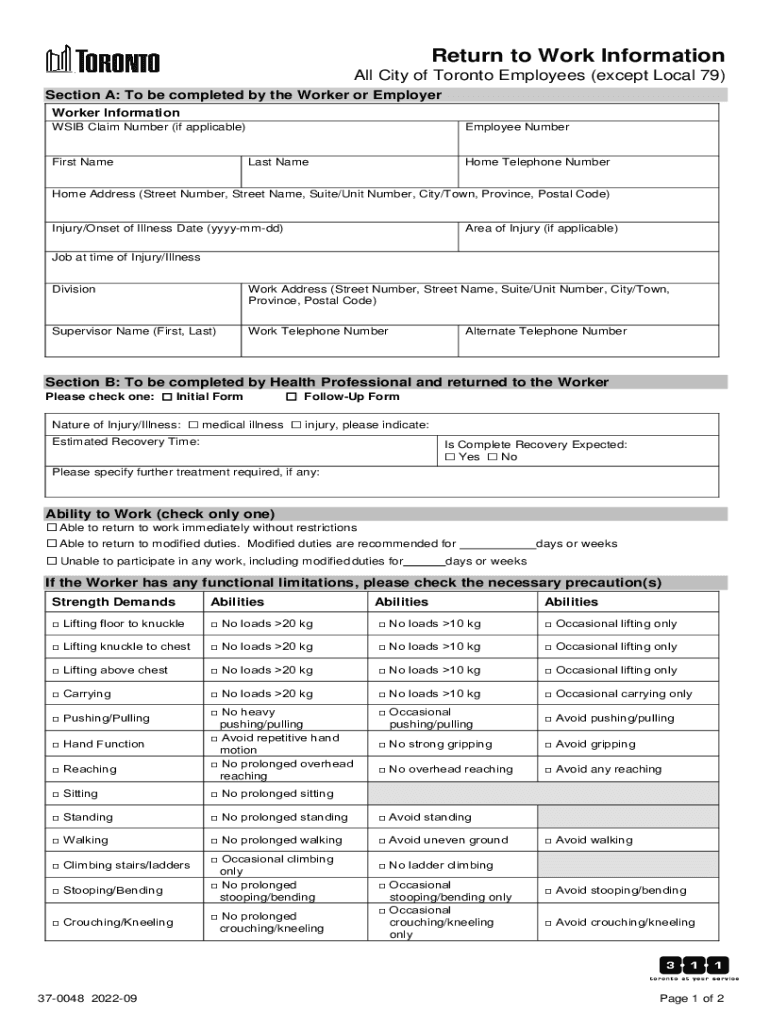
  2. In Section A, provide your Worker Information. Fill in your WSIB Claim Number, First Name, Last Name, Employee Number, and contact details including Home Telephone Number and Home Address.
  3. Next, indicate the Injury/Onset of Illness Date and specify the Area of Injury if applicable. Include your Job at the time of Injury/Illness along with Division and Work Address.
  4. Complete Supervisor Name and Work Telephone Number fields. If you have an Alternate Telephone Number, include that as well.
  5. Move to Section B for Health Professional input. Select whether this is an Initial or Follow-Up Form and describe the Nature of Injury/Illness.
  6. Provide Estimated Recovery Time and indicate if Complete Recovery is Expected. Specify any further treatment required.
  7. Check the appropriate Ability to Work options based on your condition. If there are functional limitations, check necessary precautions under Strength Demands.
  8. In Section C, complete the Worker Consent by signing and dating the form to authorize information sharing with relevant parties.

Start using our platform today for free to streamline your document editing and completion process!

See more Disclosure of Claim File Information to Worker or Employer versions

We've got more versions of the Disclosure of Claim File Information to Worker or Employer form. Select the right Disclosure of Claim File Information to Worker or Employer version from the list and start editing it straight away!
Versions Form popularity Fillable & printable
2022 4.3 Satisfied (24 Votes)
2017 4.5 Satisfied (45 Votes)
be ready to get more

Complete this form in 5 minutes or less

Get form

Got questions?

We have answers to the most popular questions from our customers. If you can't find an answer to your question, please contact us.
Contact us
The Claims Experience Report provides the claim, incident, lifetime claims cost, and year-to-date claims cost details for all currently active claims associated with a specific employer.
A claim file is disclosed: When a review or appeal of a decision is. requested. a worker or employer requests that the Review Division review a WorkSafeBC decision.
The claim detail includes any information about secondary diagnoses or procedures that happened during an inpatient stay. Each new claim detail contains: The date the service was provided. Procedure codes, such as CPT codes tell payers very specifically what procedures were performed.
Generally, employers have the right to ask applicants and employees for written consent to perform a background check. State law varies widely on the type of criminal record information that you must disclose to your employer.
disclosure means any disclosure of info, mation regarding any conduct of an. employer, or an employee of that employer, made by any employee who has. reason to believe that the information concerned shows or tends to show one or 5.

Security and compliance

At DocHub, your data security is our priority. We follow HIPAA, SOC2, GDPR, and other standards, so you can work on your documents with confidence.

Learn more
ccpa2
pci-dss
gdpr-compliance
hipaa
soc-compliance

People also ask

A claim is submitted onto the portal via a CNF (claims notification form). Its an online form completed on your behalf by your solicitor. When it is submitted onto the portal a copy is sent to the defendant insurer. What happens next? The other side have 21 days to acknowledge the CNF.

Related links