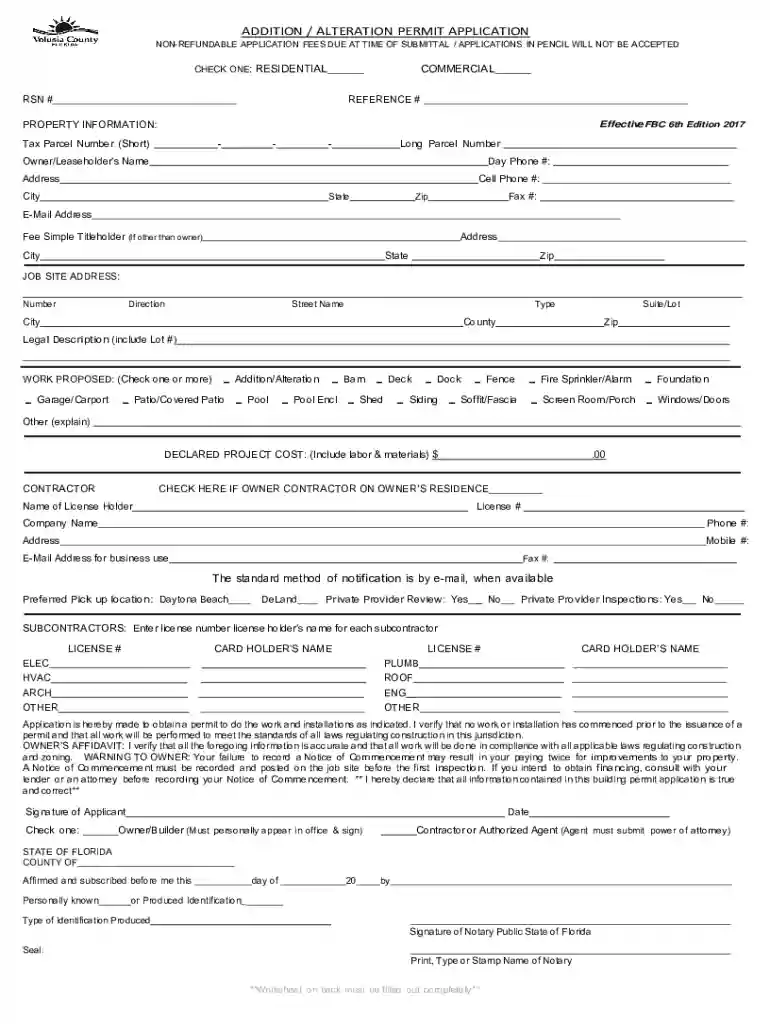
Volusia corefileparseADDITION ALTERATION PERMIT APPLICATION 2026

Get Form
volusia corefileparseADDITION ALTERATION PERMIT APPLICATION Preview on Page 1

Here's how it works

01. Edit your form online
Type text, add images, blackout confidential details, add comments, highlights and more.

02. Sign it in a few clicks
Draw your signature, type it, upload its image, or use your mobile device as a signature pad.

03. Share your form with others
Send it via email, link, or fax. You can also download it, export it or print it out.

How to use or fill out volusia corefileparseADDITION ALTERATION PERMIT APPLICATION with our platform

Form edit decoration
9.5
Ease of Setup
DocHub User Ratings on G2
9.0
Ease of Use
DocHub User Ratings on G2
  1. Click ‘Get Form’ to open the volusia corefileparseADDITION ALTERATION PERMIT APPLICATION in the editor.
  2. Begin by selecting whether your project is Residential or Commercial. This is crucial for processing your application correctly.
  3. Fill in the Property Information section, including the Tax Parcel Number, Owner/Leaseholder’s Name, and contact details. Ensure all information is accurate to avoid delays.
  4. In the Job Site Address section, provide complete details about the location of your project, including street name and legal description.
  5. Indicate the type of work proposed by checking one or more boxes under WORK PROPOSED. This helps clarify the scope of your project.
  6. Complete the Contractor section if applicable, providing their license number and contact information. If you are an owner-builder, check the appropriate box.
  7. Review all sections for accuracy before signing. Use our platform's features to easily navigate back and forth as needed.

Start filling out your permit application today for free using our platform!

See more volusia corefileparseADDITION ALTERATION PERMIT APPLICATION versions

We've got more versions of the volusia corefileparseADDITION ALTERATION PERMIT APPLICATION form. Select the right volusia corefileparseADDITION ALTERATION PERMIT APPLICATION version from the list and start editing it straight away!
Versions Form popularity Fillable & printable
2017 4.8 Satisfied (101 Votes)
2015 4 Satisfied (45 Votes)
2014 4 Satisfied (45 Votes)
be ready to get more

Complete this form in 5 minutes or less

Get form

Got questions?

We have answers to the most popular questions from our customers. If you can't find an answer to your question, please contact us.
Contact us
The Florida Building Code requires a Building Permit to construct, enlarge, alter, repair, move, demolish, or change the occupancy of a building or structure, or to , , enlarge, alter, repair, remove, convert or replace any impact resistant coverings, electrical, gas, mechanical or plumbing system, the
Construction Permits required: Residential construction such as adding a storage area, reconfiguring floor area, adding dining area, adding a porch, adding a deck, adding a shed, installing a new roof, adding receptacles or lighting, upgrading an electrical service, changing out or reconfiguring air conditioning/
Per Florida Building Code (102.2), a permit shall apply to the construction, , alteration, modification, repair, equipment, use and occupancy, location, maintenance, removal and demolition of every public and private building, structure or facility or floating residential structure, or any appurtenances
What happens if I choose not to obtain the required permits? A. Building and Zoning Code Compliance will issue an advisory notice. Once a permit is obtained, the cost will be double for an After the Fact permit.
To Schedule an Inspection: Scheduling inspections is easy when you use our online portal, Connect Live. You simply login, click on the inspections link, select the inspection you want to schedule, pick a date and click schedule. Please note: The deadline to schedule a next day inspection is at 3pm.
be ready to get more

Complete this form in 5 minutes or less

Get form

People also ask

Any work in a county right-of-way including, but not limited to, driveways, utilities (electric, cable, water, sewer) will require a Use Permit.
On May 6, the Council approved a revision to Chapter 72 of the Volusia County Code of Ordinances to eliminate the requirement for a building permit for 480 square feet or smaller sheds.

Related links