




Here's how it works



How to use or fill out Support for the SSI Savings Penalty Elimination Act with our platform

- Click ‘Get Form’ to open it in the editor.
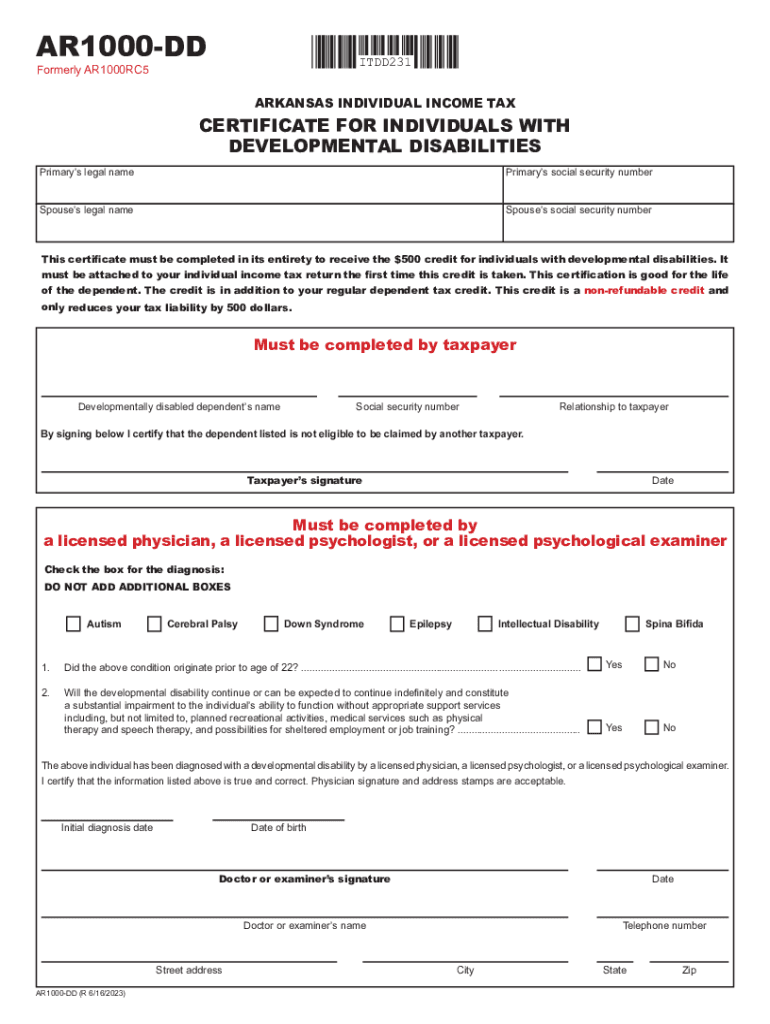
- Begin by entering the Primary’s legal name and social security number in the designated fields. Ensure accuracy as this information is crucial for identification.
- Next, fill in your Spouse’s legal name and social security number if applicable. This section is important for joint applications.
- Complete the section regarding developmentally disabled dependents by providing their name, social security number, and relationship to you. This helps establish eligibility.
- Sign and date the certification statement confirming that the dependent listed is not eligible to be claimed by another taxpayer. This step is essential for compliance.
- If applicable, indicate any developmental disabilities by checking the appropriate boxes and answering follow-up questions about the condition's origin and impact on functioning.
- Finally, ensure a licensed physician or psychologist completes their section, including their signature, date of birth of the individual, and contact information.
Start using our platform today to easily complete your form online for free!
It's free
See more Support for the SSI Savings Penalty Elimination Act versions
Got questions?
How do I sign my Support for the SSI Savings Penalty Elimination Act on iOS?
With DocHub, you can rapidly approve your Support for the SSI Savings Penalty Elimination Act or any other document on iOS, even without setting up extra applications. You can access your DocHub account from any web-connected browser and complete and sign your form in any preferred method with just a couple of clicks.
How do you edit Support for the SSI Savings Penalty Elimination Act in Chrome?
If you are using Chrome, there are two straightforward methods to modify your Support for the SSI Savings Penalty Elimination Act online. First, go to the DocHub website, add your document, and modify it utilizing our toolbar. You may also set up our Chrome extension and modify any document by dragging and dropping it in your web browser tab.
Security and compliance
At DocHub, your data security is our priority. We follow HIPAA, SOC2, GDPR, and other standards, so you can work on your documents with confidence.
Learn more


