Magnetic resonance scan examinations 2026

Get Form
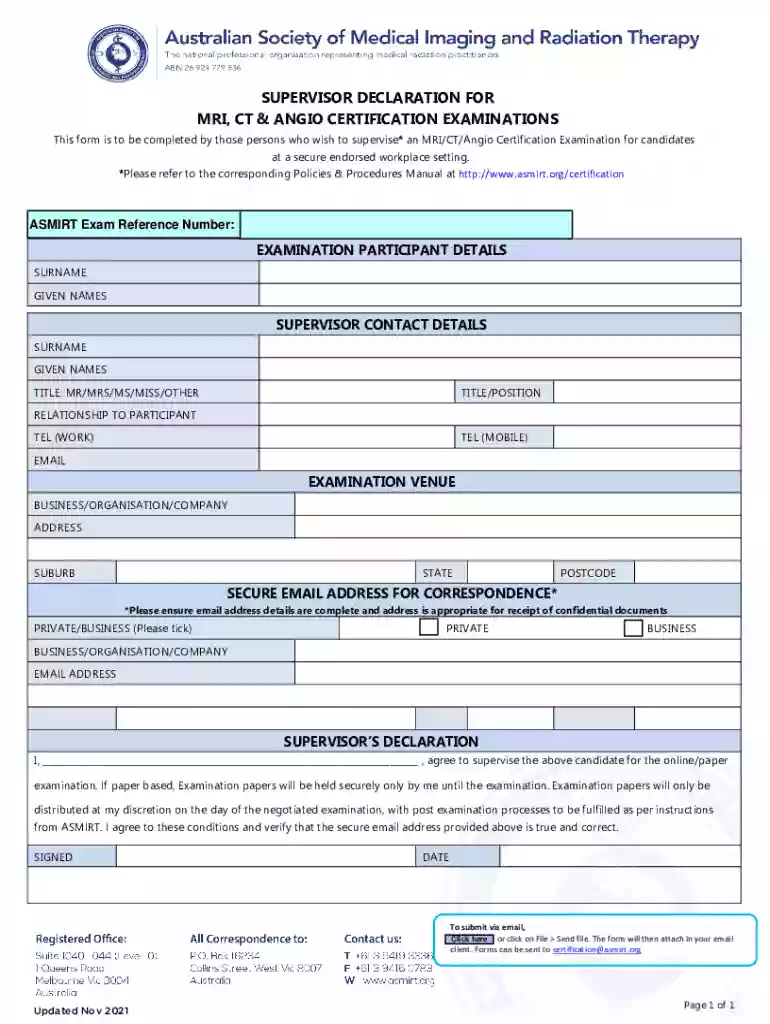
magnetic resonance scan examinations Preview on Page 1

Here's how it works

01. Edit your magnetic resonance scan examinations online
Type text, add images, blackout confidential details, add comments, highlights and more.

02. Sign it in a few clicks
Draw your signature, type it, upload its image, or use your mobile device as a signature pad.

03. Share your form with others
Send asmirt declaration mri examinations via email, link, or fax. You can also download it, export it or print it out.

How to use or fill out magnetic resonance scan examinations with our platform

Form edit decoration
9.5
Ease of Setup
DocHub User Ratings on G2
9.0
Ease of Use
DocHub User Ratings on G2
  1. Click ‘Get Form’ to open the magnetic resonance scan examination form in the editor.
  2. Begin by entering the ASMIRT Exam Reference Number at the top of the form. This is essential for tracking your examination.
  3. Fill in the Examination Participant Details section with the participant's surname and given names.
  4. In the Supervisor Contact Details section, provide your surname, given names, title (Mr/Mrs/Ms/Miss/Other), and position.
  5. Indicate your relationship to the participant and enter your work and mobile telephone numbers along with your email address.
  6. Complete the Examination Venue section by filling in the business/organization/company name, address, suburb, state, and postcode.
  7. Ensure you provide a secure email address for correspondence. Tick whether it is a private or business email.
  8. In the Supervisor’s Declaration section, write your name to agree to supervise the candidate. Sign and date this section.
  9. To submit via email, click on File > Send file to attach it in your email client. Send it to certification@asmirt.org.

Start using our platform today for free to streamline your document editing and submission process!

See more magnetic resonance scan examinations versions

We've got more versions of the magnetic resonance scan examinations form. Select the right magnetic resonance scan examinations version from the list and start editing it straight away!
Versions Form popularity Fillable & printable
2021 4.8 Satisfied (95 Votes)
be ready to get more

Complete this form in 5 minutes or less

Get form

Got questions?

We have answers to the most popular questions from our customers. If you can't find an answer to your question, please contact us.
Contact us
The most common MRI sequences are T1-weighted and T2-weighted scans. T1-weighted images are produced by using short TE and TR times. The contrast and brightness of the image are predominately determined by T1 properties of tissue. Conversely, T2-weighted images are produced by using longer TE and TR times.
MRI is the most frequently used imaging test of the brain and spinal cord. Its often performed to help diagnose: Aneurysms of cerebral vessels. Conditions of the eye and inner ear.
Its often performed to help diagnose: Aneurysms of cerebral vessels. Conditions of the eye and inner ear. Multiple sclerosis. Spinal cord conditions. Stroke. Tumors. Brain injury from trauma.
When would I need an MRI? Brain aneurysms. Brain tumors and spinal tumors. Brain and spine injuries from trauma. Compression or inflammation of spinal cord and nerves (pinched nerve). Multiple sclerosis (MS). Spinal cord conditions. Spine anatomy and alignment. Stroke.
The part of the body being scanned will be positioned in the middle of the machine. During the actual imaging, you will hear loud intermittent noises. You will have been given earplugs or headphones to lessen the noise. If you have trouble keeping these in place, please tell the technologist.

Security and compliance

At DocHub, your data security is our priority. We follow HIPAA, SOC2, GDPR, and other standards, so you can work on your documents with confidence.

Learn more
ccpa2
pci-dss
gdpr-compliance
hipaa
soc-compliance