Notes to assist in the completion of the form 2026

Get Form
Notes to assist in the completion of the form Preview on Page 1

Here's how it works

01. Edit your form online
Type text, add images, blackout confidential details, add comments, highlights and more.
02. Sign it in a few clicks
Draw your signature, type it, upload its image, or use your mobile device as a signature pad.
03. Share your form with others
Send it via email, link, or fax. You can also download it, export it or print it out.

How to use or fill out Notes to assist in the completion of the form

Form edit decoration
9.5
Ease of Setup
DocHub User Ratings on G2
9.0
Ease of Use
DocHub User Ratings on G2
  1. Begin by clicking ‘Get Form’ to open it in our editor.
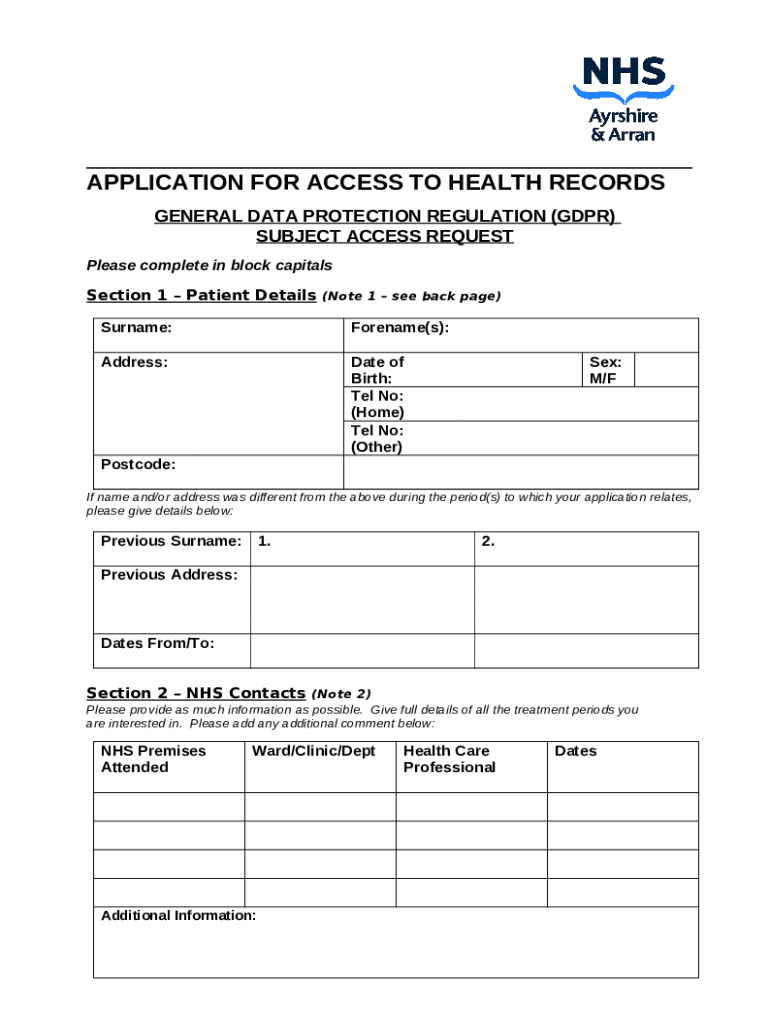
  2. In Section 1, Patient Details, fill in your surname, forename(s), address, date of birth, and contact numbers. Ensure accuracy as this information is crucial for tracing your health records.
  3. Proceed to Section 2, NHS Contacts. Provide detailed information about your treatment periods. Include NHS premises attended and any relevant health care professionals involved.
  4. In Section 3, Declaration, select the appropriate option that describes your relationship to the patient. This section must be signed in front of a countersigning individual.
  5. Complete Section 4 with the applicant's name and address for correspondence. Ensure you sign this section.
  6. In Section 5, Authorisation, have the patient authorize the release of their personal data by signing and dating this section.
  7. Finally, Section 6 requires a countersignature from an authorized individual who can confirm your identity. Make sure they complete all necessary fields.

Start using our platform today to streamline your document editing and form completion process for free!

See more Notes to assist in the completion of the form versions

We've got more versions of the Notes to assist in the completion of the form form. Select the right Notes to assist in the completion of the form version from the list and start editing it straight away!
Versions Form popularity Fillable & printable
2021 4.3 Satisfied (26 Votes)
be ready to get more

Complete this form in 5 minutes or less

Get form

Got questions?

We have answers to the most popular questions from our customers. If you can't find an answer to your question, please contact us.
Contact us

You need to use only trusted software solutions with strong data protection compliance to approve your paperwork electronically. DocHub is just the type of editor you need! It stores data on Amazon Web Servers and complies with all necessary security criteria and eSignature regulations, so it’s a reliable way to eSign your Notes to assist in the completion of the form or other documents with this tool.

You need only a web connection and a browser to fill out your Notes to assist in the completion of the form by using an iOS phone. Open the DocHub website and authenticate. Then, add your document or select it from the list in your dashboard. Then use our editing tools to fill out your form and save all your changes. You can also send it to a dedicated recipient immediately.

These are words that describe the patients underlying experience of emotion or mood, such as: PLACID, PEACEFUL, RESTFUL, TRANQUIL, PREOCCUPIED, ABSORBED, ENGROSSED, LOST IN THOUGHT, PERSONABLE, FRIENDLY, PLEASANT, AFFABLE, AGREEABLE, AMIABLE, PASSIVE, INACTIVE, INERT, UNRESISTANT, ENTHUSIASTIC, ENTHUSED, ARDENT,
Progress notes should outline the evidence-based practice used in the session, and comment on any changes in modality. You might also include any skills that may be helpful for clients to practice to help manage or reduce their symptoms, and why it would be helpful in reducing their symptoms.
If you would like to access these notes, discuss it with your therapist. Talking about your reasons for wanting to read these notes can help your therapist understand your request. It can also help you understand some of your therapists concerns about releasing these confidential records.

Security and compliance

At DocHub, your data security is our priority. We follow HIPAA, SOC2, GDPR, and other standards, so you can work on your documents with confidence.

Learn more
ccpa2
pci-dss
gdpr-compliance
hipaa
soc-compliance
be ready to get more

Complete this form in 5 minutes or less

Get form