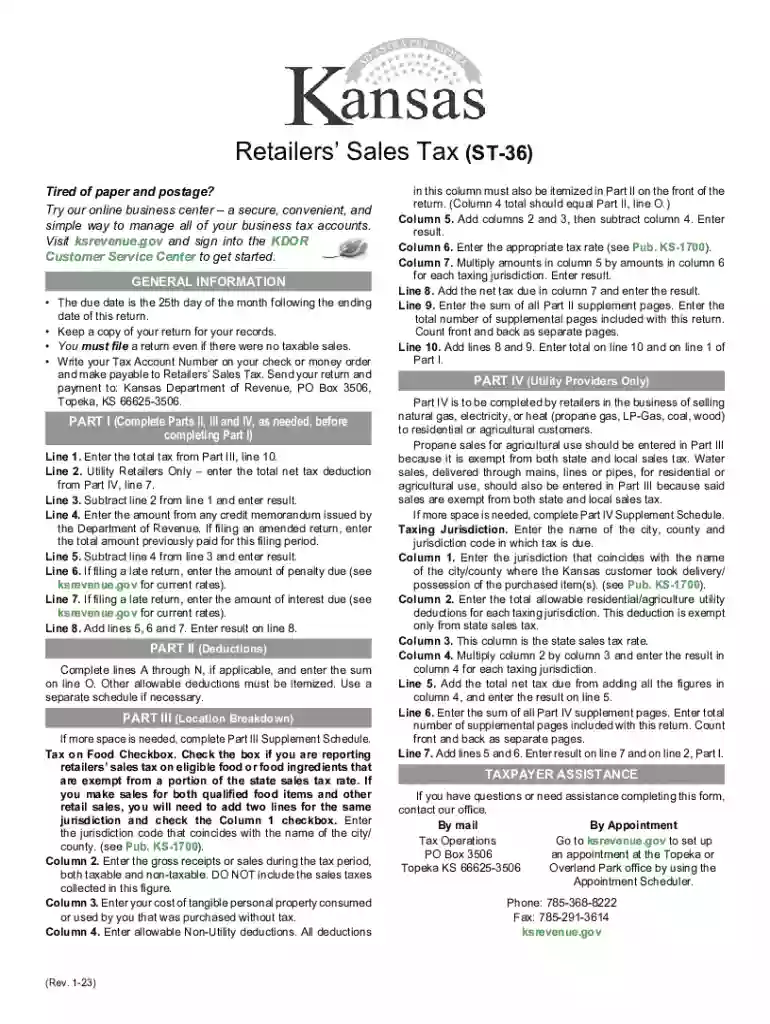
KANSAS Retailers' Sales Tax Return - e-Form RS Login 2026

Get Form
ks retailers sales tax Preview on Page 1

Here's how it works

01. Edit your ks retailers sales tax online
Type text, add images, blackout confidential details, add comments, highlights and more.

02. Sign it in a few clicks
Draw your signature, type it, upload its image, or use your mobile device as a signature pad.

03. Share your form with others
Send kansas sales tax form st 36 via email, link, or fax. You can also download it, export it or print it out.

How to use or fill out KANSAS Retailers' Sales Tax Return - e-Form RS Login with DocHub

Form edit decoration
9.5
Ease of Setup
DocHub User Ratings on G2
9.0
Ease of Use
DocHub User Ratings on G2
  1. Click ‘Get Form’ to open the KANSAS Retailers' Sales Tax Return in our editor.
  2. Begin with Part I. Enter your total tax from Part III, line 10 on line 1. If you are a utility retailer, include any net tax deductions from Part IV on line 2.
  3. Continue by calculating your subtotal. Subtract any credit memorandum from line 4 and enter the result on line 5. If applicable, add penalties and interest for late returns on lines 6 and 7.
  4. In Part II, complete lines A through N for deductions that apply to your business. Sum these deductions and enter the total on line O.
  5. For Part III, provide a breakdown of sales by jurisdiction. Ensure to check the box for tax on food if applicable, and fill in all required columns accurately.
  6. Finally, review all entries for accuracy before submitting your return. Save a copy for your records using our platform's export feature.

Start filling out your KANSAS Retailers' Sales Tax Return today using our online editor for free!

See more KANSAS Retailers' Sales Tax Return - e-Form RS Login versions

We've got more versions of the KANSAS Retailers' Sales Tax Return - e-Form RS Login form. Select the right KANSAS Retailers' Sales Tax Return - e-Form RS Login version from the list and start editing it straight away!
Versions Form popularity Fillable & printable
2023 4.2 Satisfied (39 Votes)
2021 4.8 Satisfied (123 Votes)
2019 4.2 Satisfied (47 Votes)
2017 4.4 Satisfied (165 Votes)
2009 4.2 Satisfied (53 Votes)
2008 4 Satisfied (41 Votes)
be ready to get more

Complete this form in 5 minutes or less

Get form

Got questions?

We have answers to the most popular questions from our customers. If you can't find an answer to your question, please contact us.
Contact us

Upload your st 36 form to DocHub (once you’ve set up an account for this). If you need to complete fields in it, use appropriate tools from the top pane. For instance, drop Signature Fields, assign each to specific person, and click on Sign → Request signatures from others. Personalize your message for your recipients and click Send Request. You can also send your document by fax or as a Signing link instead of using email (you’ll locate these options by navigating to the Menu → Send)

With DocHub, you have several convenient ways to edit your kansas st 36 form online. You can drag and drop the form and edit it directly at the DocHub website or use our browser extension to fill out your form right away. On top of that, you can edit your PDF on your phone, as DocHub is compatible with all the accessible mobile platforms.

How to File and Pay Sales Tax in Kansas File online File online at the Kansas Department of Revenue. File by mail You can use Form ST-16 for single jurisdiction filers or Form ST-36 for multiple jurisdiction filers and file and pay through the mail. AutoFile Let TaxJar file your sales tax for you.
IRS E-File enables you to file your Kansas Individual Income tax return and Homestead Claims, and your corporate and partnership tax returns using an approved commercial software package or tax professional.
The Kansas (KS) state sales tax rate is currently 6.5%. Depending on local municipalities, the total tax rate can be as high as 10.6%.

Security and compliance

At DocHub, your data security is our priority. We follow HIPAA, SOC2, GDPR, and other standards, so you can work on your documents with confidence.

Learn more
ccpa2
pci-dss
gdpr-compliance
hipaa
soc-compliance

People also ask

The Kansas (KS) state sales tax rate is currently 6.5%. Depending on local municipalities, the total tax rate can be as high as 10.6%. Other, local-level tax rates in the state of Kansas are quite complex compared against local-level tax rates in other states.
Kansas has a 6.50 percent state sales tax rate, a max local sales tax rate of 4.25 percent, and an average combined state and local sales tax rate of 8.66 percent.
Since 1937 Kansas imposed a compensating use tax on goods purchased from outside Kansas and used, stored or consumed in Kansas. Its purpose is to protect Kansas retailers from unfair competition from out-of-state retailers who sell goods tax-free by applying a tax on these items equal to the Kansas rate.
You can look up the local sales tax rate with TaxJars Sales Tax Calculator. The state sales tax rate in Kansas is 6.5%. In Wichita, the local sales tax rate is 1% (for Sedgwick County); the total sales tax rate is 7.5%. Sellers based out-of-state also charge sales tax based on the destination of the buyer.
Customers can call 785-368-8222 for more information. Compensating Use Tax is a tax paid on merchandise purchased from other states and used, stored, or consumed in Kansas on which no sales tax was paid. It is also due if the other states rate is less than the Kansas rate of 6.50 percent paid at the time of purchase.

kansas retailers