State Packages Electronic Filing Online Filing Individual 2026

Get Form
State Packages Electronic Filing Online Filing Individual Preview on Page 1

Here's how it works

01. Edit your form online
Type text, add images, blackout confidential details, add comments, highlights and more.

02. Sign it in a few clicks
Draw your signature, type it, upload its image, or use your mobile device as a signature pad.

03. Share your form with others
Send it via email, link, or fax. You can also download it, export it or print it out.

How to use or fill out State Packages Electronic Filing Online Filing Individual with our platform

Form edit decoration
9.5
Ease of Setup
DocHub User Ratings on G2
9.0
Ease of Use
DocHub User Ratings on G2
  1. Click 'Get Form' to open the State Packages Electronic Filing Online Filing Individual in the editor.
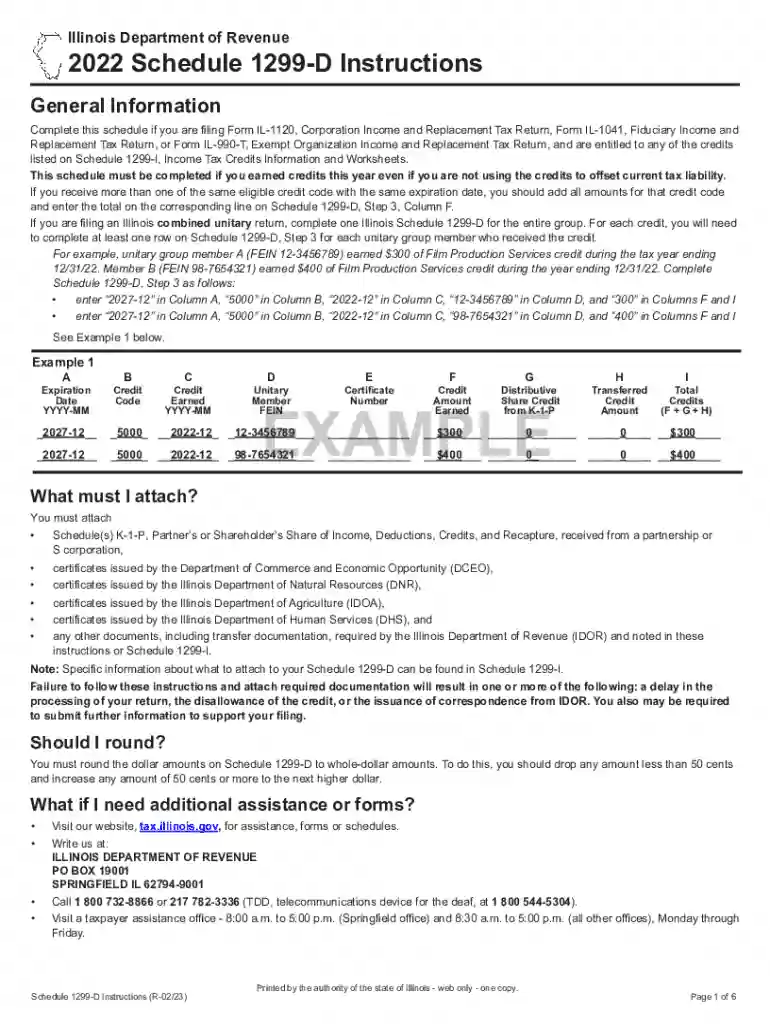
  2. Begin with Step 1, where you will complete the Research and Development Worksheet if applicable. Transfer amounts from Schedule 1299-I to the corresponding fields in Step 1.
  3. Proceed to Step 2. Enter the total amount of credit available from your previous year's Schedule 1299-D on Line 4. Follow the instructions for Lines 5 through 10 carefully.
  4. In Step 3, list all new credits earned this year. Ensure you enter expiration dates, credit codes, and amounts accurately in Columns A through I as per the guidelines provided.
  5. If additional rows are needed for more credits, attach extra Schedule(s) 1299-D and summarize totals accordingly.
  6. Finally, review all entries for accuracy before saving your completed form. Keep a copy for your records.

Start using our platform today to streamline your electronic filing process for free!

See more State Packages Electronic Filing Online Filing Individual versions

We've got more versions of the State Packages Electronic Filing Online Filing Individual form. Select the right State Packages Electronic Filing Online Filing Individual version from the list and start editing it straight away!
Versions Form popularity Fillable & printable
2023 4.5 Satisfied (42 Votes)
2022 4.5 Satisfied (29 Votes)
2021 4.6 Satisfied (38 Votes)
2020 4.8 Satisfied (229 Votes)
2015 4 Satisfied (54 Votes)
be ready to get more

Complete this form in 5 minutes or less

Get form

Got questions?

We have answers to the most popular questions from our customers. If you can't find an answer to your question, please contact us.
Contact us
A free state filing service for taxpayers using IRS Direct File. FileYourStateTaxes connects with IRS Direct File to help you complete your state tax return for free. This site is now open and will remain open until October 15, 2025 for you to file your state tax returns.
Yes, you can file your federal taxes with Direct File and your state taxes with Californias free filing tool.
eFile is an electronic method of filing and paying state and/or federal taxes using NCDOR-approved, commercial tax preparation software. eFile is a partnership program offered by the IRS (federal), NCDOR (state), and participating software providers.
NCDOR provides electronic services that allow you to securely file and/or pay your taxes online.
Returns filed after the due date are subject to a failure to file penalty of 5% of the net tax due for each month, or part of a month, the return is late (maximum 25% of the additional tax), If the return is filed under an extension, the late filing penalty will be assessed from the extended filing date rather than

People also ask

MontanaFreeFile.org, a statewide resource to help Montanans connect with free tax filing options. (Partners include MLSA and the Montana Department of Revenue.) Lawyer Referral Information Service from the State Bar of Montana. (Phone assistance is also available at (406) 449-6577.)

Related links