Cd 479 2026

Get Form
cd 479 Preview on Page 1

Here's how it works

01. Edit your cd 479 online
Type text, add images, blackout confidential details, add comments, highlights and more.

02. Sign it in a few clicks
Draw your signature, type it, upload its image, or use your mobile device as a signature pad.

03. Share your form with others
Send form 479 via email, link, or fax. You can also download it, export it or print it out.

How to use or fill out cd 479 with our platform

Form edit decoration
9.5
Ease of Setup
DocHub User Ratings on G2
9.0
Ease of Use
DocHub User Ratings on G2
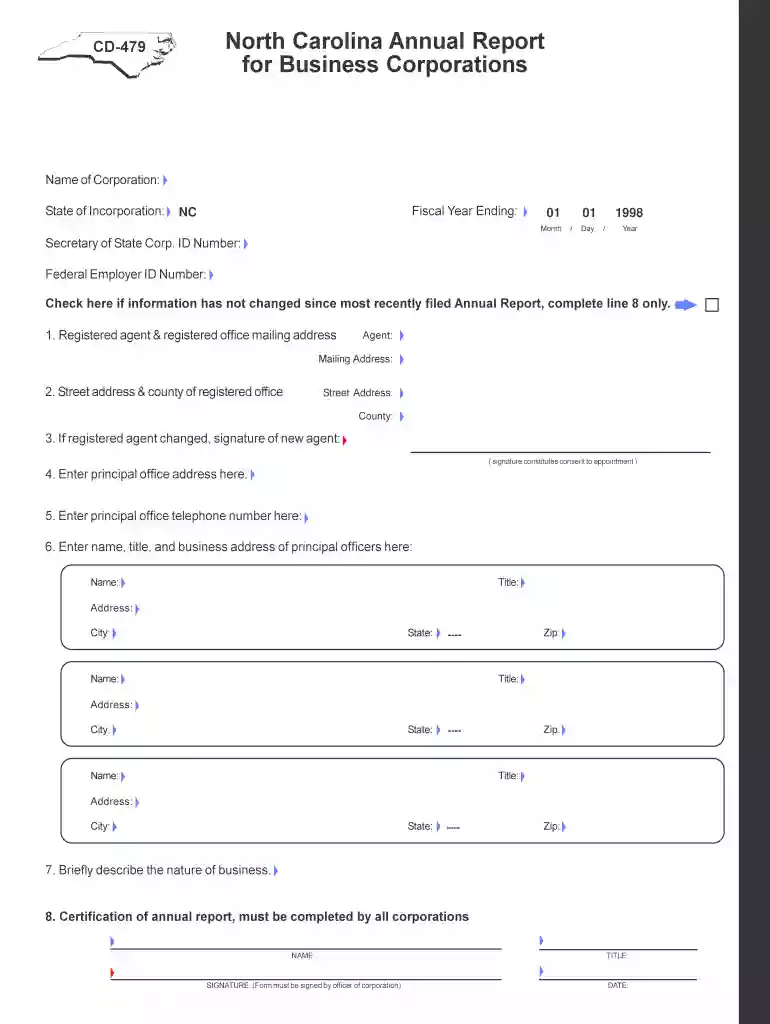
  1. Click ‘Get Form’ to open the CD-479 in the editor.
  2. Begin by entering the Name of Corporation and State of Incorporation at the top of the form. Ensure accuracy as this information is crucial for identification.
  3. Fill in the Fiscal Year Ending date, using the format Month/Day/Year. This helps establish your reporting period.
  4. Input your Secretary of State Corp. ID Number and Federal Employer ID Number in their respective fields.
  5. If there are no changes since your last report, check the box provided. Otherwise, proceed to update your registered agent and mailing address in Item 1.
  6. For any changes to your registered office's street address, complete Item 2 with a valid street address (not a P.O. Box).
  7. If applicable, have the new registered agent sign in Item 3 to confirm their appointment.
  8. Enter your principal office address and telephone number in Items 4 and 5 respectively.
  9. List all principal officers' names, titles, and business addresses in Item 6. Ensure at least one officer is designated as President if only one is listed.
  10. Provide a brief description of your business nature in Item 7 to clarify operations.
  11. Finally, certify the report by signing and dating it in Item 8 before submission.

Start filling out your CD-479 form online for free today!

See more cd 479 versions

We've got more versions of the cd 479 form. Select the right cd 479 version from the list and start editing it straight away!
Versions Form popularity Fillable & printable
2005 4.9 Satisfied (48 Votes)
1998 4 Satisfied (43 Votes)
be ready to get more

Complete this form in 5 minutes or less

Get form

Got questions?

We have answers to the most popular questions from our customers. If you can't find an answer to your question, please contact us.
Contact us

You need to use only reliable software solutions with strong security compliance to sign your paperwork electronically. DocHub is just the type of service you need! It stores data on Amazon Web Servers and complies with all necessary security criteria and eSignature laws, so it’s a trustworthy way to electronically sign your cd 479 or other documents using this tool.

Apart from a comprehensive toolset for editing PDFs on mobile devices, DocHub enables you to sign your cd 479 along the way. Open our editor in your browser, make changes using DocHub’s toolset, and complete your editing by eSigning the finished form.

A taxpayer that receives an automatic extension to file a federal corporate income tax return will be granted an automatic state extension to file the N.C. C-Corporation tax return, Form CD-405. In order to receive the automatic state extension, you MUST fill in the Federal Extension circle on page 1 of Form CD-405.
Line 479 Provincial or territorial credits. If you were a resident of Ontario, Manitoba, Saskatchewan, British Columbia, Yukon, the Northwest Territories, or Nunavut on December 31, 2011, use Form 479 in the forms book to calculate your provincial or territorial credits. Attach a copy to your paper return.
DT Max - Line 47900 - Provincial or territorial credits.

Security and compliance

At DocHub, your data security is our priority. We follow HIPAA, SOC2, GDPR, and other standards, so you can work on your documents with confidence.

Learn more
ccpa2
pci-dss
gdpr-compliance
hipaa
soc-compliance
be ready to get more

Complete this form in 5 minutes or less

Get form

People also ask

North Carolina C-Corporate Tax Extension To file an extension for Form CD-405, apply for an extension using Form CD-419 on or before the same date the business tax return is due. Form CD-419 grants an automatic 6-month extension of time to file Form CD-405.
What is W-2 Box 14? If you have extra tax info, put it in Box 14 on your W-2. Its a sort of catch-all area where your boss can list items like union dues, help with school costs, or certain employee benefits.
Form CD-429 is used to make a timely quarterly estimated Corporate Income tax payment. The Departments online filing and payment system allows you to electronically file Form CD-429, Corporate Estimated Income Tax.
Newfoundland and Labrador, Nova Scotia, Ontario, Manitoba, Saskatchewan, British Columbia, Yukon, Northwest Territories, or Nunavut. Complete Form 479 to calculate your provincial or territorial credits. Attach a copy of the form to your paper return.
479 Balance due. If you are reporting a taxable capital gain (or a net capital loss) in your income tax return, see the capital gains FAQ for more information. There are a few ways you can pay your balance due. Interest is charged on any balance that has not been paid by April 30, 2025.

Related links