




Here's how it works

01. Edit your form online
Type text, add images, blackout confidential details, add comments, highlights and more.

02. Sign it in a few clicks
Draw your signature, type it, upload its image, or use your mobile device as a signature pad.

03. Share your form with others
Send it via email, link, or fax. You can also download it, export it or print it out.
How to use or fill out ct 706 nt 2011 fillable form with DocHub

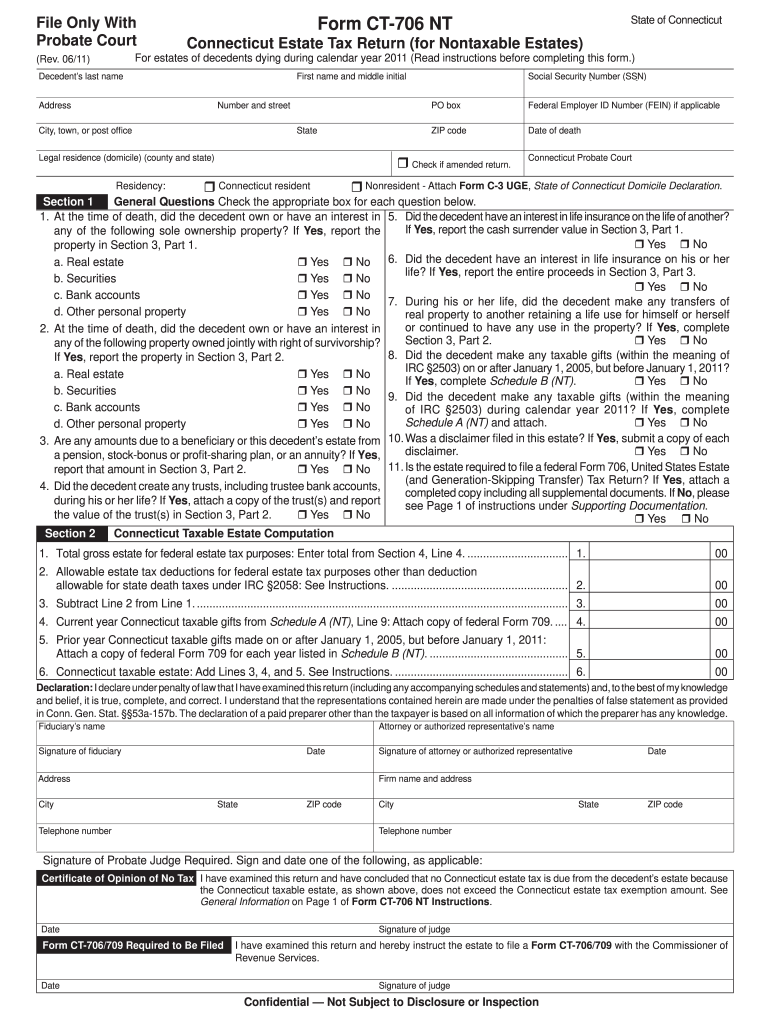
- Click ‘Get Form’ to open the ct 706 nt 2011 fillable form in our editor.
- Begin by entering the decedent's last name, first name, middle initial, and address in the designated fields at the top of the form.
- In Section 1, answer the general questions by checking 'Yes' or 'No' for each item regarding property ownership and interests. Ensure you provide accurate information as this will affect tax calculations.
- Proceed to Section 2 to compute the Connecticut taxable estate. Enter values from previous sections as instructed, ensuring all calculations are correct.
- Complete Sections 3 through 6 by detailing property values and any applicable deductions. Use our platform’s tools to easily navigate between sections and ensure all necessary information is included.
- Finally, review your entries for accuracy before saving or printing the completed form. Utilize our editor’s features for a seamless experience.
Start filling out your ct 706 nt 2011 form today for free using our platform!
Fill out ct 706 nt 2011 fillable form online
It's free
It's free
See more ct 706 nt 2011 fillable form versions
We've got more versions of the ct 706 nt 2011 fillable form form. Select the right ct 706 nt 2011 fillable form version from the list and start editing it straight away!
| Versions | Form popularity | Fillable & printable |
|---|---|---|
| 2025 | 4.1 Satisfied (21 Votes) | |
| 2024 | 4.6 Satisfied (20 Votes) | |
| 2023 | 4.7 Satisfied (51 Votes) | |
| 2022 | 4.8 Satisfied (58 Votes) | |
| 2021 | 4.8 Satisfied (75 Votes) | |
| 2020 | 4.3 Satisfied (43 Votes) | |
| 2019 | 4.4 Satisfied (237 Votes) | |
| 2018 | 4.2 Satisfied (85 Votes) | |
| 2017 | 4.4 Satisfied (243 Votes) | |
| 2016 | 4.4 Satisfied (699 Votes) | |
| 2015 | 4.3 Satisfied (152 Votes) | |
| 2014 | 4.2 Satisfied (25 Votes) | |
| 2013 | 4 Satisfied (27 Votes) | |
| 2011 | 4 Satisfied (25 Votes) | |
| 2010 | 4.3 Satisfied (58 Votes) |
Got questions?
We have answers to the most popular questions from our customers. If you can't find an answer to your question, please contact us.
Contact us
Are IRS PDF forms fillable?
IRS fill-in PDF forms use some of the features provided with docHub software, such as the ability to save the data you input (document rights).
Where can I get CT tax forms?
HOW TO OBTAIN CONNECTICUT TAX FORMS Connecticut state tax forms can be downloaded at the Department of Revenue Services (DRS) website: .ct.gov/drs/ Connecticut tax forms and publications are available at any DRS offices, during tax filing season.
Is there a fillable CT 1040 form?
Our platform has a pre-loaded version of this form ready for you to fill out and download for your records. Form CT 1040 is issued by the Connecticut Department of Revenue Services.
Does Connecticut have a state income tax form?
If you are a resident and you meet the requirements for Who Must File a Connecticut Resident Return for the taxable year, you must file Form CT-1040, Connecticut Resident Income Tax Return.
What is the CT-706 NT extension form?
Form CT-706 NT EXT is used to request a six-month extension to file Form CT-706 NT (Connecticut Estate Tax Return for Nontaxable Estates) with the Probate Court.
Security and compliance
At DocHub, your data security is our priority. We follow HIPAA, SOC2, GDPR, and other standards, so you can work on your documents with confidence.
Learn more


People also ask
Can you fill out a 1040 form online?
Answer: Yes, you can file an original Form 1040 series tax return electronically using any filing status. Filing your return electronically is faster, safer, and more accurate than mailing your tax return because its transmitted electronically to the IRS computer systems.
Where to file CT-706 NT?
Mail or submit Form CT-706 NT EXT to the PROBATE COURT for the district in which the decedent was domiciled. If the decedent was not domiciled in Connecticut, submit this form to the PROBATE COURT for the district in which Connecticut property is located. Keep a copy of this form for your records.