




01. Edit your form online
Type text, add images, blackout confidential details, add comments, highlights and more.

Type text, add images, blackout confidential details, add comments, highlights and more.

Draw your signature, type it, upload its image, or use your mobile device as a signature pad.

Send it via email, link, or fax. You can also download it, export it or print it out.
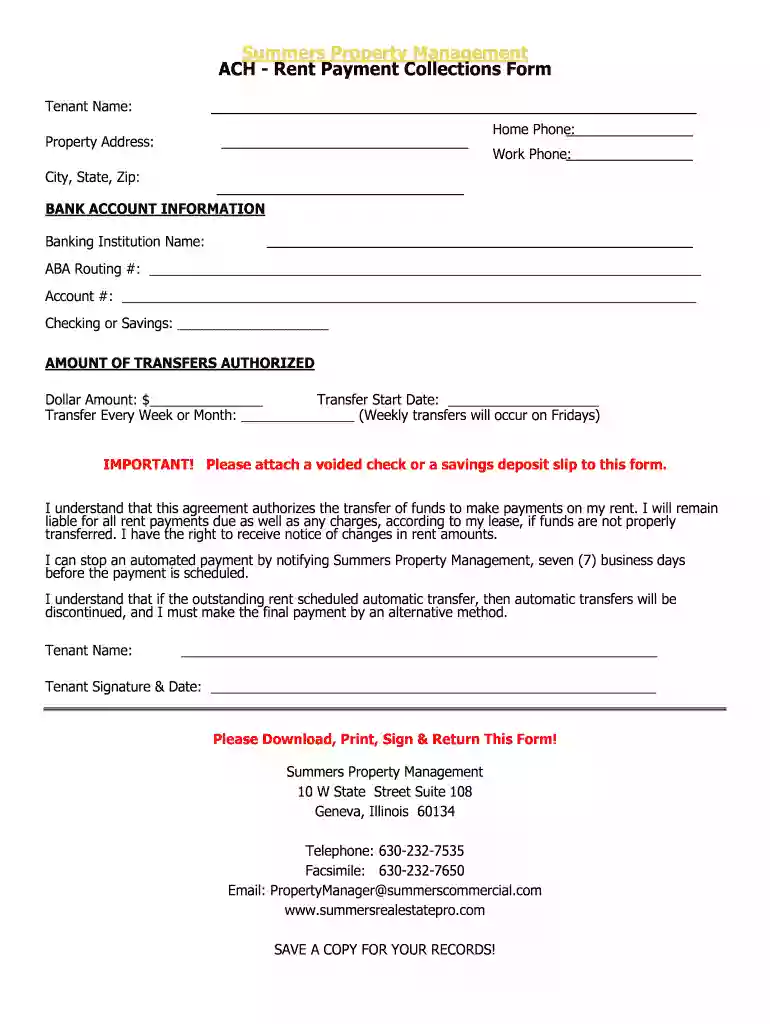
The Summers Property Management ACH Rent Payment Collections Form is a critical tool for tenants to provide authorization for automatic rent payment transfers. Automatically debiting tenant accounts requires secure documentation to ensure that payments align with the lease agreement terms. The form gathers essential information, such as tenant identification and banking details, which facilitates an efficient rent collection process. Its primary purpose is to streamline the rent payment mechanism, remove manual intervention, and reduce late payment incidents.
Tenants who wish to set up automatic rent payments via the ACH system should first thoroughly review the form provided by Summers Property Management. Understanding the entries required, such as tenant details, bank account information, payment amount, and frequency, ensures accurate completion. The next step involves filling out the form, following any specific instructions about entering recurring payments. Finally, tenants must attach a voided check or deposit slip alongside the form, which aids in verifying bank details and preventing errors.
Read Instructions: Begin by carefully reading all accompanying instructions. Pay particular attention to any specified responsibilities or liabilities related to payment errors.
Enter Personal Information: Fill in personal information accurately. This includes name, address, and tenant ID.
Provide Banking Details: Accurately enter bank account information: bank name, routing number, and account number.
Specify Payment Details: Indicate the rent amount to be transferred, the start date for the transfers, and the desired payment frequency.
Attach Verifying Documents: Attach a voided check or deposit slip for account verification purposes.
Sign the Form: Ensure the form is signed by the tenant, indicating agreement with all terms and conditions.
Submit: Return the completed form to Summers Property Management as directed in the instructions.
The form comprises several decisive sections that tenants must focus on:
Tenant Information: Identification elements such as full name, current address, and tenant ID must be provided.
Bank Account Details: A detailed segment capturing the bank's name, routing number, and account number.
Transfer Specifications: Details such as the amount, start date, and frequency.
Authorization and Signature: A section for the tenant to authorize the transaction and affirm consent with a signature.
Attachment for Verification: Inclusion of a voided check or deposit slip.
Implementing the use of this form benefits both tenants and property managers by ensuring timely payments and minimizing disputes. It automates the payment process, reducing administrative workload and the likelihood of late fees. Additionally, tenants maintain better control over their financial planning with predictable withdrawals aligning with their budget cycles. Utilizing the form also supports maintaining a positive rental history, which can favorably impact future leasing opportunities.
Using the ACH Rent Payment Collections Form complies with U.S. banking and rental regulations. The form should meet the standards of the ESIGN Act, providing legal backing for electronic transactions. Tenants are required to comply with stipulations regarding notification for halting payments to prevent unauthorized charges. Property managers must handle this information sensitively and adhere to protocols defending tenant information from unauthorized access or fraud.
Understanding core terminology on the form aids in proper completion:
ACH (Automated Clearing House): A network coordinating electronic financial transactions, including debit and credit transactions.
Authorization: Tenants must legally authorize withdrawals from their bank accounts to pay rent automatically.
Routing Number: A nine-digit code identifying the financial institution associated with a tenant’s bank account.
Voided Check: A check marked ‘VOID’ to provide account details without facilitating an actual transaction.
Consider a scenario where a tenant wishes to mitigate the risk of late rent payment. By completing the form, auto-pay through ACH withdrawal can be initiated, ensuring rent is paid on the due date. This can be vital in geographical locations prone to severe weather, like hurricanes in Florida, where mail or manual delivery methods might be disrupted. In another situation, a tenant working a high-pressure job with frequent travel commitments might utilize automated rent payments to maintain an untouched rental record, reflecting responsibility to future landlords.
We've got more versions of the Summers Property Management form. Select the right Summers Property Management version from the list and start editing it straight away!
Of course, electronically drawing your signature is appropriate, but only if you use a tool that complies with industry laws and regulations. Try DocHub, which guarantees eSignature validity under ESIGN and UETA requirements. All you need to approve your Summers Property Management electronically is an account with DocHub and an internet connection. Once you open your document in our editor, click Sign and select the Draw tool.
When you edit your Summers Property Management with DocHub, you will not need to look for other applications or solutions to sign it. An electronic signature is a component of DocHub’s extensive editing toolset, which enables you to implement changes in your form without jumping between platforms. Simply complete your form, double-check the correctness of the information and put your electronic signature at the end to make it submission-ready in minutes.
At DocHub, your data security is our priority. We follow HIPAA, SOC2, GDPR, and other standards, so you can work on your documents with confidence.
CMFM2300 SPACE PLANNING. Students follow the process of design, problem solving, and building construction management as it relates to the use of interiorRead more
The Property Management Department consists of four divisions including Facilities Management, Fleet Services, General Services, and Real Estate.


