Pa form 253 2026

Get Form
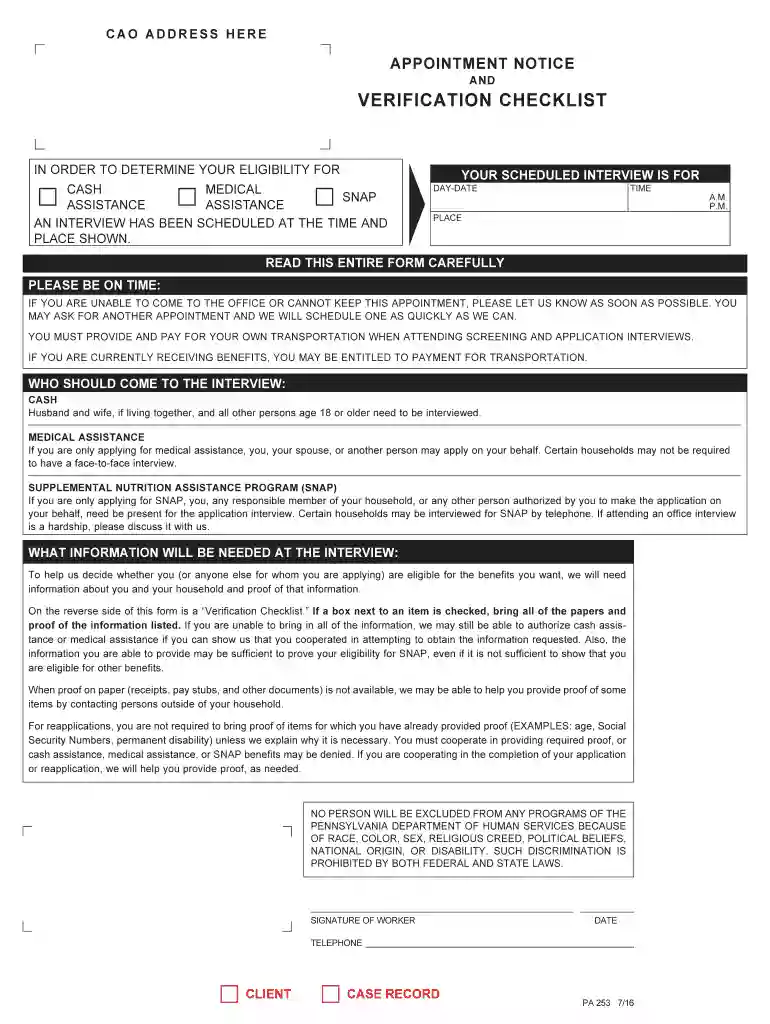
pa 253 form Preview on Page 1

Here's how it works

01. Edit your pa 253 form online
Type text, add images, blackout confidential details, add comments, highlights and more.

02. Sign it in a few clicks
Draw your signature, type it, upload its image, or use your mobile device as a signature pad.

03. Share your form with others
Send pa 253 via email, link, or fax. You can also download it, export it or print it out.

How to use or fill out pa form 253 with our platform

Form edit decoration
9.5
Ease of Setup
DocHub User Ratings on G2
9.0
Ease of Use
DocHub User Ratings on G2
  1. Click ‘Get Form’ to open the PA Form 253 in the editor.
  2. Begin by entering your scheduled interview details, including the day, date, time, and place. Ensure accuracy as this information is crucial for your appointment.
  3. Next, review the eligibility requirements for cash, medical assistance, and SNAP. Make sure to note who should attend the interview based on your application type.
  4. Proceed to fill out the verification checklist on the reverse side of the form. Check off each item you can provide proof for during your interview.
  5. If applicable, gather all necessary documents listed in the checklist. This may include identification, proof of income, and any other relevant paperwork.
  6. Finally, save your completed form and share it directly from our platform or print it for submission at your interview.

Start using our platform today to streamline your PA Form 253 completion process for free!

See more pa form 253 versions

We've got more versions of the pa form 253 form. Select the right pa form 253 version from the list and start editing it straight away!
Versions Form popularity Fillable & printable
2019 4.8 Satisfied (98 Votes)
2019 4.3 Satisfied (36 Votes)
2019 4.8 Satisfied (69 Votes)
2017 4.8 Satisfied (108 Votes)
2016 4.8 Satisfied (238 Votes)
2016 4.8 Satisfied (145 Votes)
2016 4.8 Satisfied (114 Votes)
2016 4.3 Satisfied (176 Votes)
2016 4.5 Satisfied (53 Votes)
2016 4.1 Satisfied (20 Votes)
2014 4.8 Satisfied (178 Votes)
2011 4.2 Satisfied (51 Votes)
2011 4.8 Satisfied (61 Votes)
2011 4.8 Satisfied (86 Votes)
2010 4.9 Satisfied (481 Votes)
be ready to get more

Complete this form in 5 minutes or less

Get form

Got questions?

We have answers to the most popular questions from our customers. If you can't find an answer to your question, please contact us.
Contact us
1. Complete the Application for Payment of Unclaimed Funds with included Certificate of Service and Proposed Order for Payment of Unclaimed Funds, which can be downloaded from this page. Note that the application must be docHubd. If the funds were deposited for joint claimants, both must sign the application.
To claim tax forgiveness, the claimant or claimants must complete and submit PA-40 Schedule SP with the PA-40, Individual Income Tax return. On PA-40 Schedule SP, the claimant or claimants must: Determine the amount of Pennsylvania-taxable income.
That is called a PA 253 and will list everything that is needed to process. If you signed up for electronic notifications you can check on your COMPASS app. If you have provided everything that was asked for you will just need to wait for your application to be processed.

Security and compliance

At DocHub, your data security is our priority. We follow HIPAA, SOC2, GDPR, and other standards, so you can work on your documents with confidence.

Learn more
ccpa2
pci-dss
gdpr-compliance
hipaa
soc-compliance