Type text, add images, blackout confidential details, add comments, highlights and more.
02. Sign it in a few clicks
Draw your signature, type it, upload its image, or use your mobile device as a signature pad.
03. Share your form with others
Send it via email, link, or fax. You can also download it, export it or print it out.
How to use or fill out North American Trade Agreement with our platform
Ease of Setup
DocHub User Ratings on G2
Ease of Use
DocHub User Ratings on G2
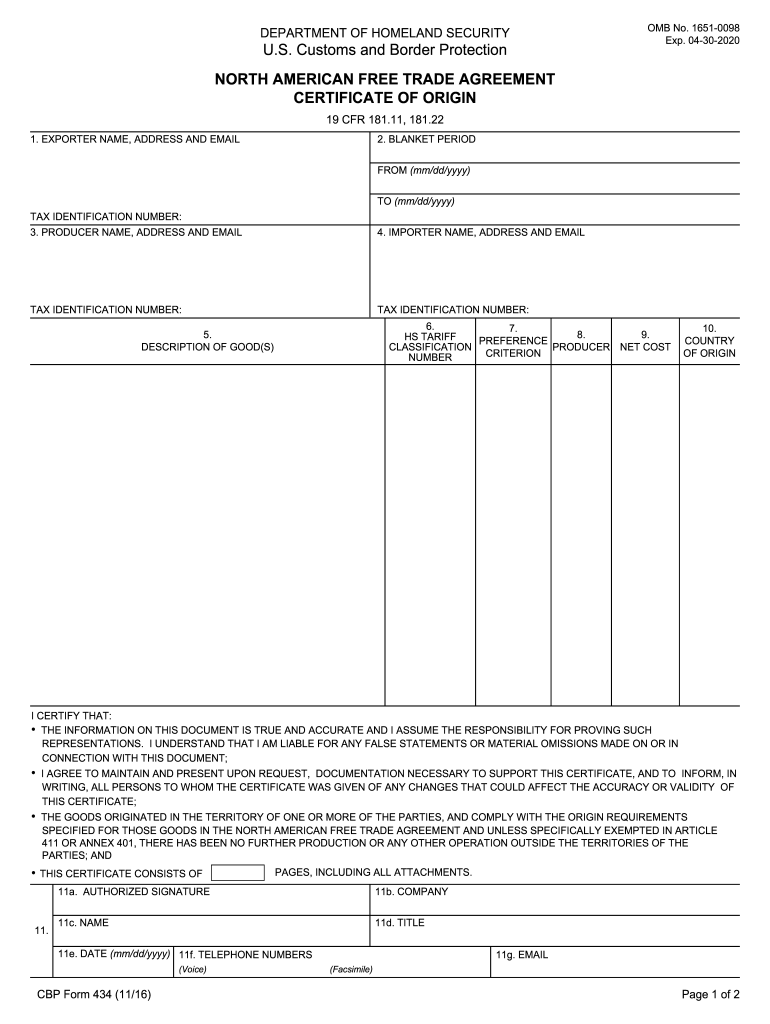
Click ‘Get Form’ to open the North American Free Trade Agreement Certificate of Origin in the editor.
Begin by filling out Field 1 with the full legal name, address, email, and tax identification number of the exporter. Ensure accuracy as this information is crucial for compliance.
In Field 2, specify the blanket period by entering the start and end dates (mm/dd/yyyy) during which this certificate applies.
Complete Field 3 with the producer's details, including their name, address, email, and tax identification number. If there are multiple producers, attach a list.
Fill out Field 4 with the importer’s information similarly to previous fields. If unknown, state 'UNKNOWN'.
In Field 5, provide a detailed description of each good being exported. This should align with invoice descriptions.
For Field 6, identify the HS tariff classification for each good accurately to ensure proper categorization.
In Field 7, indicate which preference criterion applies to each good based on NAFTA rules.
Complete Fields 10 and 11 with country of origin and authorized signature details respectively before finalizing your document.
Start using our platform today to streamline your document editing and signing process for free!
Fill out north american trade agreement online It's free
We've got more versions of the north american trade agreement form. Select the right north american trade agreement version from the list and start editing it straight away!
The USMCA addresses modern issues that NAFTA did not, such as digital trade and intellectual property rights, and places a stronger emphasis on fair labor practices and environmental responsibility.
Why did the USMCA replace NAFTA?
The USMCA, which substituted the North America Free Trade Agreement (NAFTA) is a mutually beneficial win for North American workers, farmers, ranchers, and businesses. The Agreement creates more balanced, reciprocal trade supporting high-paying jobs for Americans and grow the North American economy.
What is the North American trade agreement?
North American Free Trade Agreement (NAFTA) established a free-trade zone in North America; it was signed in 1992 by Canada, Mexico, and the United States and took effect on Jan. 1, 1994. NAFTA immediately lifted tariffs on the majority of goods produced by the signatory nations.
Is NAFTA still in effect?
The USMCA took effect on July 1, 2020, replacing NAFTA.
Why did NAFTA fail?
The 1994 North American Free Trade Agreement (NAFTA) was the first trade treaty that attempted to promote and protect workplace health and safety through a labor side agreement. NAFTA failed to protect workers health and safety due to the weaknesses of the side agreements text; the political and diplomatic
Related Searches
North american trade agreement trumpUSMCANorth american trade agreement summaryUSMCA vs NAFTANAFTA headquartersNorth american trade agreement explainedWhen was NAFTA signed and by which U.S. PresidentIs NAFTA still in effect
Related links
North American Free Trade Agreement - International Trade Law
Jul 17, 2025 The North American Free Trade Agreement (NAFTA) was a trade agreement designed to reduce the boundaries for goods and services across the borders of Canada,
North American Free Trade Agreement (NAFTA) established a free-trade zone in North America; it was signed in 1992 by Canada, Mexico, and the United States.
This site uses cookies to enhance site navigation and personalize your experience.
By using this site you agree to our use of cookies as described in our Privacy Notice.
You can modify your selections by visiting our Cookie and Advertising Notice.... Read more...Read less