
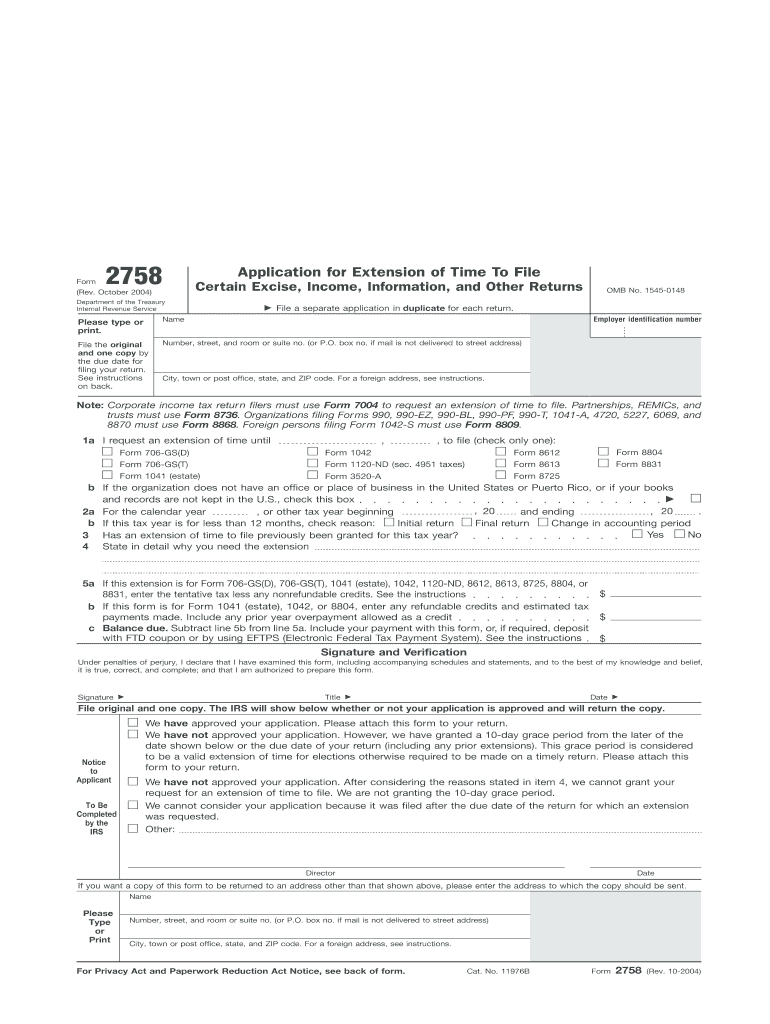







Definition & Purpose of IRS Form 2758
IRS Form 2758 is utilized to request an extension of time for filing specific tax returns with the Internal Revenue Service (IRS). It is primarily designed for fiduciaries and other non-individual entities, such as trusts, estates, partnerships, and corporations, to extend their filing deadline when circumstances prevent them from submitting the necessary returns by the standard due date. By filing this form, applicants can ensure compliance with tax obligations while addressing unforeseen delays in compiling information or completing the necessary documentation.
Key Elements of IRS Form 2758
- Applicant Information: Essential details including the name, employer identification number (EIN), and address of the entity requesting the extension.
- Reason for Extension: Must provide a reasonable explanation as to why an extension is required.
- Specific Tax Forms: Indicating which specific tax returns the extension applies to.
- Signature Requirement: An authorized representative must sign the form, verifying the accuracy and completeness of the information provided.
How to Obtain IRS Form 2758
Obtaining IRS Form 2758 is straightforward. It's available for download on the IRS website under the forms section. Alternatively, entities can call the IRS and request a physical copy be sent by mail. For those using tax preparation software, Form 2758 may be directly accessible within the software interface, enabling easy completion and submission.
Software Compatibility
- Supported Platforms: Tax preparation software like TurboTax and QuickBooks often includes capabilities for accessing and submitting IRS Form 2758 electronically.
- Digital vs. Paper Filing: While the form can be printed and mailed, many prefer electronic submission for its expedited processing and error-reduction features.
Steps to Complete IRS Form 2758
To correctly complete IRS Form 2758, adhere to the following structured procedure:
- Download the Form: Access the form online from the IRS website or through tax software.
- Fill Out Applicant Information: Enter the detailed information about the entity, including their EIN.
- Select the Tax Return Types: Indicate which specific tax return types the extension request covers.
- Provide a Reason: Write a concise explanation for needing the extension, ensuring it is reasonable and well-documented.
- Authorize the Request: Have an authorized individual of the entity sign and date the form.
- Submit the Form: Depending on preference, either mail or electronically file the completed form through the recommended channels.
Filing Deadlines and Important Dates
IRS Form 2758 must be filed by the original due date of the tax return. Missing this critical deadline could result in denial of the extension request, leading to potential penalties for late filing. It’s crucial to consider potential processing times, especially if opting for mail, to avoid any overlap with deadline constraints.
Penalties for Non-Compliance
Failing to comply with the filing deadlines can incur substantial penalties, including fines and interest charges on unpaid taxes. Entities should ensure that both the extension request and any owed tax payments are settled before the standard due date to avoid these penalties.
Legal Use and Compliance
Using IRS Form 2758 legally requires adherence to IRS guidelines ensuring that the extension is justifiable and accurate. Misrepresentation or filing without authentic need may lead to audits or legal action. Entities should retain all related documentation and correspondences for at least several years in case of IRS inquiries.
Eligibility Criteria
Not all entities are eligible to use IRS Form 2758. It is specifically for non-individual taxpayers such as estates, trusts, corporations, and partnerships. Each entity must ensure they fall within this category before proceeding with the form submission.


Form Submission Methods: Online and Mail
Entities have the choice between online and mail submission for Form 2758, each with distinct advantages:
- Online Submission: Faster processing and immediate confirmation of receipt. Highly recommended for those on a tight deadline.
- Mail Submission: While traditional, it ensures a tangible record of submission but requires intentional lead time due to postal delivery durations.
Practical Examples and Use Cases
- Example 1: Estate Planning Delays: A trust needing more time to gather beneficiary statements for accurate return filing.
- Example 2: Corporate Audit: A corporation undergoing a financial audit that temporarily restricts access to complete financial records required for tax filing.
- Example 3: Partnership Tax Liability: A partnership faced with last-minute fiscal discrepancies needing resolution before finalizing tax returns.
These scenarios illustrate the form's relevance in accommodating legitimate delays, preserving compliance while safeguarding against legal penalties.
State-Specific Rules for IRS Form 2758
Though IRS Form 2758 pertains to federal tax requirements, entities should also be aware of additional state-level filing requirements. Some states may honor the federal extension, while others require separate extension filings. Researching specific state government websites or consulting a tax professional can provide clarity and prevent potential state-level filing issues.




