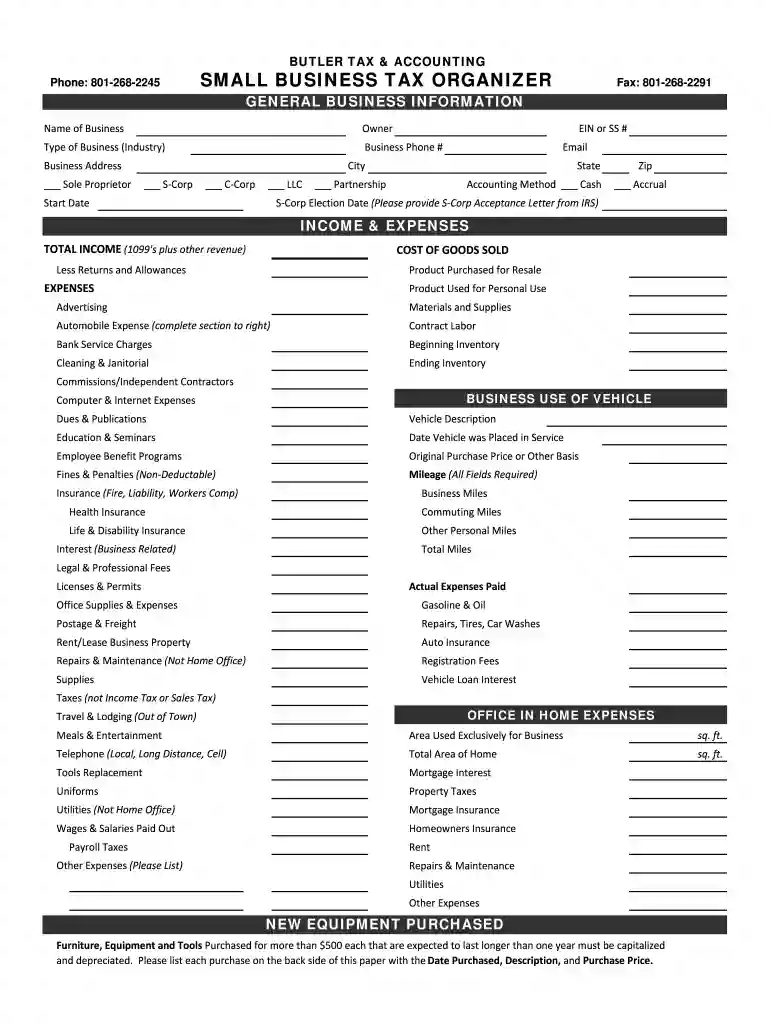
Business tax organizer 2025

Get Form
tax organizer template Preview on Page 1

Here's how it works

01. Edit your tax organizer template online
Type text, add images, blackout confidential details, add comments, highlights and more.

02. Sign it in a few clicks
Draw your signature, type it, upload its image, or use your mobile device as a signature pad.

03. Share your form with others
Send business tax organizer template via email, link, or fax. You can also download it, export it or print it out.

Definition and Importance of the Business Tax Organizer

A business tax organizer is a comprehensive tool designed to gather essential financial and operational information from a business owner, facilitating efficient tax preparation. This organizer serves various business structures, including sole proprietorships, S-Corps, C-Corps, LLCs, and partnerships. It plays a critical role in streamlining the tax process by collecting vital information needed for accurate reporting and compliance with tax regulations.

The primary purpose of a business tax organizer includes:

  • Data Collection: Compiling detailed information about a business's income, expenses, assets, and liabilities.
  • Efficiency: Simplifying the tax preparation process, reducing the time and effort required for both accountants and business owners.
  • Compliance: Ensuring all necessary data is gathered to support accurate tax filings and avoid penalties.

How to Use the Business Tax Organizer

Utilizing a business tax organizer effectively involves several strategic steps to ensure all relevant data is accurately collected. Here’s a structured approach to make the most of this tool:

  1. Gather Preliminary Information: Collect basic information about your business, such as the business name, address, and employer identification number (EIN).
  2. Document Sources of Income: List all revenue streams, including sales, service income, and any other earnings. Attach relevant documentation such as invoices and sales records.
  3. Inventory of Expenses: Categorize and document all business expenses. Common categories include:
    • Operating expenses (rent, utilities)
    • Employee wages
    • Marketing costs
    • Travel expenses
    • Equipment purchases
  4. Complete Required Sections: Fill in any specific sections of the organizer related to your business type. For instance, if you operate a home-based business, include home office expenses with accurate calculations.
  5. Review for Accuracy: After compiling all necessary information, review the entries for completeness and accuracy to ensure nothing is overlooked.

By following this approach, business owners can maximize the effectiveness of their tax organization and pave the way for smoother tax compliance.

Steps to Complete the Business Tax Organizer

Completing a business tax organizer effectively requires a systematic approach. Here is a detailed breakdown of the steps involved:

  1. Collect Needed Financial Documentation: Start by gathering all financial documents, such as bank statements, receipts, and previous tax returns, that will serve as sources of information.
  2. Fill Out Personal Business Information: Complete sections that require basic details about the business and owner(s), including contact information and business structure.
  3. Compile Income Data: For each business activity, input the income earned, ensuring each amount corresponds with supporting documents. This might involve:
    • Total sales revenue
    • Income derived from services rendered
    • Any other forms of income (investments, grants)
  4. Account for Expenses and Deductions: Carefully enter all business-related expenses. Remember to categorize these accurately, as this will affect the overall tax calculation. Useful categories may include:
    • Direct costs (materials)
    • Operational expenses
    • Depreciation on equipment
  5. Eligibility for Deductions: Double-check to ensure you have included any applicable deductions. For example, home office deductions or qualified business income deductions should be noted properly.
  6. Sign and Date: Once all information is completed accurately, ensure that the document is signed and dated to finalize your preparation.

Focusing on these steps ensures that the organizer is completed comprehensively, thus providing a solid foundation for tax preparation.

Examples of Using the Business Tax Organizer

The business tax organizer can be leveraged in various scenarios, making it applicable across different business contexts. Here are a few examples:

  • Sole Proprietor: A freelancer can utilize a business tax organizer to detail their freelance income from multiple clients, organize deductions related to home office use, and calculate self-employment tax implications.
  • Small LLC: An LLC owner might use the organizer to track income from merchandise sales, list operational costs such as website hosting and advertising, and identify eligible deductions for vehicle expenses used for business trips.
  • Corporation: A corporation can employ the business tax organizer to record income from investments, document salaries paid to employees, and claim deductions for business-related expenses.

These examples illustrate how the business tax organizer serves as a versatile tool, aiding in maintaining detailed records vital for accurate tax filings.

Key Elements of the Business Tax Organizer

The business tax organizer contains several essential elements crucial for effective tax preparation. Identifying these elements helps users understand what to focus on when filling out the form:

  • Personal Information Section: This area collects detailed information about the business owner(s) and the business itself, including the official name and type of business structure.
  • Income and Revenue Section: Provides designated spaces to list all sources of income, ensuring adequate documentation and traceability.
  • Expense Documentation: Sections designed to categorize various business expenses help in streamlining the deduction process. It may include:
    • Travel and vehicle expenses
    • Home office deductions
    • Equipment purchases
  • Signatures and Certification: A section for the business owner to sign, confirming that the information provided is accurate and complete, which is vital for compliance.

By ensuring all key elements are addressed, business owners can maximize their organization’s efficiency during tax season.

See more business tax organizer versions

We've got more versions of the business tax organizer form. Select the right business tax organizer version from the list and start editing it straight away!
Versions Form popularity Fillable & printable
2022 4.2 Satisfied (51 Votes)
2021 4.8 Satisfied (51 Votes)
2020 4.8 Satisfied (30 Votes)
2020 4.3 Satisfied (33 Votes)
2020 4.4 Satisfied (159 Votes)
2019 4.4 Satisfied (290 Votes)
2019 4.7 Satisfied (51 Votes)
2019 4.3 Satisfied (52 Votes)
2019 4.3 Satisfied (57 Votes)
2018 4.5 Satisfied (62 Votes)
2018 4.9 Satisfied (35 Votes)
2018 4.1 Satisfied (46 Votes)
2018 4.3 Satisfied (42 Votes)
2017 4.8 Satisfied (226 Votes)
2017 4.2 Satisfied (37 Votes)
be ready to get more

Complete this form in 5 minutes or less

Get form

Got questions?

We have answers to the most popular questions from our customers. If you can't find an answer to your question, please contact us.
Contact us
You can deduct many ordinary and necessary costs related to running your business. These include rent, utilities, office supplies, software, advertising, and insurance. Keep receipts and invoices for every expense. Even small costs add up over the year and can make a noticeable difference in your tax return.
The 10 Most Overlooked Tax Deductions State sales taxes. Reinvested dividends. Out-of-pocket charitable contributions. Student loan interest paid by you or someone else. Moving expenses. Child and Dependent Care Credit. Earned Income Tax Credit (EITC) State tax you paid last spring.
A common mistake that small business owners make is not having a budget, which causes them to overspend and wastes valuable time and money. With a budget, you can track your business cash flow and understand how much you spend on a monthly basis.
Avoid These Common Tax Mistakes Credits. Deductions. Not Being Aware of Tax Considerations for the Military. Not Keeping Up with Your Paperwork. Not Double Checking Your Forms for Errors. Not Adhering to Filing Deadlines or Not Filing at All. Not Fixing Past Mistakes. Not Planning for Next Year.
How to pay less taxes for small businesses: 10 ways to reduce taxable income Hire through the Work Opportunity Tax Credit. Reimburse business expenses with an accountable plan. Take depreciation deductions on business equipment. Track financial losses for your business. Plan for year-end tax strategies.

People also ask

Best Tax Software for Small Business for 2025 Best Overall: HR Block. Best for Intuit QuickBooks Users: Intuit TurboTax. Best Online Business Tax Filing Software: TaxAct. Best for Self-Employed Filers: TaxSlayer. Best for Freelancers: Cash App Taxes.
A CPA or EA would likely be your best first stop to discussing advisory, tax planning, and tax savings opportunities.
Four common tax errors that can be costly for small businesses Underpaying estimated taxes. Depositing employment taxes. Filing late. Not separating business and personal expenses. More information:

small business tax form