




01. Edit your irs form 4549 online
Type text, add images, blackout confidential details, add comments, highlights and more.

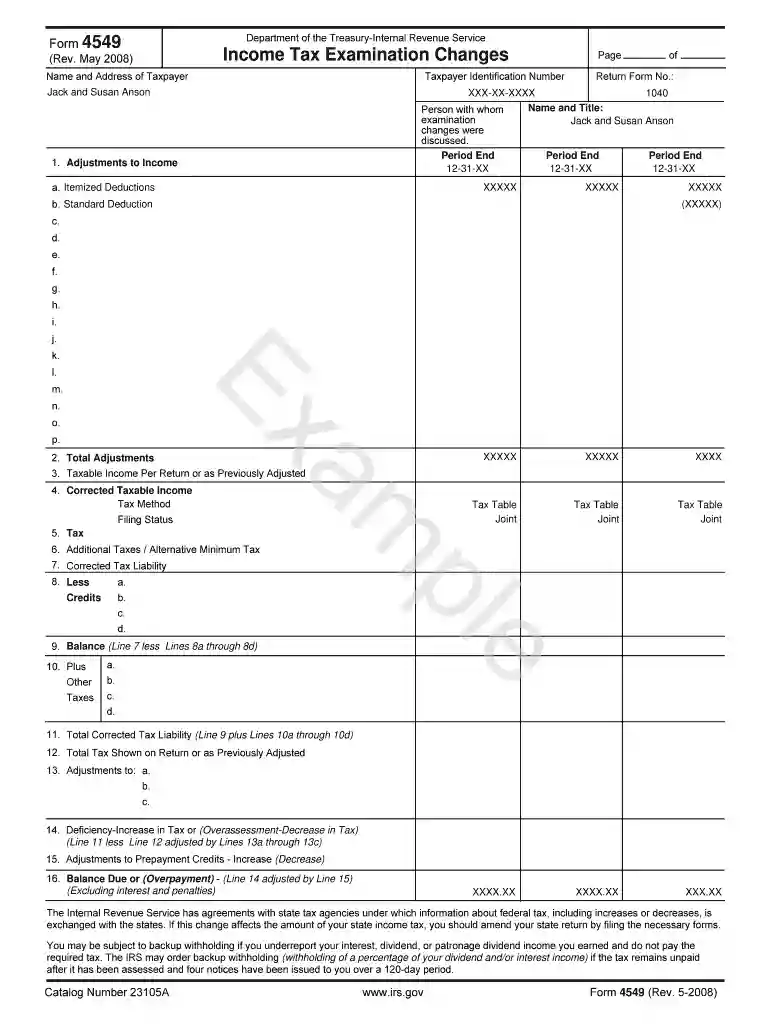
Type text, add images, blackout confidential details, add comments, highlights and more.

Draw your signature, type it, upload its image, or use your mobile device as a signature pad.

Send irs form 4549 pdf via email, link, or fax. You can also download it, export it or print it out.
Form 4549, officially known as the "Income Tax Examination Changes," is a document issued by the Internal Revenue Service (IRS). It serves to notify taxpayers of any changes in their reported income or tax liabilities following a tax examination. This form is essential for taxpayers as it details adjustments made to their original tax filings, including corrected taxable income, assessed penalties, and any potential impacts on state taxation. The document also includes a section for the taxpayer's consent, allowing for the immediate assessment and collection of additional taxes or penalties.
The IRS provides detailed guidelines on how Form 4549 is used during tax examinations. These guidelines ensure transparency and help taxpayers understand the reasons behind any adjustments. The document also outlines taxpayer rights during the examination process and the steps for disputing findings if necessary.
Failing to respond appropriately to Form 4549 can result in significant penalties:
Form 4549 is issued exclusively by the IRS following a thorough examination of a taxpayer's records. It reflects the agency's official findings and outlines any required actions for the taxpayer.
We've got more versions of the irs form 4549 form. Select the right irs form 4549 version from the list and start editing it straight away!
| Versions | Form popularity | Fillable & printable |
|---|---|---|
| 2008 | 4.9 Satisfied (45 Votes) |
At DocHub, your data security is our priority. We follow HIPAA, SOC2, GDPR, and other standards, so you can work on your documents with confidence.
Sep 26, 2020 The information included in this Form 10-Q should be read in conjunction with the Companys audited consolidated financial statements and notesRead more
To request an Audit Reconsideration, the taxpayer must have filed a tax return for which the assessment remains unpaid or the IRS has reversed tax credits thatRead more
Consent to Assessment and Collection - I do not wish to exercise my appeal rights with the Internal Revenue Service or to contest in.Read more


