



Here's how it works



How to use or fill out Printable 2020 Alabama Form 2210AL (Estimated Tax Penalties for Individuals) with DocHub

- Click ‘Get Form’ to open it in the editor.
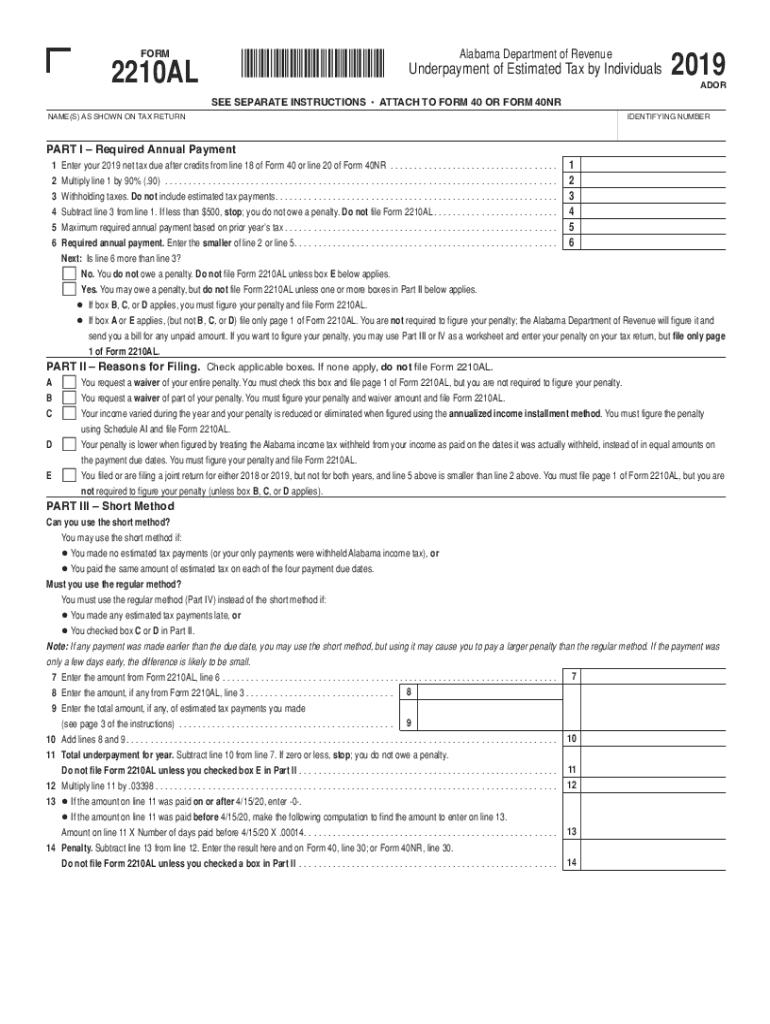
- Begin by entering your name(s) as shown on your tax return in the designated field at the top of the form.
- In Part I, enter your 2019 net tax due after credits from the appropriate line of Form 40 or Form 40NR in line 1.
- Calculate and enter 90% of the amount from line 1 in line 2. This is crucial for determining if you owe a penalty.
- List any withholding taxes in line 3, then subtract this from line 1 and enter the result in line 4. If this amount is less than $500, you do not owe a penalty.
- Continue through Part II by checking applicable boxes that explain your reasons for filing. This will guide how you proceed with calculating any penalties.
- If necessary, complete Parts III and IV to figure your underpayment using either the short method or regular method based on your situation.
Start editing your form today for free on our platform!
It's free
See more Printable 2020 Alabama Form 2210AL (Estimated Tax Penalties for Individuals) versions
Got questions?
How can I sign my underpayment penalty alabama without printing?
eSignatures are an excellent alternative to traditional signing, as they save time, effort, and costs people spend on printing, scanning, and paper delivery. You can electronically sign your underpayment penalty alabama utilizing a reliable and robust online document management services like DocHub. It complies with primary eSignature regulations (ESIGN and UETA), so all documents approved there are legally binding and have the same validity as manually signed ones.
Can I sign my Printable 2020 Alabama Form 2210AL (Estimated Tax Penalties for Individuals) while I edit it?
When you edit your Printable 2020 Alabama Form 2210AL (Estimated Tax Penalties for Individuals) with DocHub, you will not need to look for other applications or services to eSign it. An electronic signature is part of DocHub’s extensive editing toolset, which allows you to apply changes in your form without jumping between platforms. Simply complete your form, double-check the correctness of your information and put your electronic signature at the end to make it submission-ready quickly.
Security and compliance
At DocHub, your data security is our priority. We follow HIPAA, SOC2, GDPR, and other standards, so you can work on your documents with confidence.
Learn more


Related forms