




01. Edit your dsmv 450 online
Type text, add images, blackout confidential details, add comments, highlights and more.

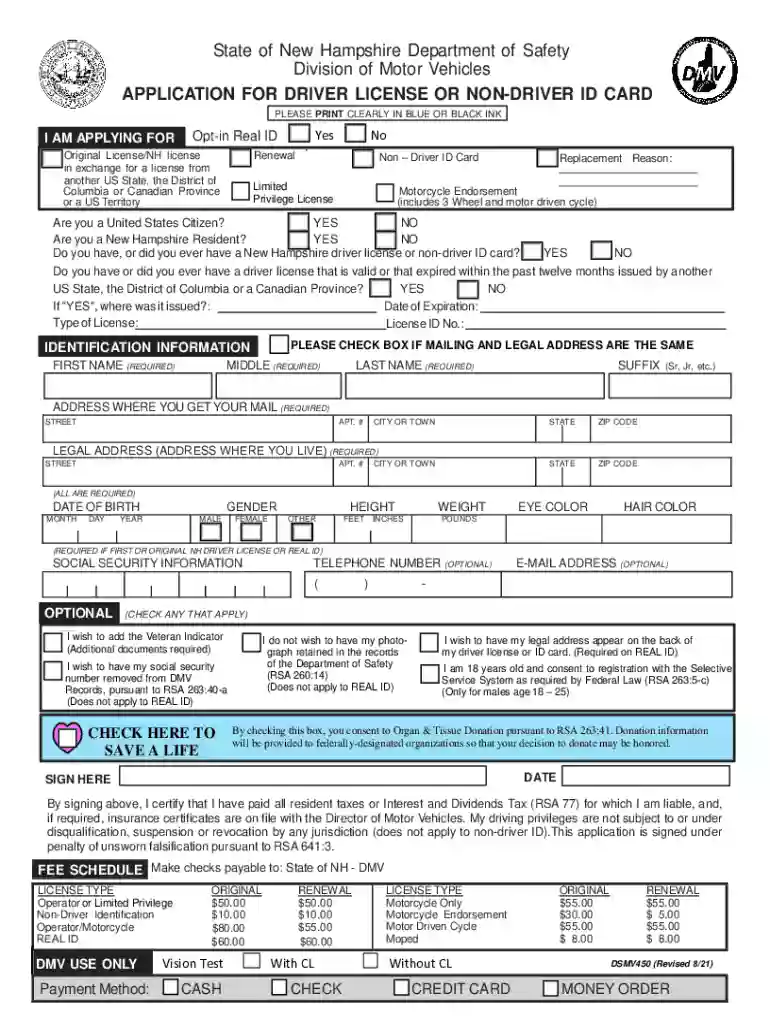
Type text, add images, blackout confidential details, add comments, highlights and more.

Draw your signature, type it, upload its image, or use your mobile device as a signature pad.

Send dsmv 450 form via email, link, or fax. You can also download it, export it or print it out.
The term "form online" generally refers to digital forms used in various contexts to collect information, apply for services, or submit official requests. These forms can encompass a wide range of applications, including government documents, business applications, and personal data collection. Online forms offer a seamless method for users to input data, reducing the need for physical paperwork and enabling quicker processing. This digital approach aligns with the growing trend of moving traditional document processes online to enhance accessibility and efficiency for users.
Using an online form typically involves a straightforward process accessible to anyone with an internet connection. Users can fill out these forms by:
Accessing the Platform: Navigate to the relevant website or platform where the form is hosted. Ensure you are using a secure internet connection for confidentiality.
Filling Out Required Fields: Carefully read each section and provide the necessary information. This often includes basic identification details and any specific data pertinent to the form's purpose.
Reviewing the Information: Before submission, double-check all entries to avoid errors. Many platforms allow for saving progress and returning later, which can be useful for comprehensive forms.
Submitting the Form: Once all information is reviewed, submit the form by following the platform's instructions. Confirmation of submission might be provided via email or on-screen notification.
Online forms are designed to guide users through each step, ensuring all necessary information is captured efficiently.
Completing an online form involves a systematic approach that ensures accuracy and completeness:
Preparation: Gather all necessary documents and information beforehand, such as identification numbers, addresses, and any specific details relevant to the form.
Initial Access: Use the appropriate URL or link to access the form. This link might be provided by an institution or through a dedicated portal.
Navigation: Familiarize yourself with the form's layout. Many forms are broken down into manageable sections, which can be navigated using tabs or a menu.
Data Entry: Enter information in each designated field, making sure to follow any formatting requirements, such as date formats or numerical entries.
Attachments: If the form requires additional documents, use the provided upload feature. Ensure that files meet the size and type specifications outlined on the platform.
Validation: Some forms come with built-in validation checks, highlighting any incomplete or incorrectly formatted fields. Address these issues before proceeding.
Finalization: After reviewing and confirming all details, submit the form. It’s advisable to save or print a copy of the form for your records.
These steps help streamline the process, reducing the potential for errors and ensuring that the form is completed thoroughly.
Online forms are crafted with specific elements to facilitate efficient information collection:
User Interface: A responsive and intuitive design that guides users through the process, often with tooltips or help sections.
Field Types: Includes text boxes, dropdown menus, radio buttons, and checkboxes, each designed to collect various types of data efficiently.
Navigation Controls: Buttons for moving through different sections, such as "Next", "Previous", "Save", and "Submit", enhancing user experience.
Validation Checks: Mechanisms to alert users about missing or incorrect information, promoting data accuracy before submission.
Security Features: Data encryption and secure access measures to protect user information, complying with privacy standards and regulations.
These elements are critical for both usability and data integrity, making the form process seamless and user-friendly.
Forms used online, especially those related to government or legal documentation, must adhere to certain legal standards:
Compliance: Adherence to laws such as the ESIGN Act, which grants electronic signatures the same legal standing as handwritten ones.
Authentication: Secure login processes, often involving multi-factor authentication, to verify the identity of the user completing the form.
Confidentiality: Implementation of encryption protocols to protect sensitive information from unauthorized access.
Consent: Explicitly obtaining user consent for data usage and submission, often through disclaimer agreements included in the form.
These legal considerations ensure that online forms serve not only as tools of convenience but also as legally sound mechanisms for conducting official business.
A broad spectrum of users can benefit from online forms, depending on their application:
Individuals: For personal tasks such as applying for driver licenses, signing up for services, and submitting tax returns.
Businesses: For administrative tasks like employee onboarding, client information collection, and contractual agreements.
Government Agencies: For collecting public data, facilitating service applications, and managing regulatory compliances.
Educational Institutions: For student applications, enrollment processes, and feedback mechanisms.
Online forms streamline tasks for diverse groups, making them vital tools across various sectors.


State-specific regulations can influence how online forms are structured and used:
Document Requirements: Certain states may require additional documentation or certifications for form submissions, such as state IDs or local address proofs.
Compliance Standards: Differences in data protection laws can affect the level of security and privacy features required for online forms.
Tax Considerations: State-specific tax forms, such as property or sales tax filings, often necessitate unique fields and instructions tailored to regional laws.
Licensing and Permits: Forms related to professional licensing or business permits may include state-specific sections to reflect local guidelines.
Acknowledging these variations ensures accurate and compliant form submissions across jurisdictions.
Understanding the compatibility of online forms with various software systems can enhance user experience and efficiency:
Integration with Tools: Compatibility with document management software like DocHub ensures seamless import, editing, and submission capabilities.
Platform Independence: Forms should function across different operating systems and devices, ensuring accessibility from desktops, tablets, and smartphones.
Export Options: Ability to export data to applications like Excel or Google Sheets for analysis and record-keeping.
APIs and Automation: For advanced users, enabling forms to interact with other systems through APIs can facilitate automation and data flow between platforms.
Compatibility is pivotal for maximizing the utility and reach of online forms, allowing users to tailor processes to their specific needs.
We've got more versions of the dsmv 450 form. Select the right dsmv 450 version from the list and start editing it straight away!
At DocHub, your data security is our priority. We follow HIPAA, SOC2, GDPR, and other standards, so you can work on your documents with confidence.


