Type text, add images, blackout confidential details, add comments, highlights and more.
02. Sign it in a few clicks
Draw your signature, type it, upload its image, or use your mobile device as a signature pad.
03. Share your form with others
Send it via email, link, or fax. You can also download it, export it or print it out.
How to use or fill out term loan agreement with our platform
Ease of Setup
DocHub User Ratings on G2
Ease of Use
DocHub User Ratings on G2
Click ‘Get Form’ to open the term loan agreement in the editor.
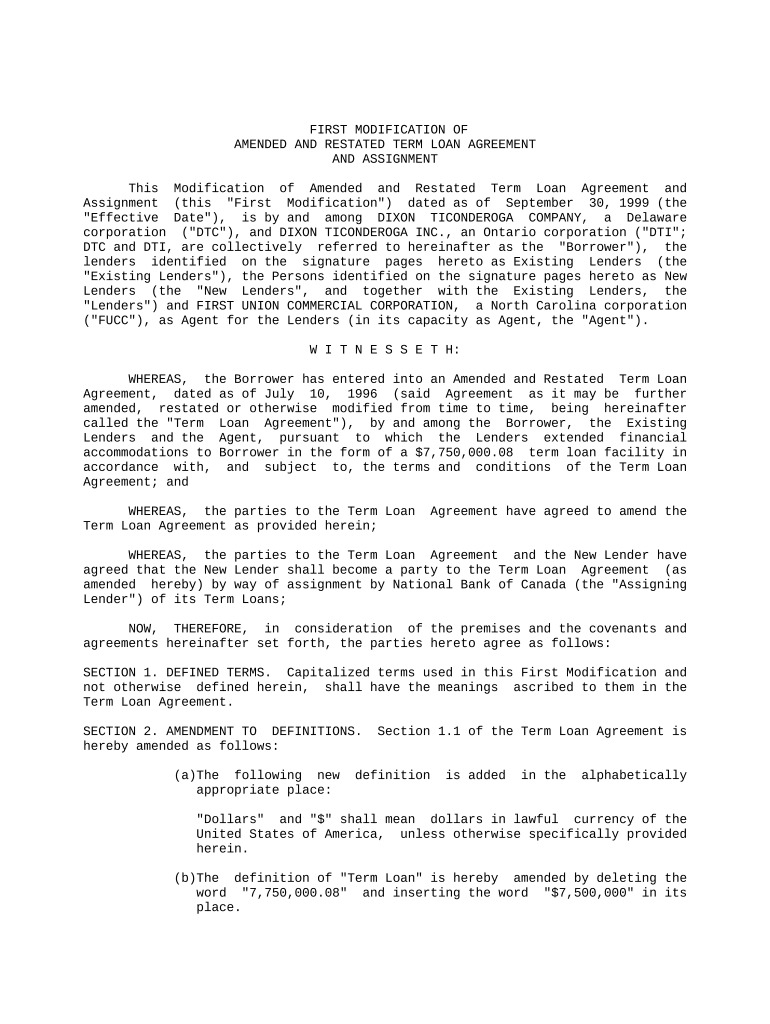
Begin by filling out the Borrower section, ensuring you include the correct legal names of all parties involved, such as DIXON TICONDEROGA COMPANY and DIXON TICONDEROGA INC.
Proceed to Section 1, where you will define any capitalized terms that are specific to this modification. Make sure to reference the original Term Loan Agreement for consistency.
In Section 2, amend definitions as necessary. For example, update monetary amounts accurately reflecting changes in the loan terms.
Review Sections 3 and 4 for amendments related to payment provisions. Ensure that all payment details are current and reflect any new agreements made.
Complete Section 8 by confirming representations and warranties. This is crucial for validating the agreement's enforceability.
Finally, ensure all parties sign the document electronically using our platform’s signature feature for a seamless completion process.
Start editing your term loan agreement today for free on our platform!
Term loan agreement templateTerm loan agreement pdfSimple term loan agreementLoan Agreement format WordLoan agreement templateLoan agreement vs promissory notePersonal loan agreementPersonal loan Agreement pdf
Security and compliance
At DocHub, your data security is our priority. We follow HIPAA, SOC2, GDPR, and other standards, so you can work on your documents with confidence.
A loan agreement between the lender and borrower is created for every new loan, and it is legally enforceable. All loans on the SmartCredit.io platform are alsoRead more
By executing this Agreement the Borrower is agreeing to the loan terms as specified Loan Term Requested. Estimated Loan Start Date. Other Desired Terms.Read more
Cookie consent notice
This site uses cookies to enhance site navigation and personalize your experience.
By using this site you agree to our use of cookies as described in our Privacy Notice.
You can modify your selections by visiting our Cookie and Advertising Notice.