Type text, add images, blackout confidential details, add comments, highlights and more.
02. Sign it in a few clicks
Draw your signature, type it, upload its image, or use your mobile device as a signature pad.
03. Share your form with others
Send it via email, link, or fax. You can also download it, export it or print it out.
How to use or fill out Employee Information Form - Stony Brook University with our platform
Ease of Setup
DocHub User Ratings on G2
Ease of Use
DocHub User Ratings on G2
Click ‘Get Form’ to open the Employee Information Form in the editor.
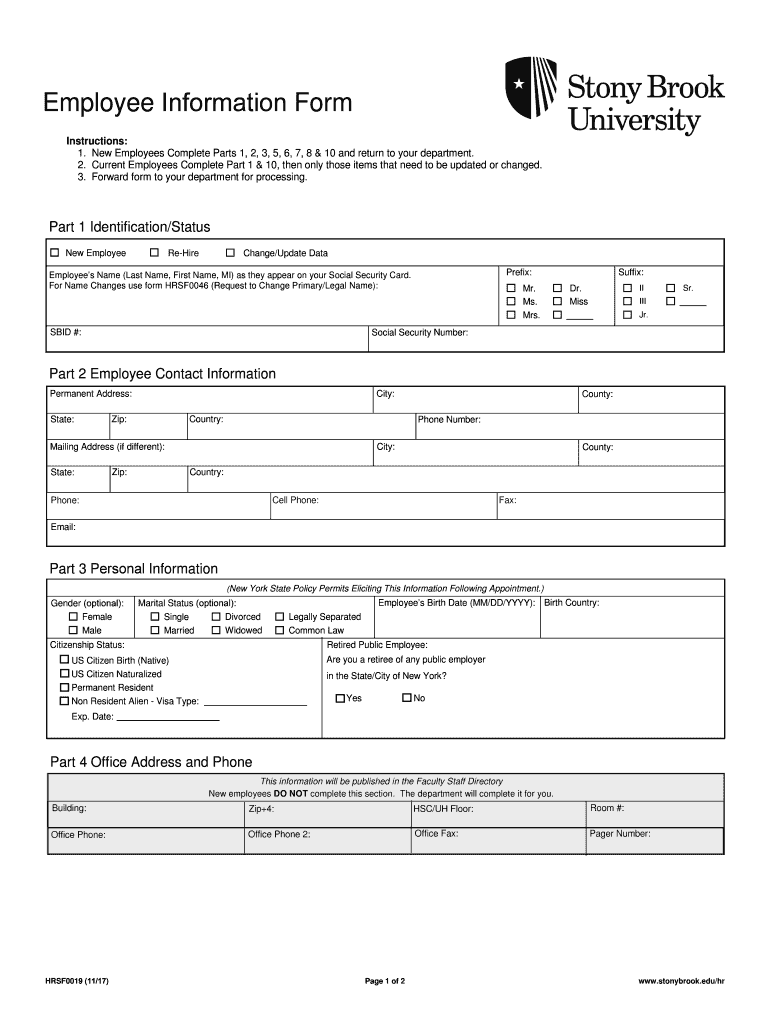
Begin with Part 1, where you will identify your status as a New Employee, Re-Hire, or Change/Update Data. Fill in your name as it appears on your Social Security Card and provide your SBID number.
In Part 2, enter your permanent address and contact information. Ensure all fields are filled accurately, including phone numbers and email addresses.
Proceed to Part 3 for optional personal information such as gender and marital status. Complete the citizenship status section carefully.
Skip Part 4 if you are a new employee; this will be completed by your department. Move on to Part 5 to list any skills or credentials.
In Part 6, provide emergency contact details. You can add multiple contacts if necessary.
Complete Parts 7 and 8 regarding prior employment and education level.
Finally, review Part 10 to certify that all provided information is accurate before signing and dating the form.
Start filling out your Employee Information Form today for free using our platform!
Fill out Employee Information Form - Stony Brook University online It's free
See more Employee Information Form - Stony Brook University versions
We've got more versions of the Employee Information Form - Stony Brook University form. Select the right Employee Information Form - Stony Brook University version from the list and start editing it straight away!
Employee information form stony brook university onlineStony Brook New Employee OrientationStony Brook Employee PortalStony Brook Hospital employee HandbookCpmp stony brook human resourcesStony Brook CPMP JobsStony Brook Southampton Hospital human ResourcesStony Brook Employee Health
Security and compliance
At DocHub, your data security is our priority. We follow HIPAA, SOC2, GDPR, and other standards, so you can work on your documents with confidence.
Stony Brook University Hospital: Health Information
Sep 16, 2014 Information Management Department at Stony Brook University Hospital complied with applicable requirements related to procurement and human
(5) Safety - Ensured all members of the team held updated certifications in biomedical research, human practices, and any other required trainings. AdditionallyRead more
Employees Name (Last Name, First Name, MI) as they appear on your Social Security Card. For Name Changes use form HRSF0046 (Request to Change Primary/LegalRead more
Cookie consent notice
This site uses cookies to enhance site navigation and personalize your experience.
By using this site you agree to our use of cookies as described in our Privacy Notice.
You can modify your selections by visiting our Cookie and Advertising Notice.