




Here's how it works



How to use or fill out Fillable Online hca wa MEDICAL CLAIM FORM Uniform ... with DocHub

- Click ‘Get Form’ to open it in the editor.
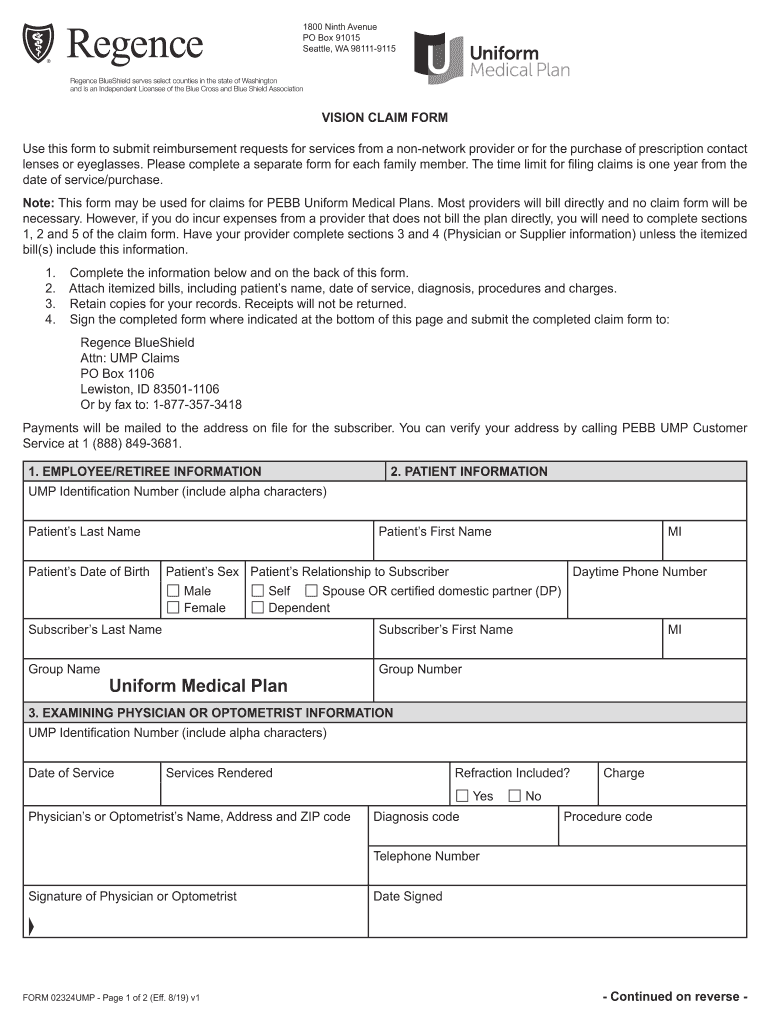
- Begin by filling out the EMPLOYEE/RETIREE INFORMATION section. Enter your UMP Identification Number, last name, first name, and other required details.
- Next, complete the PATIENT INFORMATION section. Provide the patient's last name, first name, date of birth, sex, and relationship to the subscriber.
- In the EXAMINING PHYSICIAN OR OPTOMETRIST INFORMATION section, input the date of service and services rendered. Ensure to include any diagnosis and procedure codes as well as charges.
- Fill out the SUPPLIER INFORMATION section completely or attach a copy of the prescription. Include details about lenses or glasses ordered.
- Finally, sign and date the EMPLOYEE/RETIREE RELEASE INFORMATION section before submitting your claim form.
Start using our platform today for free to streamline your claims process!
It's free
See more Fillable Online hca wa MEDICAL CLAIM FORM Uniform ... versions
Got questions?
How can I sign my Fillable Online hca wa MEDICAL CLAIM FORM Uniform ... on iOS?
With DocHub, you can easily sign your Fillable Online hca wa MEDICAL CLAIM FORM Uniform ... or any other paperwork on iOS, even without setting up extra programs. You can access your DocHub account from any web-connected browser and fill out and sign your document in any preferred method with just a couple of clicks.
How do you create an e-signature for the Fillable Online hca wa MEDICAL CLAIM FORM Uniform ... on iOS?
In addition to a comprehensive toolset for editing PDFs on mobile devices, DocHub allows you to sign your Fillable Online hca wa MEDICAL CLAIM FORM Uniform ... along the way. Open our editor in your web browser, make modifications using DocHub’s toolset, and finish your editing by eSigning the completed form.
What is a health claim form?
What is the purpose of a health claim?
What is the medical claim form for Tricare West?
Security and compliance
At DocHub, your data security is our priority. We follow HIPAA, SOC2, GDPR, and other standards, so you can work on your documents with confidence.
Learn more




