Individual education plans to print 2009 form-2026

Get Form
iep individual education plan example Preview on Page 1

Here's how it works

01. Edit your iep individual education plan example online
Type text, add images, blackout confidential details, add comments, highlights and more.

02. Sign it in a few clicks
Draw your signature, type it, upload its image, or use your mobile device as a signature pad.

03. Share your form with others
Send it via email, link, or fax. You can also download it, export it or print it out.

How to use or fill out individual education plans to print 2009 form with our platform

Form edit decoration
9.5
Ease of Setup
DocHub User Ratings on G2
9.0
Ease of Use
DocHub User Ratings on G2
  1. Click ‘Get Form’ to open the individual education plans to print 2009 form in the editor.
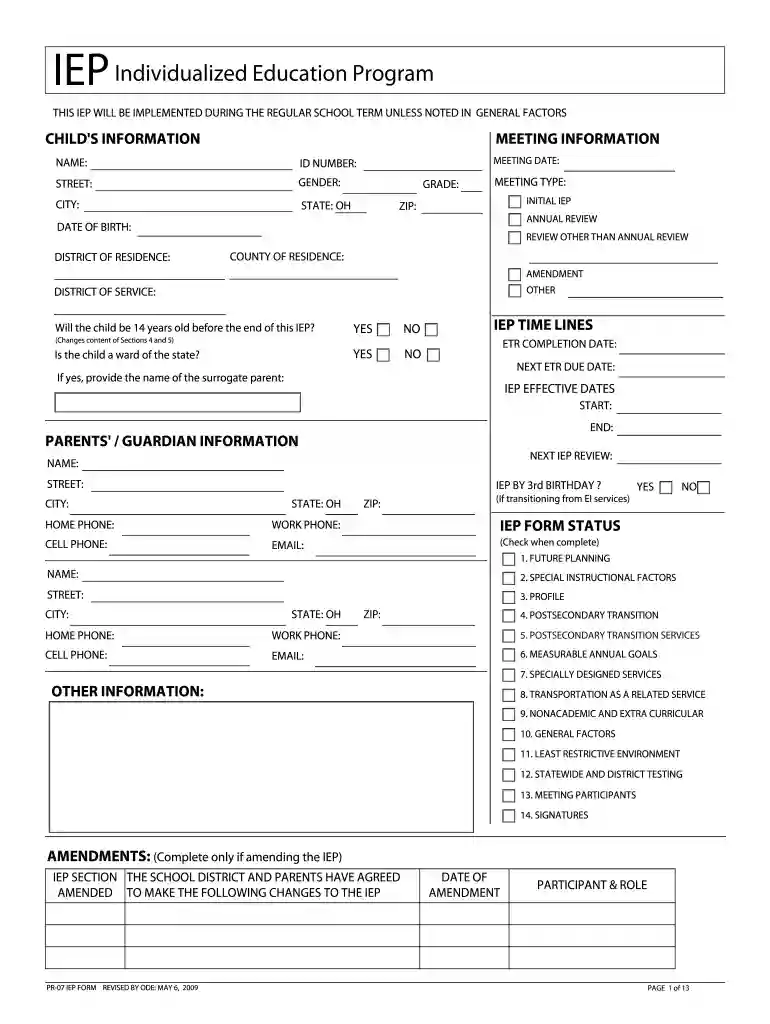
  2. Begin by filling out the 'Child's Information' section. Enter the child's name, date of birth, gender, and address details accurately.
  3. Proceed to 'Meeting Information'. Specify the meeting date, type (e.g., Initial IEP), and district information. Ensure all fields are completed for clarity.
  4. In the 'Parents' / Guardian Information' section, provide contact details including phone numbers and email addresses. This ensures effective communication regarding the IEP.
  5. Complete sections on 'Future Planning', 'Special Instructional Factors', and 'Measurable Annual Goals'. Be specific about goals and services required for the child’s educational success.
  6. Review all entries for accuracy before saving your changes. Utilize our platform's features to highlight any important notes or amendments needed.

Start using our platform today to effortlessly fill out and manage your individual education plans!

See more individual education plans to print 2009 form versions

We've got more versions of the individual education plans to print 2009 form form. Select the right individual education plans to print 2009 form version from the list and start editing it straight away!
Versions Form popularity Fillable & printable
2021 4.9 Satisfied (33 Votes)
2017 4.3 Satisfied (25 Votes)
2012 4.9 Satisfied (411 Votes)
2009 4.4 Satisfied (63 Votes)
be ready to get more

Complete this form in 5 minutes or less

Get form

Got questions?

We have answers to the most popular questions from our customers. If you can't find an answer to your question, please contact us.
Contact us
How to Request IEP Records. To obtain your childs IEP records, you should submit a written request to the school. While schools generally have up to 45 days to comply, many respond more quickly. Your request should clearly state that you seek access to your childs IEP records under FERPA and IDEA.
To print IEP Progress Reports: Log on to the Special Education view. Click the IEP tab. Select the IEPs you want to print IEP progress reports for; the report includes any IEPs currently appearing on the list page. On the Reports menu, click IEP Progress Report.
IEP Online Connect allows parents or guardians to access their childs special education documents remotely and securely online. Parents/guardians have the ability to view and/or sign documents in IEP Online Connect according to school district procedures.
The IEP document includes student information related to present levels of educational performance, annual goals, special education services, participation with peers, assessment accommodations, service duration, transition service needs, and age of majority.
Initiating the IEP Process This identification can happen through a teachers referral, parental concerns, or observations made by school staff. Once a need is recognized, the school district is responsible for conducting a comprehensive evaluation to determine the childs eligibility for special education.

Security and compliance

At DocHub, your data security is our priority. We follow HIPAA, SOC2, GDPR, and other standards, so you can work on your documents with confidence.

Learn more
ccpa2
pci-dss
gdpr-compliance
hipaa
soc-compliance

People also ask

How to write an effective IEP Step 1: Define the learning team. Step 2: Present levels of academic achievement, functional performance, strengths, and needs. Step 3: Set goals. Step 4: Understand accommodations and modifications, and decide how to use them.

Related links