




Here's how it works



How to use or fill out Get FL DR-534 2021-2022 - US Legal Forms with DocHub

- Click ‘Get Form’ to open it in the editor.
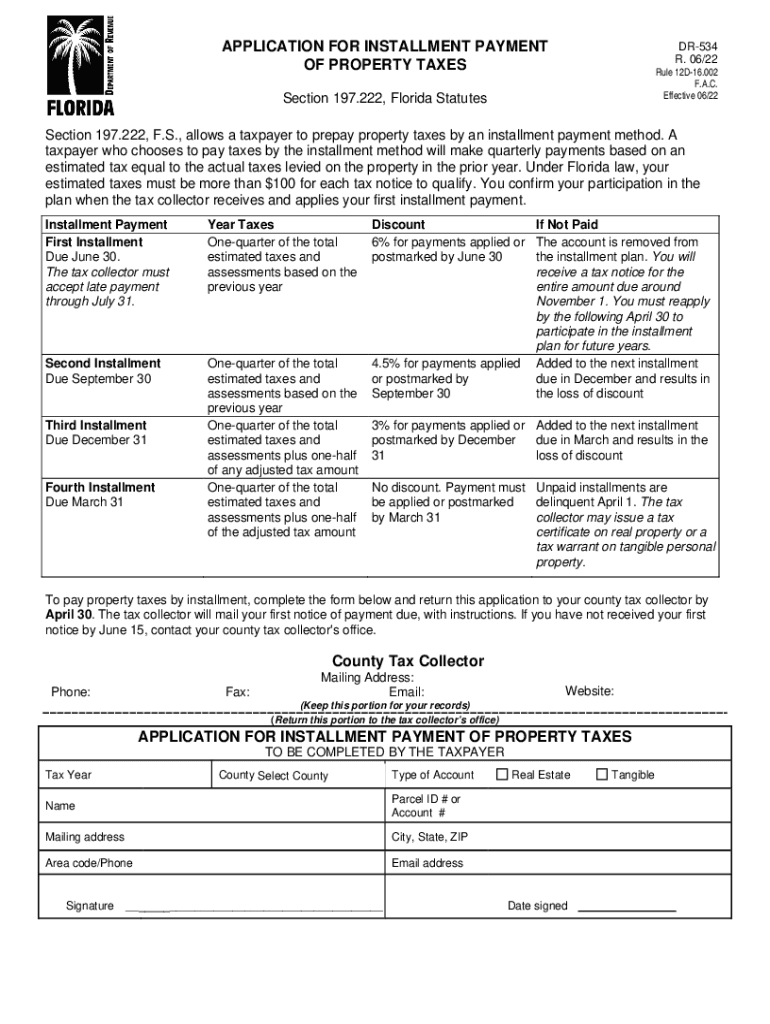
- Begin by entering the Tax Year at the top of the form. This is essential for identifying which year's taxes you are applying for.
- Select your County from the dropdown menu. This ensures that your application is directed to the correct tax collector's office.
- Indicate the Type of Account by checking either 'Real Estate' or 'Tangible'. This helps categorize your property type.
- Fill in your Name, Parcel ID # or Account #, and Mailing Address including City, State, and ZIP code. Accurate information is crucial for processing your application.
- Provide your Area code/Phone number and Email address for communication regarding your application status.
- Sign and date the form at the bottom. Your signature confirms your request for installment payment of property taxes.
Start using our platform today to complete your FL DR-534 form easily and efficiently!
It's free
See more Get FL DR-534 2021-2022 - US Legal Forms versions
Got questions?
How can I send my Get FL DR-534 2021-2022 - US Legal Forms for eSignature?
Upload your Get FL DR-534 2021-2022 - US Legal Forms to DocHub (after you’ve set up an account for this). If you need to fill out fields in it, use proper tools from the top pane. For example, add Signature Fields, assign each to specific party, and click on Sign → Request signatures from others. Customize your message for your recipients and click Send Request. You can also send your form by fax or as a Signing link instead of using email (you’ll find these options by navigating to the Menu → Send)
Can I edit Get FL DR-534 2021-2022 - US Legal Forms on my phone?
As a comprehensive document modifying service, DocHub is accessible on mobile phones. Open DocHub in your choice of mobile internet browser and use our smart mobile-friendly toolset to complete your Get FL DR-534 2021-2022 - US Legal Forms.
Security and compliance
At DocHub, your data security is our priority. We follow HIPAA, SOC2, GDPR, and other standards, so you can work on your documents with confidence.
Learn more


