REA 4001. Complaint Form-2026

Get Form
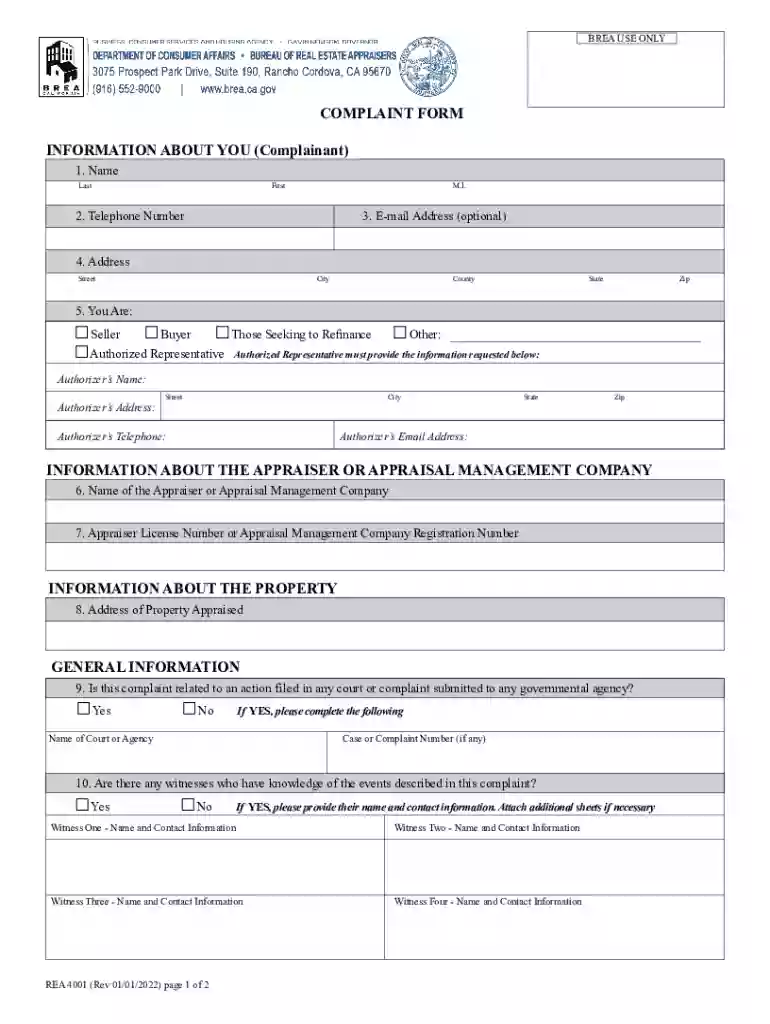
REA 4001. Complaint Form Preview on Page 1

Here's how it works

01. Edit your form online
Type text, add images, blackout confidential details, add comments, highlights and more.

02. Sign it in a few clicks
Draw your signature, type it, upload its image, or use your mobile device as a signature pad.

03. Share your form with others
Send it via email, link, or fax. You can also download it, export it or print it out.

How to use or fill out REA 4001. Complaint Form with DocHub

Form edit decoration
9.5
Ease of Setup
DocHub User Ratings on G2
9.0
Ease of Use
DocHub User Ratings on G2
  1. Click ‘Get Form’ to open the REA 4001. Complaint Form in our editor.
  2. Begin by filling out your personal information in the 'INFORMATION ABOUT YOU' section. Enter your name, telephone number, and email address if desired. Specify your role (Seller, Buyer, etc.) and provide details for an authorized representative if applicable.
  3. In the 'INFORMATION ABOUT THE APPRAISER OR APPRAISAL MANAGEMENT COMPANY' section, input the name and license number of the appraiser or company involved.
  4. Complete the 'INFORMATION ABOUT THE PROPERTY' section by entering the address of the property that was appraised.
  5. Answer questions regarding any related court actions or witnesses in the 'GENERAL INFORMATION' section. Provide names and contact information for any witnesses if necessary.
  6. Indicate your opinion on the market value of the real estate and whether you belong to any protected classes.
  7. List any supporting documentation you are submitting with your complaint in the designated area.
  8. Finally, provide a detailed statement of your complaint and ensure to sign and date the certification statement at the end of the form.

Start using our platform today to fill out your REA 4001. Complaint Form online for free!

See more REA 4001. Complaint Form versions

We've got more versions of the REA 4001. Complaint Form form. Select the right REA 4001. Complaint Form version from the list and start editing it straight away!
Versions Form popularity Fillable & printable
2022 4.8 Satisfied (45 Votes)
2017 4.4 Satisfied (141 Votes)
be ready to get more

Complete this form in 5 minutes or less

Get form

Got questions?

We have answers to the most popular questions from our customers. If you can't find an answer to your question, please contact us.
Contact us

Electronic signatures are an excellent replacement for traditional signing, as they save time, effort, and costs people spend on printing, scanning, and paper delivery. You can electronically sign your REA 4001. Complaint Form utilizing a reliable and powerful online document management services like DocHub. It complies with major eSignature standards (ESIGN and UETA), so all documents approved there are legally binding and have the same validity as physically signed ones.

You can complete and eSign your REA 4001. Complaint Form online, even on a tight deadline. All you need to access high quality editing tools on any device is a DocHub profile, that you can register within a couple of moments. Once you sign up, add your file or find what you are searching for in our catalog, complete it using the editing tools you want, and place your electronic signature on it at the end.

They are all dependent on the specifics of the situation. That being said, appraisers can be sued for several reasons, including negligence, errors and oversight, failure to notice underlying issues, or even fraud.
Each state appraisal regulatory agency where an appraiser holds a license or certification is responsible for investigating complaints and taking appropriate disciplinary action against an appraiser if they do not employ recognized methods or techniques or do not follow the Uniform Standards of Professional Appraisal
The local state appraisal board is responsible for ensuring that its licensed and certified appraisers comply with USPAP when preparing appraisals. Anyone having concerns about an appraisers work can submit a complaint to the state appraisal board in the appraisers state of practice.
be ready to get more

Complete this form in 5 minutes or less

Get form

People also ask

Complaints against Real Estate Agents or Companies If you have a complaint against a licensed real estate agent or business, visit California DREs website for details on How To File A Complaint, or call the California DRE Public Information Line at (877) 373-4542.
How to file a complaint with RERA? File the complaint on the official portal. Upload all necessary documents and make payment. Be a part of the hearing and resolution. Get notified of the final order. Take necessary post-order action. A useful guide for homebuyers: 7 reasons to file a RERA complaint.
Enforcement Investigations Type of InvestigationSources Complaints Clients Homeowners Lenders Other regulators (local, state and federal) Appraisers Background Investigations Law enforcement Other regulatory agencies (local, state and federal) Questionable Applications BREAs Licensing Unit

Related links