Form 24 3 2025

Get Form
form 24 3 Preview on Page 1

Here's how it works

01. Edit your form online
Type text, add images, blackout confidential details, add comments, highlights and more.
02. Sign it in a few clicks
Draw your signature, type it, upload its image, or use your mobile device as a signature pad.
03. Share your form with others
Send it via email, link, or fax. You can also download it, export it or print it out.

How to use or fill out form 24 3 with our platform

Form edit decoration
9.5
Ease of Setup
DocHub User Ratings on G2
9.0
Ease of Use
DocHub User Ratings on G2
  1. Click ‘Get Form’ to open it in the editor.
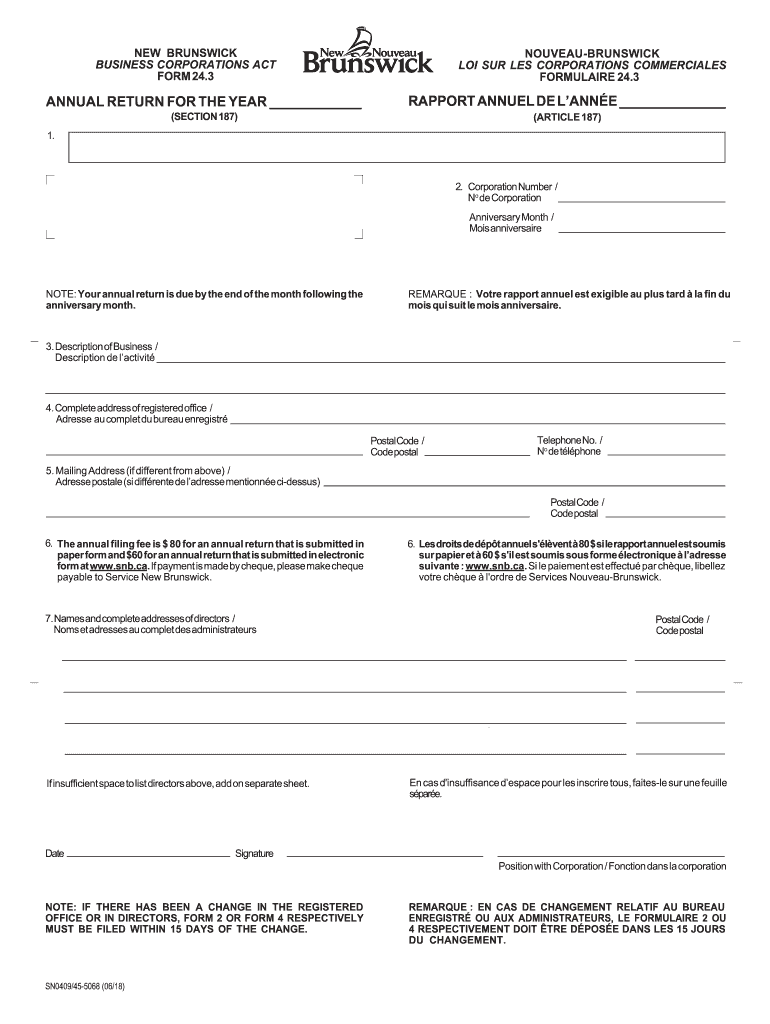
  2. Begin by entering the year for which the return is being filed at the top of the page.
  3. In Item 2, input your Corporation Number and Anniversary Month. This information is crucial as it determines your filing deadline.
  4. For Item 3, provide a brief description of your business activities, such as manufacturing or retail.
  5. Complete Item 4 with the full address of your registered office, ensuring to include all necessary details like street number and postal code.
  6. If your mailing address differs from the registered office, fill out Item 5 accordingly.
  7. In Item 6, note that the annual filing fee is $80 for paper submissions and $60 for electronic submissions. Ensure you select your payment method.
  8. List all directors in Item 7 along with their complete addresses. If space is insufficient, attach a separate sheet.
  9. Finally, sign and date the form in the signature section, indicating your position within the corporation.

Start using our platform today to streamline your form completion process for free!

See more form 24 3 versions

We've got more versions of the form 24 3 form. Select the right form 24 3 version from the list and start editing it straight away!
Versions Form popularity Fillable & printable
2018 4.8 Satisfied (42 Votes)
2010 4.4 Satisfied (66 Votes)
be ready to get more

Complete this form in 5 minutes or less

Get form

Got questions?

We have answers to the most popular questions from our customers. If you can't find an answer to your question, please contact us.
Contact us

Yes, you can utilize DocHub for signing any business and personal documentation, including your form 24 3. All electronic signatures you create with our service are legally binding and court-admissible, as DocHub complies with criteria required by ESIGN and UETA. Save your accomplished paperwork with a detailed Audit Trail if needed.

If you choose analog ways of completing your form 24 3, you can easily download your file for printing. Search DocHub’s Forms & Templates catalog to find the exact file template you require and open it for editing or download it on your device in the format of your choice. It is easy to complete your form electronically and place your handwritten signature on it after printing or eSign your file with DocHub.

Section 58 (S58) of the Companies Act 2016 is the new form that has replaced Form 49. This form is used for the same purposes, namely notifying the SSM about the appointment and resignation of directors, managers, and secretaries, as well as any changes in their particulars.
Form 24 is used to allot new shares to shareholders of a sdn bhd company. The form needs to be submitted to SSM for registration once the allotment were approved by the directors existing shareholders. Form 24 consist of the latest amounts details of authorised capital paid-up capital of a sdn bhd company.
Processing Time and Compliance After Closure Typically, the processing time for closing an LLP using LLP Form 24 takes about 2-3 months.
be ready to get more

Complete this form in 5 minutes or less

Get form

People also ask

What is Form 49? Form 49 used to be a standard part of corporate filings under the old Companies Act 1965. It was used to submit the particulars of directors, managers, and company secretaries to the Companies Commission of Malaysia (SSM). This included their names, ID numbers, addresses, and positions.
Guide for Completing Air Force Form 24, Application for Appointment as Reserve of the Air. Force or USAF without Component. Air Force Form 24 is used by a variety of organizations; not all of the questions on the form are applicable to individuals seeking judge advocate positions in the Air Reserve Component.
The Form-24 is provided by the Employees State Insurance Corporation (ESIC), Ministry of Labour and Employment, Government of India.
What Replaced Form 24? Under the Companies Act 2016, the process became more efficient. Instead of using Form 24, companies now comply through Section 78 Return of Allotment of Shares.
Form 49 tracked changes in directors, managers, and secretaries under the Companies Act 1965. Form 24 reported new share allotments and shareholder details. The Companies Act 2016 replaced both forms with streamlined, event-based filingsSection 58 (for officers) and Section 78 (for share allotments).

Related links