




01. Edit your form online
Type text, add images, blackout confidential details, add comments, highlights and more.

Type text, add images, blackout confidential details, add comments, highlights and more.

Draw your signature, type it, upload its image, or use your mobile device as a signature pad.

Send it via email, link, or fax. You can also download it, export it or print it out.
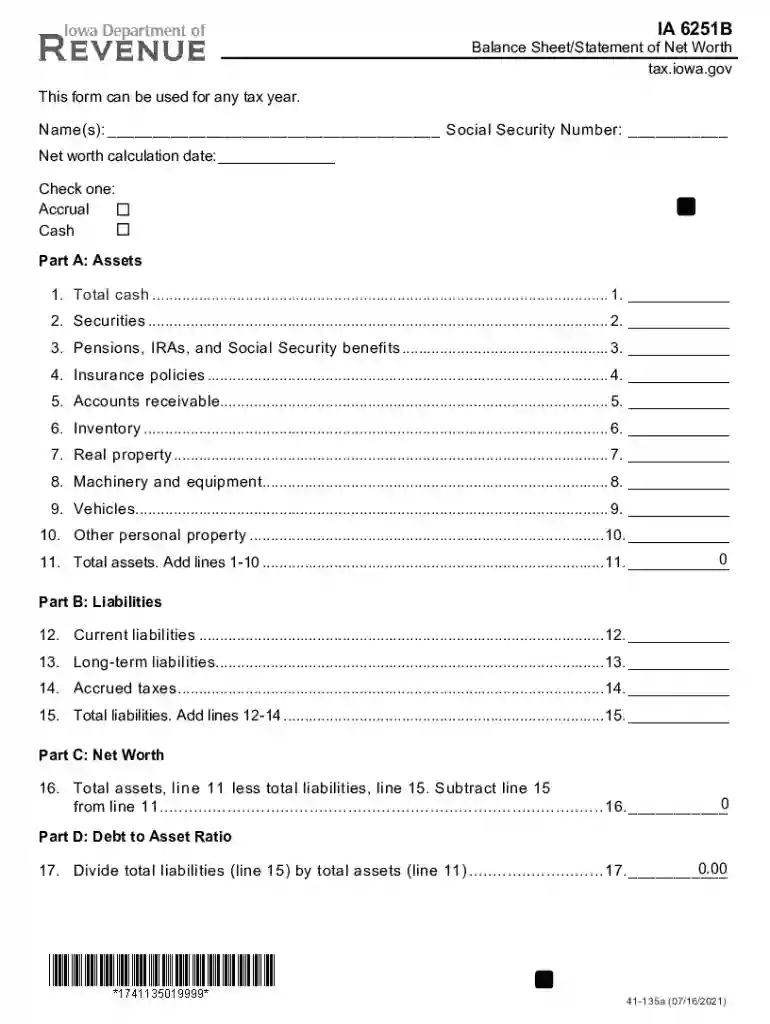
The IA Sheet, specifically identified as Iowa Form 6251B, is a critical document used for tax purposes within the state of Iowa. This form serves as a Balance Sheet or Statement of Net Worth, allowing individuals to meticulously calculate and report their net worth. Key components included in this document are extensive details about assets and liabilities, covering items such as cash, securities, real estate, and personal property. This structured format not only aids in capturing comprehensive financial data but also ensures adherence to Iowa's specific tax reporting requirements.
The IA Sheet emphasizes thoroughness in financial disclosure. It demands that both personal and business financial elements are reported accurately to provide a holistic view of an individual’s economic standing. This comprehensive approach helps taxpayers ensure they remain compliant with state tax laws, minimizing potential disputes or audits.
Successfully completing the IA Sheet involves a detailed understanding and methodical approach. The process requires:
Gathering Financial Records: Collect all necessary documents that showcase your financial position, including receipts, bank statements, and property deeds.
Listing Assets and Liabilities: Distinctly categorize and list each asset and liability, ensuring figures are precise and up to date.
Calculating Net Worth: Subtract total liabilities from total assets to derive your net worth, a fundamental aspect in the form.
Review and Verification: Double-check all entries for accuracy and ensure all sections comply with the state's requirements.
When filling out the IA Sheet, adherence to a consistent accounting method—either cash or accrual—is vital. This choice impacts how transactions are recorded and reported, ensuring consistency and transparency across financial documents.
This form is predominantly used by individuals residing in Iowa or those with financial activities within the state that require comprehensive net worth reporting. It is crucial for self-employed individuals, business owners, and investors who structure their financial strategies around accurate net worth assessments.


Understanding the applicability of the IA Sheet across different economic sectors enhances its utility. Whether you manage a corporation, LLC, or partnership, this form plays an integral role in financial planning and statutory tax reporting.
Several essential components define the structure of the IA Sheet:
Supplementary documents such as bank statements, investment portfolios, and legal titles must support values reported in the sheet, ensuring the form's integrity and accuracy.
The legal framework governing the IA Sheet ensures that individuals provide truthful and comprehensive financial data. The form's legal backing underscores its importance in tax assessments and state compliance regulations. Non-compliance or misreporting can lead to significant penalties, emphasizing the need for precise and honest financial declarations.
Regular audits and checks ensure the IA Sheet's data aligns with legal stipulations. Having thorough supporting documents and clear computations can facilitate a smoother audit process if required by tax authorities.
Grasping the terminology associated with the IA Sheet is crucial for accurate completion:
The IA Sheet can be accessed through several means. Primarily, it is available directly from the Iowa Department of Revenue’s official website. Additionally, it can be requested from tax professionals who provide filing services within Iowa.
For those in need of physical copies, local IRS offices or authorized tax service centers can provide hard copies. Understanding these access points facilitates ease in preparing and completing tax documents.
Navigating the state-specific rules surrounding the IA Sheet is fundamental to successful form completion. Iowa’s guidelines dictate precise reporting standards that must be adhered to, ensuring compliance and minimizing error risks.
Adequate familiarity with Iowa's unique filing principles, deadlines, and submission requirements helps taxpayers avoid common pitfalls associated with non-compliance. Engaging with local experts or state tax advisors can further reinforce adherence to these guidelines.
Different taxpayer scenarios present unique challenges and obligations when completing the IA Sheet. Self-employed professionals, retirees, students, and business investors have varying reporting needs, highlighting the form's flexible application.

Understanding and addressing these scenarios ensures that all requirements are met, providing clarity and compliance under diverse financial circumstances.
We've got more versions of the ia sheet form. Select the right ia sheet version from the list and start editing it straight away!
| Versions | Form popularity | Fillable & printable |
|---|---|---|
| 2025 | 4.9 Satisfied (41 Votes) | |
| 2025 | 4.4 Satisfied (30 Votes) | |
| 2024 | 4.6 Satisfied (59 Votes) | |
| 2024 | 4.3 Satisfied (55 Votes) | |
| 2023 | 4.4 Satisfied (36 Votes) | |
| 2023 | 4.1 Satisfied (51 Votes) | |
| 2023 | 4.4 Satisfied (41 Votes) | |
| 2023 | 4.7 Satisfied (28 Votes) | |
| 2022 | 4.4 Satisfied (37 Votes) | |
| 2022 | 4.9 Satisfied (20 Votes) | |
| 2022 | 4.6 Satisfied (54 Votes) | |
| 2021 | 4.8 Satisfied (208 Votes) | |
| 2021 | 4.8 Satisfied (71 Votes) | |
| 2021 | 4.9 Satisfied (58 Votes) | |
| 2021 | 4.8 Satisfied (193 Votes) |
At DocHub, your data security is our priority. We follow HIPAA, SOC2, GDPR, and other standards, so you can work on your documents with confidence.


