Type text, add images, blackout confidential details, add comments, highlights and more.

02. Sign it in a few clicks
Draw your signature, type it, upload its image, or use your mobile device as a signature pad.

03. Share your form with others
Send hr102 via email, link, or fax. You can also download it, export it or print it out.

How to use or fill out hr 102 with our platform
Ease of Setup
DocHub User Ratings on G2
Ease of Use
DocHub User Ratings on G2
Click ‘Get Form’ to open the hr 102 document in the editor.
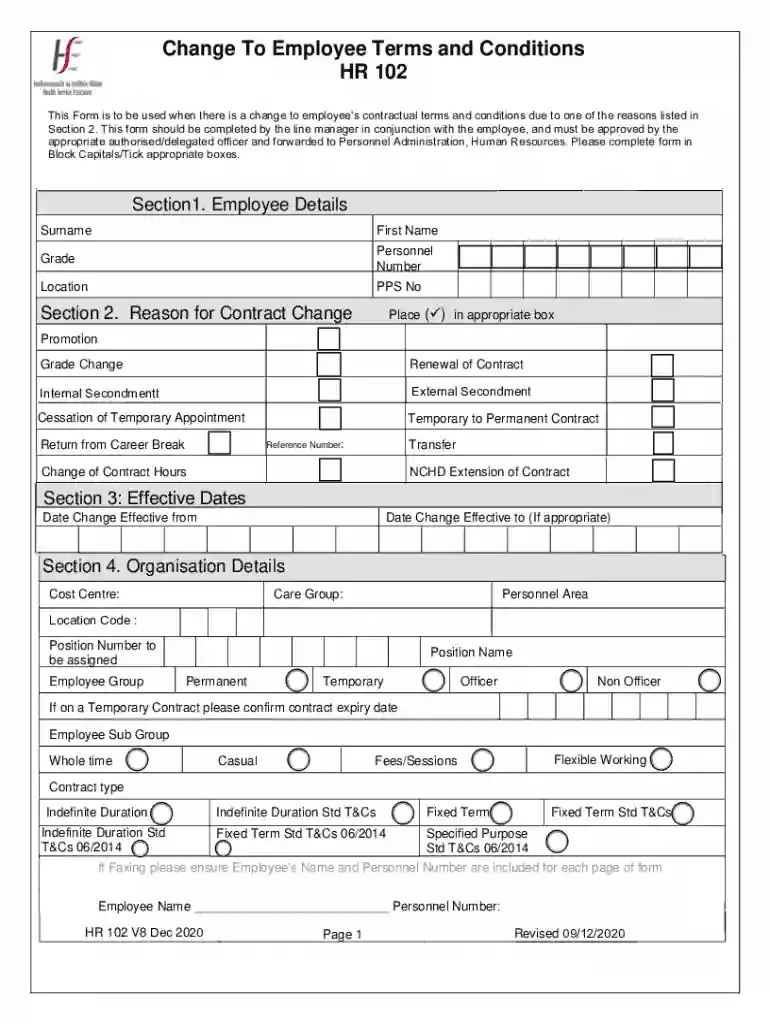
Begin by filling out Section 1, Employee Details. Enter the employee's surname, first name, grade, personnel number, location, and PPS number in block capitals.
Move to Section 2 to indicate the reason for the contract change. Place a tick in the appropriate box for options such as promotion or renewal of contract.
In Section 3, specify the effective dates of the change by entering both 'Effective From' and 'Effective To' dates.
Complete Section 4 with organization details including cost centre and position number. Ensure all fields are filled accurately.
Proceed to Section 5 to outline working week details. Specify weekly contracted hours and work schedule rules.
In Section 6, provide pay details including annual salary and pay scale type. Make sure all financial information is correct.
If applicable, complete Section 7 regarding allowances that may be affected by this contract change.
Finally, ensure Sections 8 through 10 are signed and dated by both the employee and line manager for approval before submission.
Start using our platform today to streamline your hr processes for free!
Documents in this publication are viewable by registered users only. Log in or register for a free trial. Guest users have access to all documents in the
Cookie consent notice
This site uses cookies to enhance site navigation and personalize your experience.
By using this site you agree to our use of cookies as described in our Privacy Notice.
You can modify your selections by visiting our Cookie and Advertising Notice.