Type text, add images, blackout confidential details, add comments, highlights and more.
02. Sign it in a few clicks
Draw your signature, type it, upload its image, or use your mobile device as a signature pad.
03. Share your form with others
Send wisconsin form mr via email, link, or fax. You can also download it, export it or print it out.
How to use or fill out wi m r with our platform
Ease of Setup
DocHub User Ratings on G2
Ease of Use
DocHub User Ratings on G2
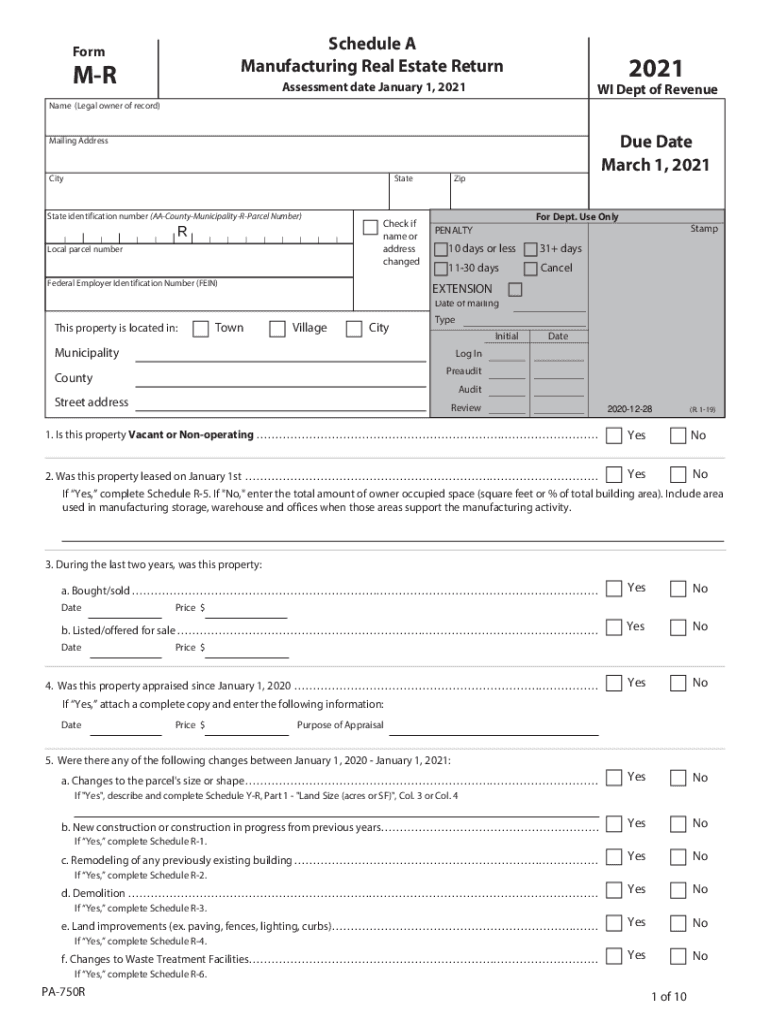
Click ‘Get Form’ to open the wi m r in the editor.
Begin by entering the legal owner's name and mailing address in the designated fields. Ensure accuracy as this information is crucial for correspondence.
Fill in the state identification number and local parcel number. These identifiers are essential for processing your return correctly.
Indicate if there have been any changes to your name or address by checking the appropriate box.
Complete Schedule A by answering questions regarding property status, such as whether it is vacant or leased. Attach any necessary documentation if applicable.
Proceed to Schedule R sections for reporting new constructions, remodels, or demolitions. Provide detailed descriptions and costs associated with each change.
Finally, review all entries for accuracy before submitting your form electronically through our platform.
Start filling out your wi m r form today for free using our editor!
CW9163E-MR | Cisco Meraki Wi-Fi 6E Outdoor Access Point
The Meraki CW9163E is cloud-managed 2x2:2 Wi-Fi 6E (802.11ax) tri-band outdoor access point which will work with different external antennas. Key Features.
The Manufacturing Real Estate Return (MR form) is e-filed My Tax Account (MTA). MTA Benefits Ease of use MTA allows authorized users to complete many tasks.
Cookie consent notice
This site uses cookies to enhance site navigation and personalize your experience.
By using this site you agree to our use of cookies as described in our Privacy Notice.
You can modify your selections by visiting our Cookie and Advertising Notice.