




Here's how it works

01. Edit your 2022 personal exemption online
Type text, add images, blackout confidential details, add comments, highlights and more.

02. Sign it in a few clicks
Draw your signature, type it, upload its image, or use your mobile device as a signature pad.

03. Share your form with others
Send michigan exemption allowance 2022 via email, link, or fax. You can also download it, export it or print it out.
How to use or fill out 2022 mi exemption with our platform

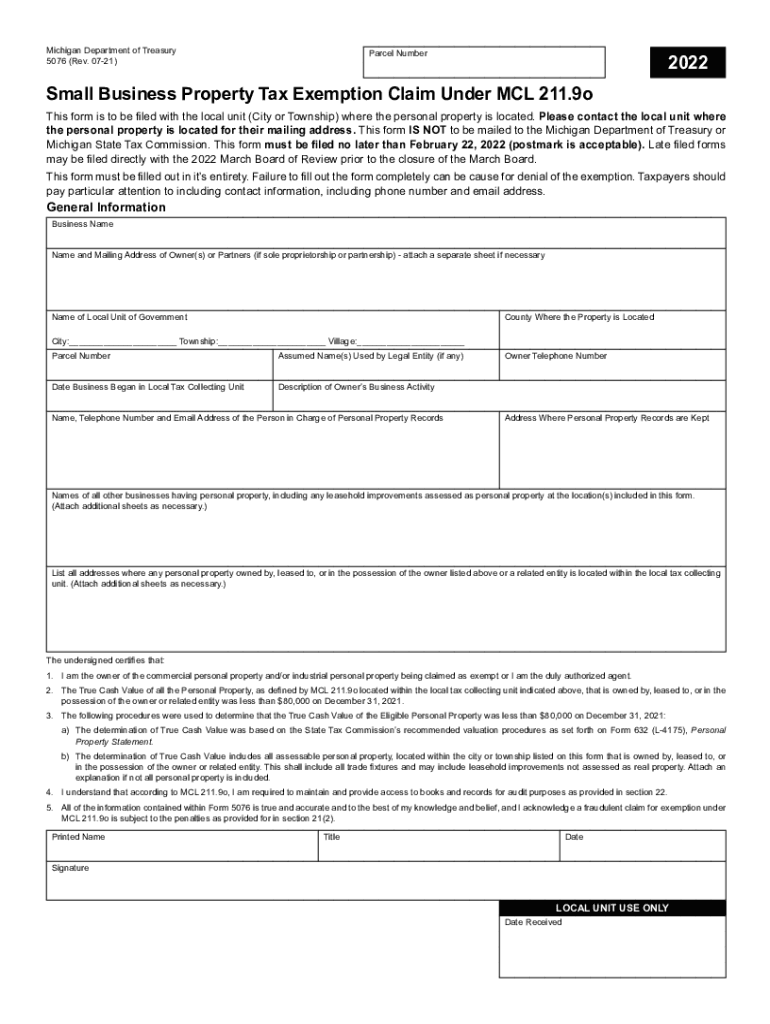
- Click ‘Get Form’ to open the 2022 mi exemption in the editor.
- Begin by entering your Parcel Number at the top of the form. This is essential for identifying your property.
- Fill in the General Information section, including your Business Name and the Name and Mailing Address of Owner(s) or Partners. If necessary, attach a separate sheet.
- Provide details about the Local Unit of Government, including County, City, Township, and Village where your property is located.
- Complete the section regarding Assumed Names used by your legal entity and indicate when your business began in this local tax collecting unit.
- Describe your business activity clearly and provide contact information for the person responsible for personal property records.
- List all addresses where any personal property owned or leased by you is located within the local tax collecting unit. Attach additional sheets if needed.
- Finally, certify that all information provided is accurate by signing and dating the form before submission.
Start using our platform today to fill out your 2022 mi exemption form easily and for free!
Fill out 2022 mi exemption online
It's free
See more 2022 mi exemption versions
We've got more versions of the 2022 mi exemption form. Select the right 2022 mi exemption version from the list and start editing it straight away!
| Versions | Form popularity | Fillable & printable |
|---|---|---|
| 2025 | 4.2 Satisfied (32 Votes) | |
| 2024 | 4.1 Satisfied (28 Votes) | |
| 2023 | 4.3 Satisfied (71 Votes) | |
| 2022 | 4.4 Satisfied (87 Votes) | |
| 2021 | 4.4 Satisfied (353 Votes) | |
| 2020 | 4.3 Satisfied (121 Votes) | |
| 2019 | 4.4 Satisfied (239 Votes) | |
| 2018 | 4.4 Satisfied (261 Votes) | |
| 2016 | 4.3 Satisfied (139 Votes) | |
| 2015 | 4 Satisfied (31 Votes) |
Security and compliance
At DocHub, your data security is our priority. We follow HIPAA, SOC2, GDPR, and other standards, so you can work on your documents with confidence.
Learn more


Related forms

Devon National Bus Pass Application Form
The document is an application form for the National Bus Pass issued by Devon County Council for eligible residents. It ...
Application for registration on the supplier register
The document is an application form for registration as a supplier of general goods and services to the Sol Plaatje Muni ...

WV-100-INFO How Do I Get an Order to Prohibit Workplace Violence?
The document provides guidance on obtaining a workplace violence protective order in California, outlining the legal fra ...

Weekly Reading Log, 4th Grade
The document is a Weekly Reading Log for 4th grade students, requiring them to read for five days each week and complete ...
Urine report form pdf - Pro Advantage
The document is a urinalysis report form used for collecting and analyzing urine samples from patients. It includes sect ...

Pelvic floor distress inventory
The document is a Pelvic Floor Distress Inventory (PFDI-20) designed to assess pelvic floor disorders through three spec ...

TKA Over-the-counter Medication Permission Form
The document is a permission form for parents to authorize the administration of over-the-counter medication to their ch ...