



Here's how it works



How to use or fill out revenue 4797n with our platform

- Click ‘Get Form’ to open it in the editor.
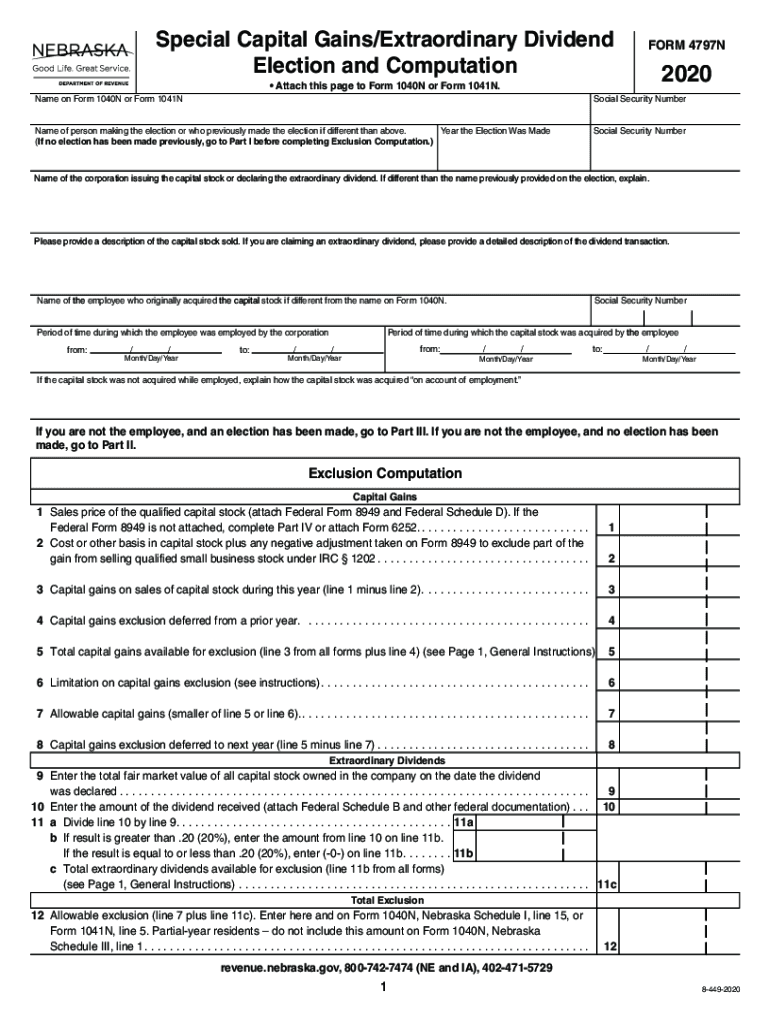
- Begin by entering your name and Social Security Number on the form. If you are making an election, provide the name of the corporation and a description of the capital stock sold.
- Complete Part I if you are the employee making the election. Answer questions regarding previous elections and provide necessary details about employment and stock acquisition.
- For Exclusion Computation, fill in sales price, cost basis, and calculate capital gains. Ensure to attach any required federal forms as indicated.
- If claiming extraordinary dividends, enter the fair market value of stock owned and dividend amounts received. Follow through with calculations for exclusions.
- Review all entries for accuracy before saving or exporting your completed form directly from our platform.
Start using our platform today to easily complete your revenue 4797n form online for free!
It's free
See more revenue 4797n versions
Got questions?
What do I need to sign my revenue 4797n electronically?
Electronic document approval demands a software solution that complies with data security and eSignature regulations. DocHub is an excellent tool for that, as it fulfills all the above mentioned requirements. Whatever method you like to sign your revenue 4797n in DocHub, your electronic signature will be legally binding and court-admissible.
How to fill out and sign revenue 4797n online?
You can easily fill out, edit, and even eSign your revenue 4797n using DocHub. Create a new account and start your free trial. After that, you can upload the file with the form and simply make all the necessary edits. No need to print on paper or use a third-party application to sign it, as you can put your electronic signature on your document quicker via DocHub.
Security and compliance
At DocHub, your data security is our priority. We follow HIPAA, SOC2, GDPR, and other standards, so you can work on your documents with confidence.
Learn more