Mo mo sheet form printable 2026

Get Form
mo mo sheet form printable Preview on Page 1

Here's how it works

01. Edit your form online
Type text, add images, blackout confidential details, add comments, highlights and more.
02. Sign it in a few clicks
Draw your signature, type it, upload its image, or use your mobile device as a signature pad.
03. Share your form with others
Send it via email, link, or fax. You can also download it, export it or print it out.

How to use or fill out mo mo sheet form printable with our platform

Form edit decoration
9.5
Ease of Setup
DocHub User Ratings on G2
9.0
Ease of Use
DocHub User Ratings on G2
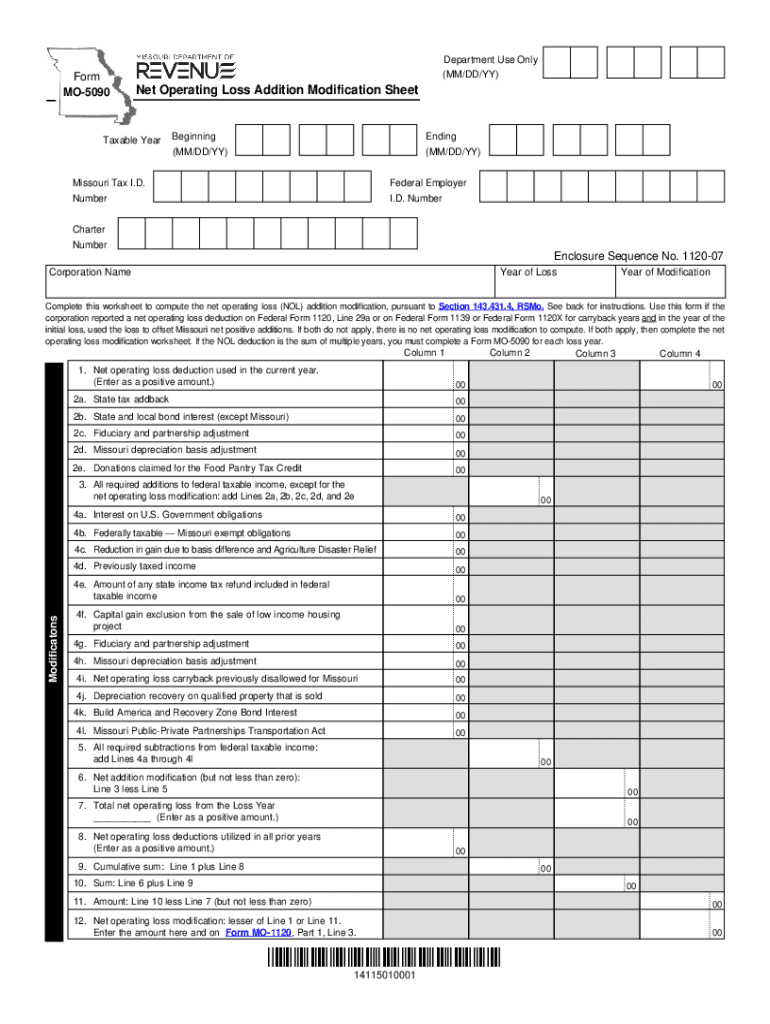
  1. Click ‘Get Form’ to open the mo mo sheet form in the editor.
  2. Begin by entering the Taxable Year, including the Beginning and Ending dates in MM/DD/YY format. This sets the context for your modifications.
  3. Fill in your Missouri Tax I.D., Federal Employer I.D. Number, and Charter Number. These identifiers are crucial for processing your form accurately.
  4. In Column 1, enter the Net Operating Loss deduction used in the current year as a positive amount. This is essential for calculating your modifications.
  5. Proceed to Lines 2a through 2e to input all required additions from the loss year to federal taxable income. Ensure accuracy as these figures impact your final calculations.
  6. Complete Lines 4a through 4l with all necessary subtractions from federal taxable income. This will help you determine your net addition modification.
  7. Finally, follow through with calculations on Lines 6 to 12, ensuring that each step reflects accurate totals based on previous entries.

Start using our platform today for free to streamline your document editing and form completion!

See more mo mo sheet form printable versions

We've got more versions of the mo mo sheet form printable form. Select the right mo mo sheet form printable version from the list and start editing it straight away!
Versions Form popularity Fillable & printable
2023 4.9 Satisfied (36 Votes)
2022 4.1 Satisfied (22 Votes)
2021 4.8 Satisfied (67 Votes)
2020 4.2 Satisfied (43 Votes)
2019 4.2 Satisfied (80 Votes)
2018 4.4 Satisfied (205 Votes)
2017 4.2 Satisfied (38 Votes)
2010 4.2 Satisfied (62 Votes)
be ready to get more

Complete this form in 5 minutes or less

Get form

Got questions?

We have answers to the most popular questions from our customers. If you can't find an answer to your question, please contact us.
Contact us
If its a carry over from another schedule or form, usually you want to put the zero. If the line doesnt apply, then leave it blank.
What Information Do I Need to File an MO 1040? Your federal adjusted gross income (AGI) from your federal tax return (Form 1040). W-2 forms from your employers reporting your wages and withholdings. 1099 forms reporting other income sources like interest, dividends, or freelance work.
Form MO-A, Part 1, computes Missouri modifications to federal adjusted gross income.
Note: The W-4 form 2024 steps are the same as the W-4 form 2025 steps. Step 1: Enter your personal information. Step 2: Account for all jobs you and your spouse have. Step 3: Claim your children and other dependents. Step 4: Make other adjustments. Step 5: Sign and date your form.
How to fill out the Missouri Form MO-1040A Tax Filing Instructions? Gather your income statements and tax documents. Fill in your personal information and income details on the form. Claim applicable deductions and credits. Review your completed form for accuracy. Submit the form electronically or via mail.

Security and compliance

At DocHub, your data security is our priority. We follow HIPAA, SOC2, GDPR, and other standards, so you can work on your documents with confidence.

Learn more
ccpa2
pci-dss
gdpr-compliance
hipaa
soc-compliance

People also ask

Form MO-60 is due on or before the due date of the return. A copy of Form MO-60 must be enclosed with the Missouri return when filed. An approved Form MO-60 extends the due date up to six months for the individual, composite, and shareholder income tax returns.

Related links