




Here's how it works

01. Edit your form online
Type text, add images, blackout confidential details, add comments, highlights and more.

02. Sign it in a few clicks
Draw your signature, type it, upload its image, or use your mobile device as a signature pad.

03. Share your form with others
Send it via email, link, or fax. You can also download it, export it or print it out.
How to use or fill out Connecticut Fuel Tax with our platform

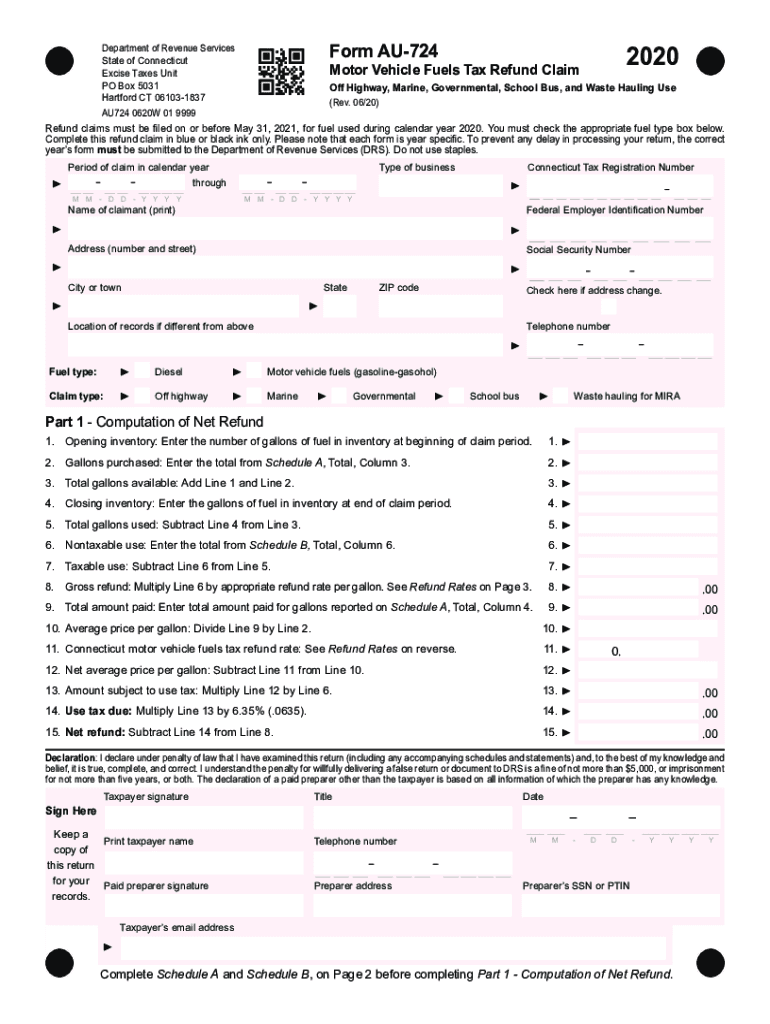
- Click ‘Get Form’ to open the Connecticut Fuel Tax form AU-724 in the editor.
- Begin by filling in your personal information, including your name, address, and Federal Employer Identification Number (FEIN) in the designated fields.
- Select the appropriate fuel type and claim type by checking the corresponding boxes on the form.
- Complete Schedule A by entering details of your motor vehicle fuel purchases, including month, supplier name, gallons purchased, and amount paid. Ensure receipts are attached.
- Fill out Schedule B to report nontaxable use by listing equipment types and total gallons used. Round totals to the nearest whole gallon.
- Proceed to Part 1 - Computation of Net Refund. Follow the instructions carefully to calculate your refund based on your entries from Schedules A and B.
- Finally, review all entries for accuracy before signing and submitting your completed form to the Department of Revenue Services.
Start using our platform today for free to streamline your Connecticut Fuel Tax refund process!
Fill out connecticut fuel tax online
It's free
See more connecticut fuel tax versions
We've got more versions of the connecticut fuel tax form. Select the right connecticut fuel tax version from the list and start editing it straight away!
| Versions | Form popularity | Fillable & printable |
|---|---|---|
| 2025 | 4.2 Satisfied (24 Votes) | |
| 2024 | 4.1 Satisfied (59 Votes) | |
| 2023 | 4.1 Satisfied (42 Votes) | |
| 2022 | 4.9 Satisfied (49 Votes) | |
| 2021 | 4.8 Satisfied (48 Votes) | |
| 2020 | 4.4 Satisfied (170 Votes) | |
| 2018 | 4.4 Satisfied (45 Votes) | |
| 2017 | 4.4 Satisfied (101 Votes) | |
| 2012 | 4.2 Satisfied (44 Votes) |
Security and compliance
At DocHub, your data security is our priority. We follow HIPAA, SOC2, GDPR, and other standards, so you can work on your documents with confidence.
Learn more


Related forms

June 13, 2012 - Regional Fruit and Vegetable Programs - Cornell - rvpadmin cce cornell
The document is a weekly publication from the Cornell Vegetable Program, focusing on agricultural updates for vegetable ...

2008 February Facts - Cornell Blogs Service - Cornell University
The document is a newsletter from the Cornell University Cooperative Extension (CUCE) for Herkimer County's 4-H program, ...

English - Cornell Tree-Ring Laboratory - Cornell University
The document provides guidelines for collecting wood and charcoal samples for dendrochronological analysis at the Malcol ...

Application Form - Harvard College Library - Harvard University - hcl harvard
The document is an application form for the Houghton Library Visiting Fellowship for the academic year 2014-2015, requir ...

Application Instructions and PRISE Application Supplement
The document outlines the application process for the Harvard College Program for Research in Science and Engineering (P ...

Program in Neuroscience Rotation Registration Form
The document is a Rotation Registration Form for students in the Neuroscience program, requiring submission to the Progr ...

Medical Record Form Description Worksheet - portal mah harvard
The document is a worksheet designed for creating or revising a medical records form at Mount Auburn Hospital. It outlin ...

1 From surface form to mental representation: A processing
The document investigates the processing of Russian numerical phrases, focusing on the morphological forms of nouns used ...