







Definition & Meaning
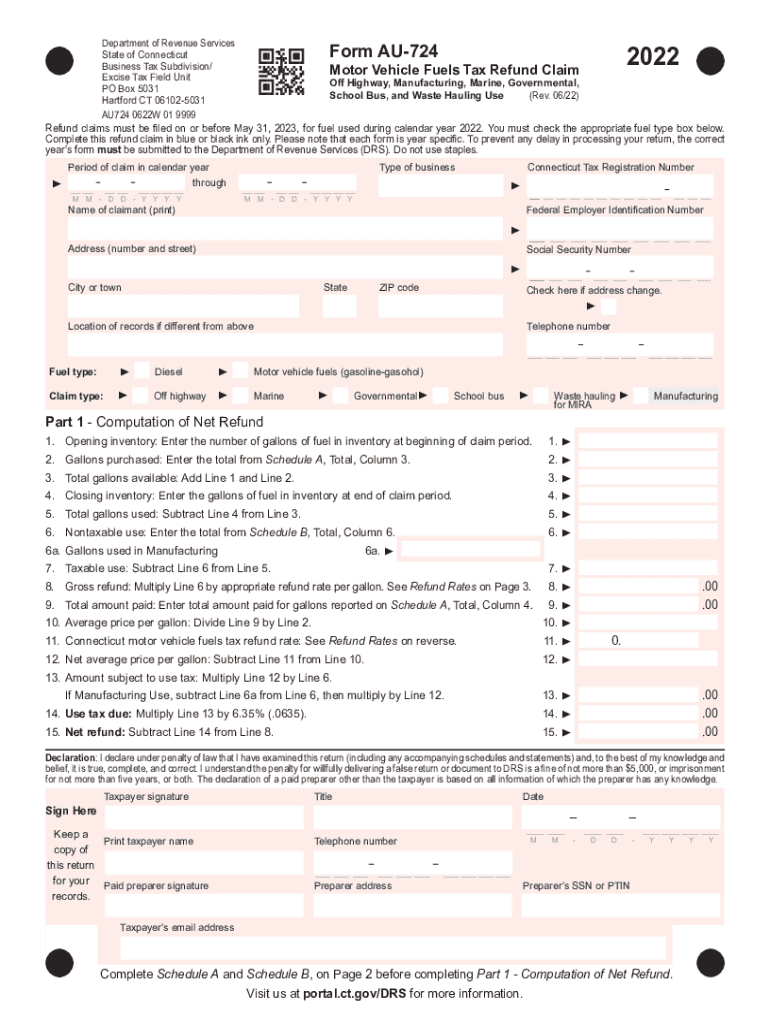
The DocHub Form AU-724, also referenced as "DocHub form-library 284364-au-724AU-724," refers to a specific form used for filing a Motor Vehicle Fuels Tax Refund Claim in the state of Connecticut. This document is essential for individuals or businesses looking to receive refunds on taxes paid for fuel used in non-standard functions, such as off-highway travel, manufacturing processes, marine operations, governmental purposes, school bus transportation, and waste hauling. The form captures detailed usage and tax information, allowing taxpayers to reclaim taxes in compliance with Connecticut's laws and regulations.
- Purpose: Reclaim taxes paid on fuel used in designated activities that do not contribute to standard highway maintenance and infrastructure.
- Official Issuer: Connecticut Department of Revenue Services, which is responsible for managing tax-related forms and refund procedures.
- Scope: Applies specifically to the calendar year for which the refund is claimed, typically requiring precise data reflective of fuel expenditures and usage.
Key Elements of the DocHub Form AU-724
The DocHub Form AU-724 includes several critical components that users need to complete accurately to ensure the claim is processed. Each section of the form plays a significant role in verifying eligibility and calculating the refund amount.
- Claimant Information: Details about the individual or business filing the claim, including name, contact information, and tax identification number.
- Fuel Usage Data: A comprehensive breakdown of fuel types and quantities used in qualifying activities, with specific categories such as off-highway, marine use, and more.
- Expense Calculations: Detailed computations to determine the total refund amount, highlighting the per-gallon tax rate and total gallons claimed.
- Signature and Certification: A section for the claimant to certify the accuracy and validity of the information provided under penalty of perjury.
Steps to Complete the DocHub Form AU-724
Completing the DocHub Form AU-724 involves a series of systematic steps to ensure all required information is documented thoroughly. Below is a guideline on how to properly fill out the form:
- Gather Documentation: Collect all invoices, purchase receipts, and records related to fuel purchases and usage.
- Fill Out Claimant Information: Complete the initial section with personal or company details.
- Specification of Usage: Input precise data regarding the category of fuel use — for example, highlighting off-highway or marine use clearly.
- Calculate Refund Claim: Use the provided formulas or tables to determine the eligible refund; include all necessary verifications or tables.
- Certification and Submission: Sign and date the form, then ensure submission by the outlined deadline, which may require additional attachments or supplementary forms.
How to Obtain the DocHub Form AU-724
Accessing the DocHub Form AU-724 is straightforward, with several avenues available for obtaining the necessary documentation.
- Online Download: Visit the Connecticut Department of Revenue Services website or the DocHub platform to download the form.
- Physical Copies: Request a hard copy through postal mail directly from the Department or through authorized retail or representative tax offices.
Important Terms Related to DocHub Form AU-724
Understanding specific terminology is crucial when dealing with the DocHub Form AU-724 to ensure accurate completion and comprehension of requirements.
- Tax Refund Claim: The process of seeking reimbursement for taxes previously paid on fuel that qualifies for a non-standard use exemption.
- Motor Vehicle Fuels Tax: A state-imposed tax on fuel, typically used for funding roadway and transportation infrastructure.
- Off-Highway Usage: Fuel consumption for vehicles or machinery operating outside standard public highways, which may qualify for a tax refund.
- Eligible Use Categories: Specific classifications of fuel use that qualify for tax rebate consideration according to state laws.
Legal Use of the DocHub Form AU-724
Compliance with legal standards is paramount when utilizing the DocHub Form AU-724, as each aspect of the form is regulated under state tax legislation.
- Document Requirement: Claimants must ensure all information provided is truthful and complete, as errors or omissions can lead to penalties or loss of refund eligibility.
- Evidence Submission: Supporting documents verifying purchase, amount, and specific eligible use must accompany the form to qualify for any claimed refund.
- Submission Deadlines: All refund claims must be postmarked or submitted electronically by May 31 following the year of fuel use. This deadline is statutory and non-negotiable.
State-Specific Rules for the DocHub Form AU-724
Though the DocHub Form AU-724 is specific to Connecticut, there are unique state rules that dictate eligibility and filing procedures.
- Connecticut Regulations: Mandates regarding fuel tax refunds are defined by state law, and claimants must follow guidelines precisely as established.
- Approved Use Cases: Detailed definitions of what constitutes acceptable uses for refundable fuel taxes—such as agricultural, commercial marine, or governmental operations.
- Verification of Use: Periodic audits or spot checks by state authorities ensure compliance and deter fraudulent claims.
Examples of Using the DocHub Form AU-724
Utilizing real-world applications of the DocHub Form AU-724 can illustrate the process and common scenarios encountered by claimants.
- Agricultural Usage: A farming business using fuel for tractors and other non-highway machines may file a claim detailing fuel purchases to reclaim taxes.
- Marine Operations: Companies operating ferry services or private boats that consume significant fuel levels in non-commercial capacities might qualify for a refund.
- Government Contracts: Municipal projects involving heavy machinery working in non-road environments can leverage the form for budgetary tax relief.
This comprehensive guide ensures you are well-equipped with the necessary information to tackle the DocHub Form AU-724 with confidence and accuracy, optimizing your potential for a successful claim.




