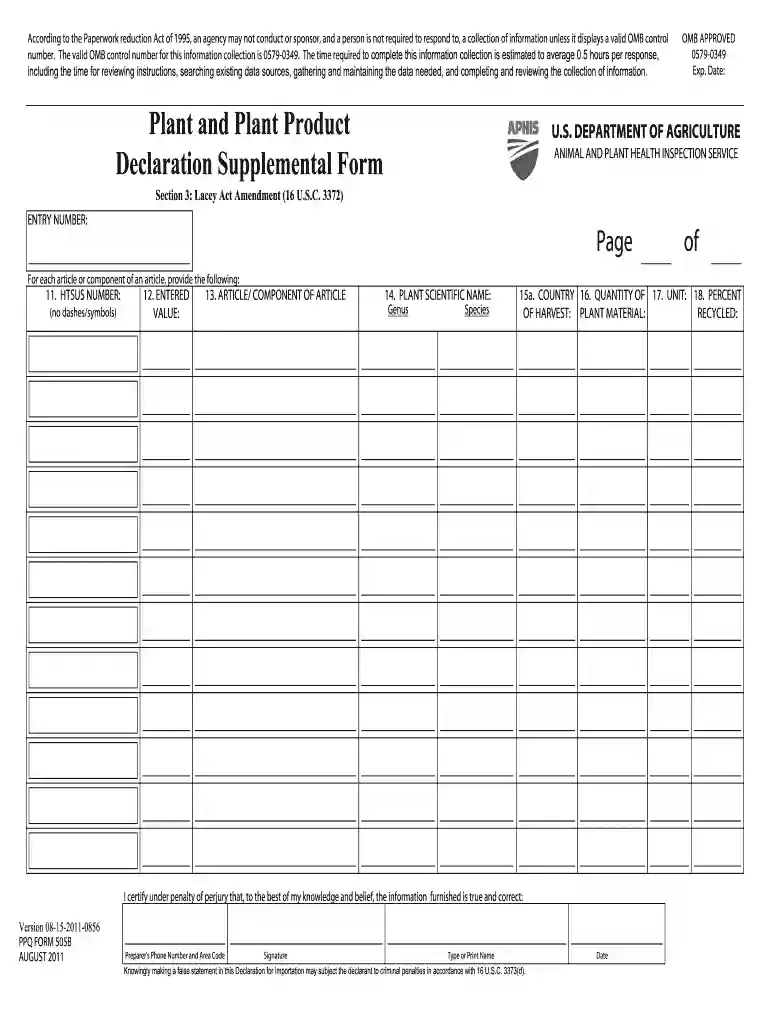
Declaration supplemental form 2025

Get Form
supplemental declaration form Preview on Page 1

Here's how it works

01. Edit your supplemental declaration form online
Type text, add images, blackout confidential details, add comments, highlights and more.

02. Sign it in a few clicks
Draw your signature, type it, upload its image, or use your mobile device as a signature pad.

03. Share your form with others
Send it via email, link, or fax. You can also download it, export it or print it out.

How to use or fill out declaration supplemental form with our platform

Form edit decoration
9.5
Ease of Setup
DocHub User Ratings on G2
9.0
Ease of Use
DocHub User Ratings on G2
  1. Click ‘Get Form’ to open the declaration supplemental form in the editor.
  2. Begin by entering the ENTRY NUMBER in Section 3, which is crucial for tracking your submission.
  3. For each article or component, fill in the HTSUS NUMBER without any dashes or symbols. This number is essential for classification.
  4. Next, provide the ENTERED VALUE of the article. Ensure this reflects the accurate monetary value.
  5. Specify the ARTICLE/ COMPONENT OF ARTICLE clearly to avoid any confusion during processing.
  6. Enter the PLANT SCIENTIFIC NAME, including both Genus and Species, to ensure proper identification.
  7. Indicate the COUNTRY of origin and fill in the QUANTITY OF PLANT MATERIAL being declared.
  8. Select the appropriate UNIT for measurement and specify the PERCENT OF HARVEST that is recycled if applicable.
  9. Finally, certify your information by signing and dating at the bottom of the form, ensuring all details are true and correct.

Start using our platform today to streamline your document editing and form completion process for free!

See more declaration supplemental form versions

We've got more versions of the declaration supplemental form form. Select the right declaration supplemental form version from the list and start editing it straight away!
Versions Form popularity Fillable & printable
2019 3.8 Satisfied (34 Votes)
2011 3.9 Satisfied (52 Votes)
be ready to get more

Complete this form in 5 minutes or less

Get form

Got questions?

We have answers to the most popular questions from our customers. If you can't find an answer to your question, please contact us.
Contact us
An affidavit is a written statement that a person confirms to be true by swearing an oath or making an affirmation before a person who is authorised by law to witness the affidavit.
A substitute statement is a document that can be filed in place of an oath or declaration when the inventor is deceased, legally incapacitated, cannot be found or docHubed after diligent effort, or refuses to execute the oath or declaration.
A supplemental oath or declaration is a document that can be submitted to correct deficiencies or inaccuracies in an earlier-filed inventors oath or declaration. According to MPEP 603, it is provided for under 35 U.S.C. 115(h) and 37 CFR 1.67.
In filing a patent application and paying required fees, the USPTO provides forms and an electronic filing tool. You may also wish to find a patent attorney or agent to help draft the required description of the invention and claims, and any required drawings.
Depending on the type of declaration form, the respondent may have to fill in his or her name, gender/sex, occupation, educational background, date of birth, telephone number, and other similar information.
be ready to get more

Complete this form in 5 minutes or less

Get form

People also ask

An oath is when a person swears that the contents of a document are true and correct. A solemn declaration is when a person solemnly declares that the contents of a document are true and correct.
37 CFR 3.73(c) statement: This is a document filed with the USPTO to establish the assignees right to take action in a patent application.
A sworn declaration (also called a sworn statement or a statement under penalty of perjury) is a document that recites facts pertinent to a legal proceeding. It is very similar to an affidavit but is not witnessed and sealed by an official such as a notary public.

Related links